The Problem
Many professionals and entrepreneurs are overwhelmed by the sheer volume of emails they receive daily. Sifting through these emails to identify those requiring immediate attention is a time-consuming and mentally draining task. This often leads to delayed response times, missed opportunities, and a constant feeling of being behind.
The traditional approach of manually reading and responding to each email is no longer sustainable in today's fast-paced business environment. The need for a more efficient and intelligent system to manage email communication is critical to boost productivity and reduce stress.
The Solution
We developed an AI-powered email assistant that automates the process of triaging incoming Gmail emails and drafting professional replies. The system uses OpenAI's advanced language models to analyze the content of each email, determine if a response is needed, and generate a draft reply tailored to the specific inquiry.
This solution leverages the power of n8n to seamlessly integrate Gmail and OpenAI, creating a fully automated workflow. n8n was chosen for its flexibility, scalability, and ability to handle complex data transformations, making it the ideal platform for building this intelligent email assistant.
How It Works — Intelligent Email Automation
This system intelligently automates email responses, saving time and improving efficiency.
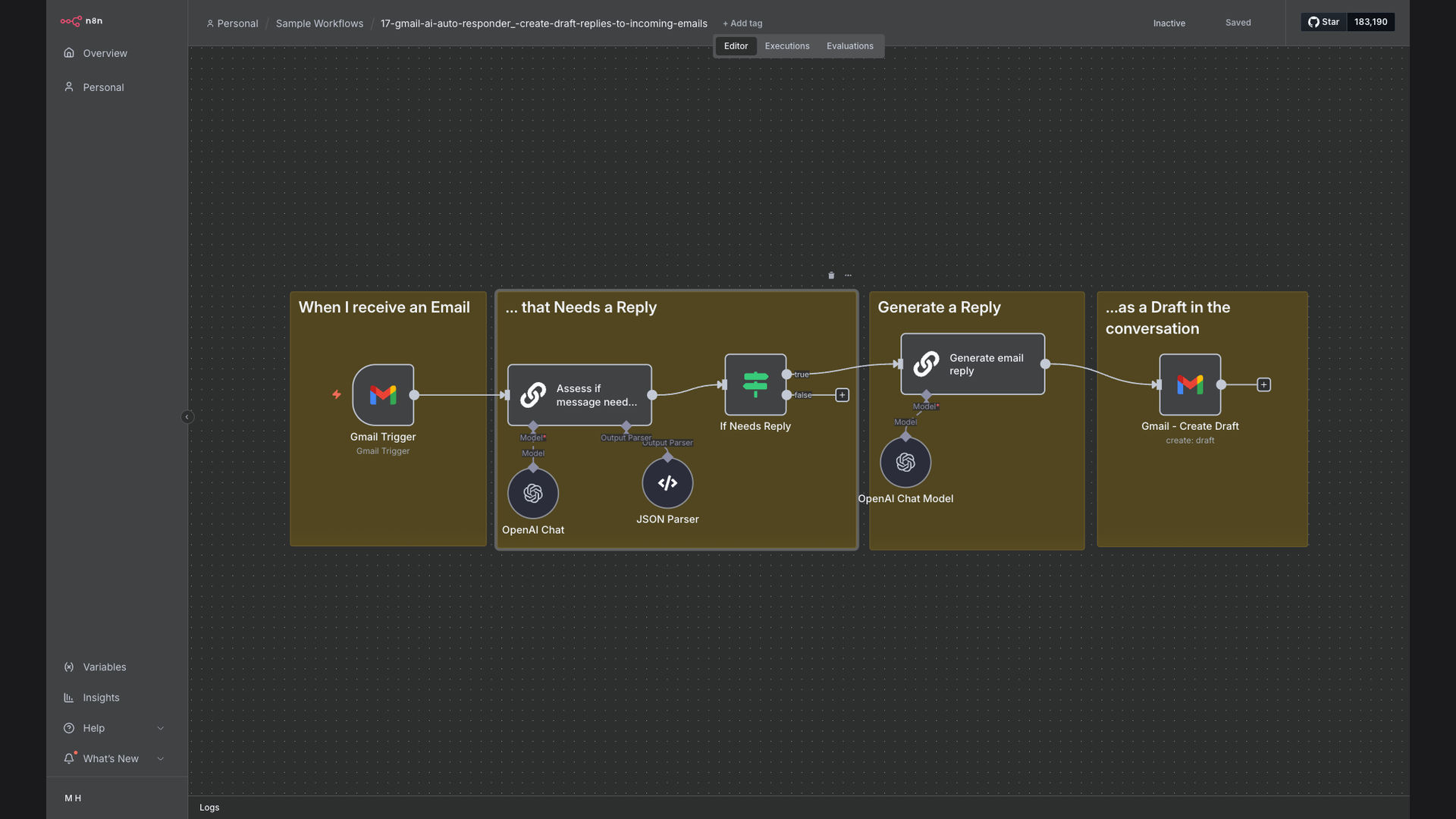
- New Email Trigger: The workflow starts when a new email arrives in your Gmail inbox.
- Fetch Email Content: n8n retrieves the content of the new email, including the sender, subject, and body.
- AI Analysis: The email content is sent to OpenAI for analysis to determine if a reply is needed.
- Decision Logic: Based on OpenAI's analysis, the workflow determines whether to proceed with drafting a reply.
- Draft Reply: If a reply is needed, OpenAI generates a draft reply based on the email content.
- Format Reply: n8n formats the draft reply into a professional and coherent message.
- Send Reply (Optional): The workflow can automatically send the reply or save it as a draft for review.
- Log Activity: The entire process is logged for tracking and analysis.
💡 AI-Powered Efficiency: By leveraging OpenAI, this system can quickly and accurately determine which emails require a response and generate relevant draft replies, significantly reducing manual effort.
What This System Does That Manual Process Can't
Instant Triage
AI quickly analyzes emails, identifying those needing immediate attention, unlike manual sorting.
Automated Drafting
Generates professional email drafts, saving time and effort compared to manual composition.
24/7 Availability
Operates continuously, ensuring timely responses even outside of business hours, unlike manual efforts.
Personalized Responses
AI tailors drafts to the specific email content, providing more relevant replies than generic templates.
Data-Driven Insights
Tracks email volume, response times, and AI performance, offering insights for continuous improvement over manual tracking.
Scalable Solution
Easily handles increasing email volumes without additional manual effort, unlike limited human capacity.
Before vs. After: Intelligent Email Automation
Before: Spending 2+ hours daily on email triage, with response times averaging 24 hours and a backlog of 50+ unread emails.
After: Email triage automated, response times reduced to under 1 hour, and a consistently clear inbox, saving 10+ hours per week.
Implementation: Live in 2 Weeks
- Requirements Gathering: We start by understanding your specific email communication needs and preferences.
- Workflow Design: Our team designs a custom n8n workflow tailored to your requirements, integrating Gmail and OpenAI.
- Testing and Refinement: We thoroughly test the workflow and refine the AI's email drafting capabilities to ensure optimal performance.
- Deployment: The automated email assistant is deployed and integrated into your existing Gmail setup.
- Ongoing Support: We provide ongoing support and maintenance to ensure the system continues to meet your evolving needs.
The Right Fit — and When It Isn't
This AI email assistant is ideal for busy professionals, entrepreneurs, and businesses that handle a high volume of email communication. It's particularly beneficial for those seeking to improve response times, reduce email overload, and focus on more strategic tasks.
However, this solution may not be suitable for businesses that require highly personalized or sensitive email communication, as the AI-generated drafts may need further customization. In such cases, a hybrid approach combining automation with human oversight may be more appropriate.