The Problem
Many researchers, students, and professionals spend countless hours manually sifting through PDF documents to find specific information. This process is time-consuming and inefficient, often leading to missed insights and frustration. The challenge lies in quickly extracting relevant information from large volumes of unstructured data.
Traditional search methods are inadequate for understanding the context and nuances within documents. Users need a solution that can intelligently interpret their questions and provide accurate, context-aware answers. The lack of such a tool results in delayed decision-making and reduced productivity.
The Solution
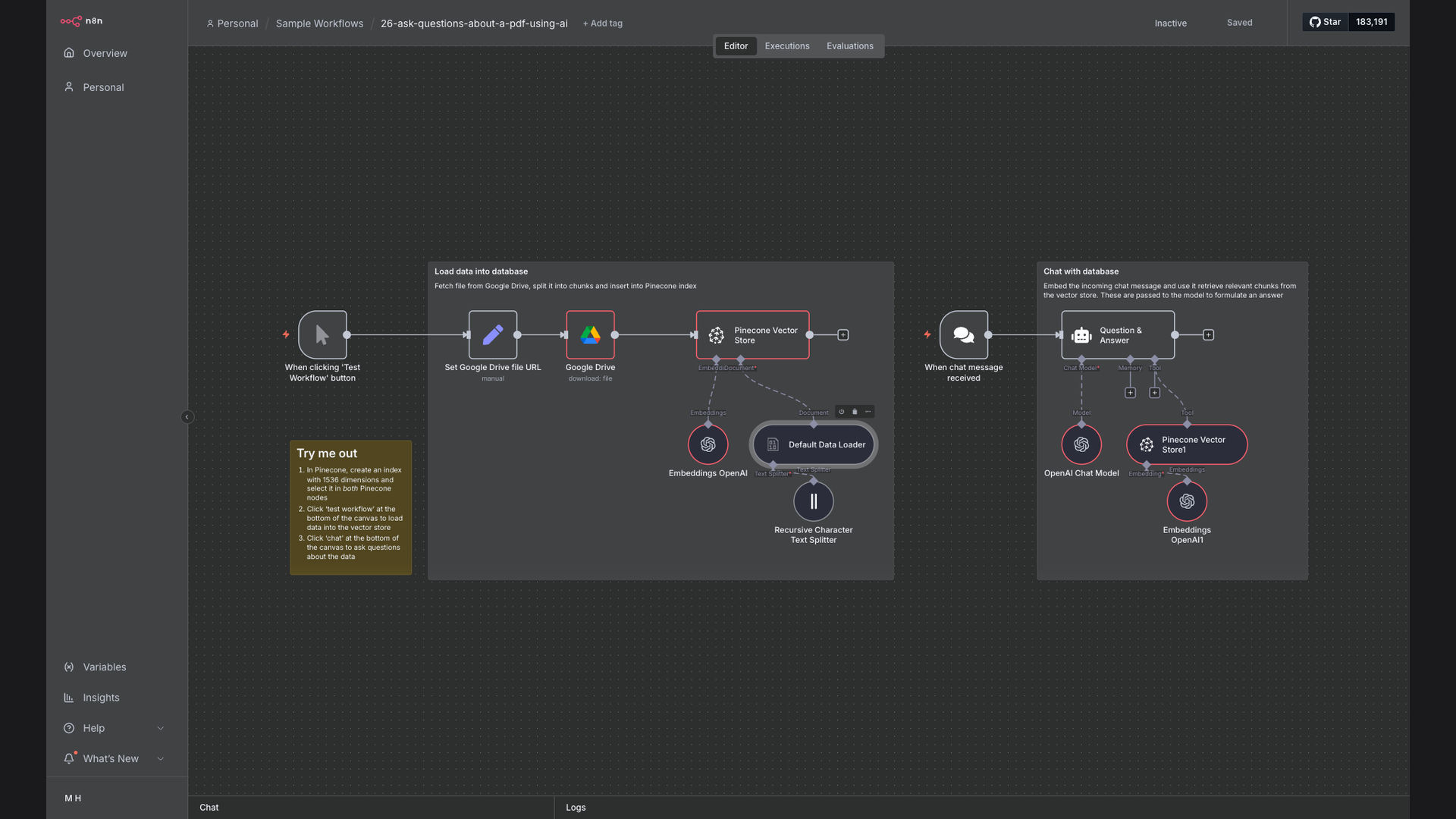
We built an AI-powered PDF chat assistant that allows users to ask questions about their PDF documents and receive instant, accurate answers. This system automates the entire process, from document ingestion to information retrieval, using n8n, Pinecone, and OpenAI.
n8n was chosen as the primary automation platform due to its flexibility and ability to seamlessly integrate with various AI and data storage services. Pinecone provides a scalable vector database for efficient semantic search, while OpenAI's language models ensure accurate and context-aware responses.
How It Works — Streamlining Document Insights
The AI-powered PDF chat assistant automates the entire process of extracting and answering questions from PDF documents, providing users with instant access to critical information.
- PDF Upload: The workflow begins by retrieving PDF documents from a specified Google Drive folder.
- Document Chunking: The PDF is split into smaller, manageable chunks to improve processing efficiency and relevance.
- Text Embedding: Each chunk of text is converted into a vector embedding using OpenAI's embedding models.
- Vector Storage: The vector embeddings are stored in a Pinecone vector database for efficient semantic search.
- Question Input: Users ask questions related to the content of the PDF documents.
- Semantic Search: The system performs a semantic search in the Pinecone database to find the most relevant text chunks.
- Contextualization: The retrieved text chunks are used as context for OpenAI's language models.
- Answer Generation: OpenAI generates a comprehensive and accurate answer to the user's question.
💡 Key Benefit: This system eliminates the need for manual document review, saving users significant time and effort while providing accurate and context-aware answers.
What This System Does That [Manual Process] Can't
Instant Answers
Provides immediate responses to questions, eliminating the need to manually search through documents.
Contextual Understanding
Understands the context of questions and provides accurate, relevant answers based on the document content.
Time Savings
Reduces the time spent on document review and information retrieval, freeing up valuable time for other tasks.
Improved Productivity
Enhances productivity by providing quick access to critical information, enabling faster decision-making.
Enhanced Accuracy
Minimizes the risk of human error and ensures accurate information retrieval through automated processing.
Scalable Solution
Easily scales to handle large volumes of documents and user queries, accommodating growing information needs.
Before vs. After: Streamlined Information Access
Before: Manually searching through PDF documents took an average of 2-3 hours per document, with a high risk of missing critical information.
After: The AI-powered chat assistant provides instant answers, reducing the time spent on document review to just a few minutes and improving information accuracy.
Implementation: Live in 4 Weeks
- Requirements Gathering: We worked closely with the client to understand their specific document processing needs and information retrieval goals.
- Workflow Design: Our team designed a custom n8n workflow that integrated Google Drive, Pinecone, and OpenAI to automate the entire process.
- System Configuration: We configured the Pinecone vector database and OpenAI language models to ensure optimal performance and accuracy.
- Testing and Refinement: The system was thoroughly tested and refined to ensure it met the client's expectations and delivered accurate results.
The Right Fit — and When It Isn't
This solution is ideal for organizations that need to quickly extract information from large volumes of PDF documents. It is particularly well-suited for researchers, students, and professionals who require instant access to critical insights.
However, it may not be the best fit for organizations with limited document processing needs or those that require highly specialized information retrieval capabilities beyond the scope of standard language models.