The Problem
Many professionals and teams struggle with inefficient calendar management. Manually scheduling appointments, coordinating availability, and sending reminders is time-consuming and prone to errors. This often leads to missed meetings, double bookings, and frustration among team members.
The need for a more streamlined and automated solution is evident, especially for those who rely heavily on Google Calendar for their daily operations. The challenge lies in creating a system that can understand natural language requests, accurately interpret scheduling needs, and seamlessly interact with Google Calendar without requiring constant manual intervention, leading to lost productivity and increased administrative overhead.
The Solution
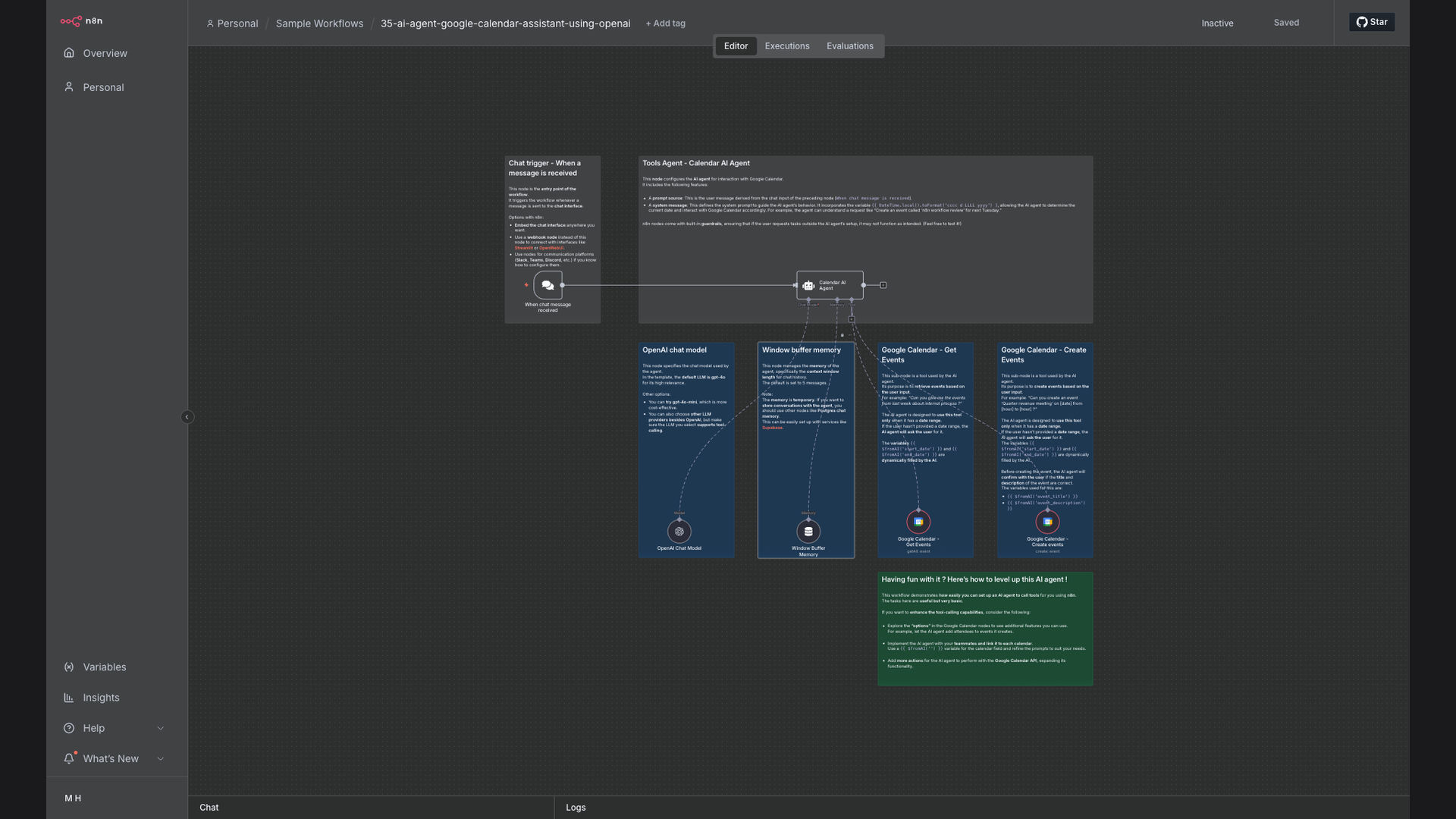
The solution is an AI-powered Google Calendar assistant built using n8n and OpenAI. This workflow listens to user chat messages, leverages OpenAI to interpret scheduling requests, and interacts directly with Google Calendar to retrieve existing events or create new ones. This eliminates the need for manual scheduling and ensures accuracy in managing appointments.
n8n was chosen as the primary platform for its flexibility and ability to integrate seamlessly with both OpenAI and Google Calendar. By using n8n, the workflow can be customized to fit specific needs and scaled as required. OpenAI provides the natural language processing capabilities, allowing the assistant to understand and respond to a wide range of scheduling requests, making it a powerful and efficient solution.
How It Works — Streamlining Calendar Management with AI
This AI-powered Google Calendar assistant simplifies scheduling by automating the entire process, from understanding user requests to managing calendar events.
- Receive Message: The workflow starts by listening to incoming messages from a chat platform, such as Slack or Telegram, where users submit their scheduling requests.
- Interpret Request: The message is then sent to OpenAI, which uses its natural language processing capabilities to understand the user's intent and extract relevant information, such as the date, time, and duration of the meeting.
- Check Availability: n8n queries Google Calendar to check the availability of the user and any other participants involved in the meeting.
- Suggest Time Slots: If there are any conflicts, the workflow suggests alternative time slots based on the availability of all participants.
- Book Appointment: Once a suitable time slot is confirmed, n8n creates a new event in Google Calendar with all the necessary details, including the date, time, location, and participants.
- Send Confirmation: A confirmation message is sent back to the user via the chat platform, confirming the appointment and providing all the relevant details.
- Send Reminders: The workflow can also be configured to send reminders to all participants before the meeting, ensuring everyone is aware of the upcoming appointment.
- Handle Rescheduling: If a user needs to reschedule an appointment, the workflow can handle the request by updating the event in Google Calendar and sending notifications to all participants.
💡 AI-Driven Efficiency: By leveraging OpenAI and n8n, this system automates the entire calendar management process, reducing manual effort and improving accuracy.
What This System Does That Manual Process Can't
Saves Time
Automates scheduling, freeing up valuable time for other tasks. No more back-and-forth emails to find a suitable time.
Reduces Errors
Minimizes the risk of double bookings and missed appointments. AI ensures accuracy in interpreting and managing calendar events.
Understands Natural Language
Interprets scheduling requests from chat messages. Users can communicate in natural language, making it easy to schedule appointments.
Seamless Integration
Integrates seamlessly with Google Calendar and chat platforms. n8n connects all the necessary tools for a smooth and efficient workflow.
Customizable
Can be customized to fit specific needs and preferences. The workflow can be tailored to handle complex scheduling scenarios.
Scalable
Scales easily to accommodate growing teams and increasing scheduling demands. The system can handle a large volume of requests without performance issues.
Before vs. After: Streamlined Scheduling
Before: Manually scheduling appointments took an average of 15 minutes per meeting, resulting in 5 hours per week wasted on calendar management.
After: With the AI-powered assistant, scheduling time is reduced to under 2 minutes per meeting, saving over 4 hours per week and improving overall productivity.
Implementation: Live in 3 Weeks
- Planning Phase: Defining the scope of the project, identifying the necessary integrations, and designing the workflow architecture. This phase involves understanding the specific scheduling needs and preferences.
- Development Phase: Building the n8n workflow, integrating OpenAI for natural language processing, and connecting to Google Calendar. This phase includes testing and debugging to ensure smooth operation.
- Testing Phase: Thoroughly testing the workflow with various scheduling scenarios to ensure accuracy and reliability. This phase involves simulating real-world use cases and gathering feedback.
- Deployment Phase: Deploying the workflow to a production environment and configuring the necessary settings. This phase includes monitoring the system to ensure optimal performance.
- Training Phase: Training users on how to interact with the AI-powered assistant and providing ongoing support. This phase ensures that users can effectively leverage the new system.
The Right Fit — and When It Isn't
This AI-powered Google Calendar assistant is ideal for individuals and teams who spend a significant amount of time scheduling appointments and managing their calendars. It's particularly useful for those who want to automate the process and reduce the risk of errors.
However, it may not be the right fit for those who have very simple scheduling needs or who prefer to manually manage their calendars. Additionally, it requires some technical expertise to set up and maintain, although GrowwStacks can provide assistance with this.