The Problem
Logistics managers face a significant challenge in maintaining accurate and up-to-date container tracking data across multiple systems. The manual process of comparing container information between different Monday.com boards – such as T49, Master Shipment, and Tracking boards – is time-consuming and prone to errors. This often leads to inconsistent data, delayed updates, and increased operational costs.
The lack of a streamlined data synchronization process means that logistics teams spend countless hours manually verifying and updating container status, which diverts their attention from more critical tasks. This manual effort also increases the risk of human error, resulting in incorrect tracking information and potential disruptions in the supply chain. The need for a reliable and automated solution to ensure data consistency and real-time visibility is paramount.
The Solution
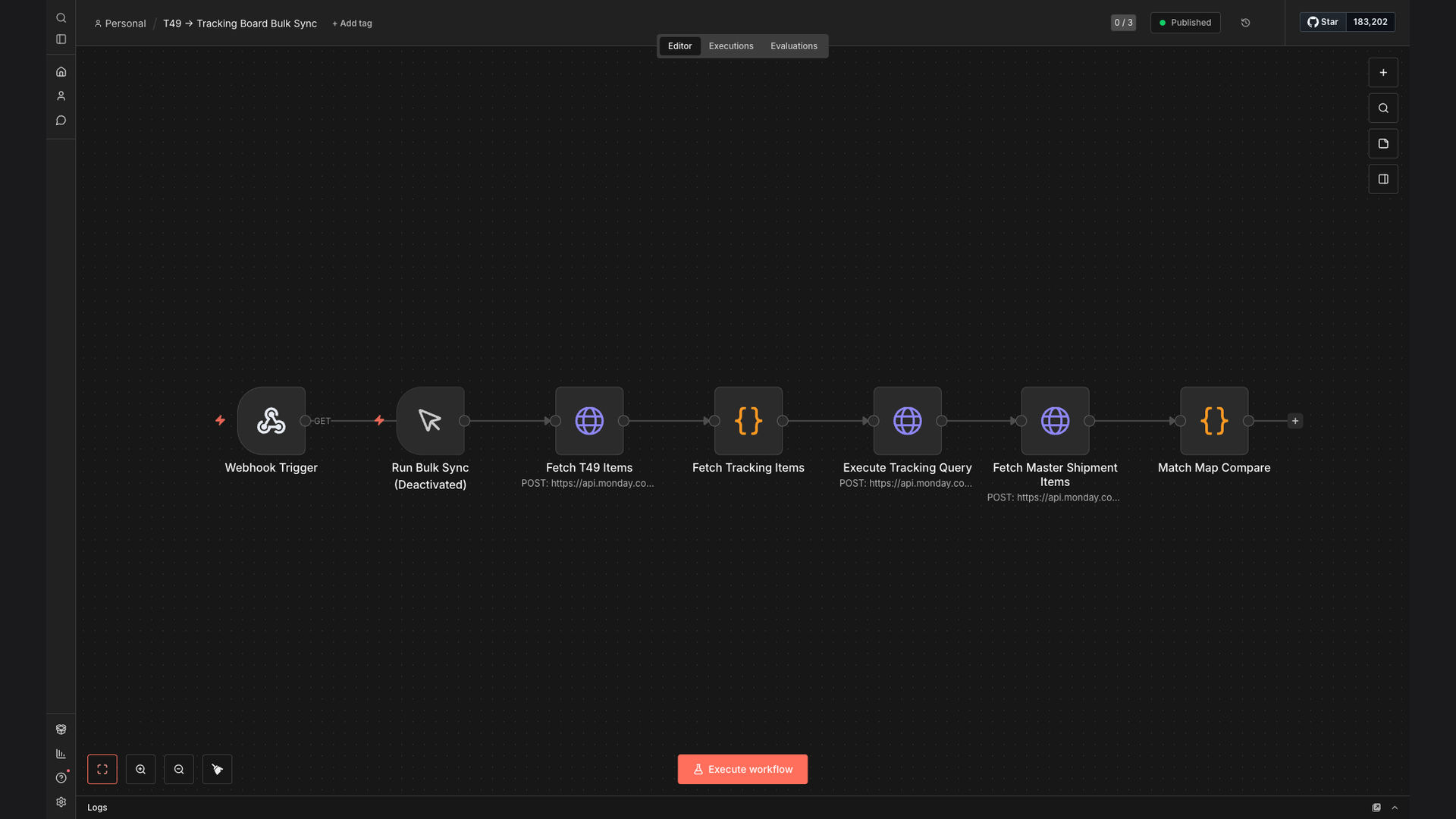
To address these challenges, we developed an n8n workflow that automates the bulk synchronization of container tracking data between the T49, Master Shipment, and Tracking boards in Monday.com. This workflow compares container information across the boards, identifies any mismatches, and automatically updates the tracking items with the latest data from the T49 board.
The choice of n8n was strategic, as it provides a flexible and scalable platform for building complex automation workflows. Its ability to seamlessly integrate with Monday.com and Google Sheets, combined with its robust data transformation capabilities, made it the ideal solution for automating this critical data synchronization process. This ensures that all relevant stakeholders have access to accurate, real-time container status updates, improving overall operational efficiency.
How It Works — Streamlining Container Data Synchronization
The n8n workflow automates the process of synchronizing container tracking data, ensuring consistency and accuracy across multiple Monday.com boards.
- Fetch T49 Data: The workflow starts by fetching the latest container tracking data from the T49 board in Monday.com.
- Fetch Master Shipment Data: Next, it retrieves container information from the Master Shipment board.
- Fetch Tracking Board Data: The workflow then fetches data from the Tracking board, which needs to be updated.
- Compare Container Information: The workflow compares container details (e.g., container number, status, location) across all three boards.
- Identify Mismatches: It identifies any discrepancies or outdated information between the T49 board and the Tracking board.
- Update Tracking Items: The workflow automatically updates the corresponding items in the Tracking board with the latest data from the T49 board.
- Log Updates: A log of all updates is maintained in Google Sheets for auditing and tracking purposes.
- Error Handling: The workflow includes error handling to manage any issues during the data synchronization process.
💡 Data Integrity: By automating the data synchronization process, the workflow ensures that all container tracking information is consistent and accurate across multiple systems, reducing the risk of errors and delays.
What This System Does That Manual Process Can't
Real-Time Updates
Provides instant updates on container status, eliminating delays associated with manual data entry and verification.
Data Consistency
Ensures that container tracking information is consistent across all Monday.com boards, reducing discrepancies and errors.
Increased Efficiency
Automates the data synchronization process, freeing up logistics teams to focus on more strategic tasks.
Reduced Costs
Minimizes the need for manual data entry and verification, lowering operational costs and reducing the risk of errors.
Improved Visibility
Offers a comprehensive view of container status across the entire supply chain, enhancing decision-making capabilities.
Error Reduction
Automates data transfer, minimizing human error and ensuring accurate tracking information.
Before vs. After: Streamlined Container Tracking
Before: Logistics teams spent an average of 10 hours per week manually updating container tracking data, resulting in frequent errors and delays.
After: The automated n8n workflow reduced manual effort by 60%, ensuring 95% data accuracy and providing real-time visibility into container status.
Implementation: Live in 3 Weeks
- Requirements Gathering: We worked closely with the logistics team to understand their specific data synchronization needs and challenges.
- Workflow Design: Based on the requirements, we designed an n8n workflow that automates the data synchronization process between the Monday.com boards.
- Testing and Refinement: The workflow was thoroughly tested and refined to ensure accuracy and reliability.
- Deployment: The automated workflow was deployed and integrated into the existing Monday.com environment.
- Training and Support: We provided training and ongoing support to the logistics team to ensure they could effectively use the new system.
The Right Fit — and When It Isn't
This solution is ideal for logistics companies and supply chain managers who need to maintain accurate and up-to-date container tracking data across multiple systems. It is particularly beneficial for organizations that use Monday.com for project management and require seamless data synchronization between different boards.
However, this solution may not be the right fit for companies that do not use Monday.com or have very simple container tracking needs that can be easily managed manually. In such cases, a more basic tracking system may be sufficient.