The Problem
Cleaning businesses often face challenges in efficiently onboarding new cleaners. The traditional process involves manual data entry from application forms, which is time-consuming and prone to errors. This can lead to delays in getting new cleaners ready to work, impacting the business's ability to meet client demands.
Furthermore, managing cleaner information across different platforms (e.g., application forms, databases, email) can be disorganized and difficult to track. This lack of integration can result in miscommunication, lost data, and increased administrative overhead. The need for a streamlined, automated onboarding process is critical for scaling and maintaining a competitive edge.
The Solution
The solution is an automated cleaner onboarding workflow built with n8n. This workflow integrates Typeform, Airtable, and Gmail to streamline the entire process, from application submission to confirmation and approval. It automatically captures application data, stores it in a centralized Airtable database, and sends personalized emails to both the cleaner and the administrative team.
n8n was chosen for its flexibility and ability to seamlessly connect various applications. Its no-code interface allows for easy customization and maintenance, making it an ideal platform for automating complex workflows like cleaner onboarding. By automating these tasks, the cleaning business can significantly reduce manual effort, improve data accuracy, and accelerate the onboarding process.
How It Works — Streamlining the Onboarding Journey
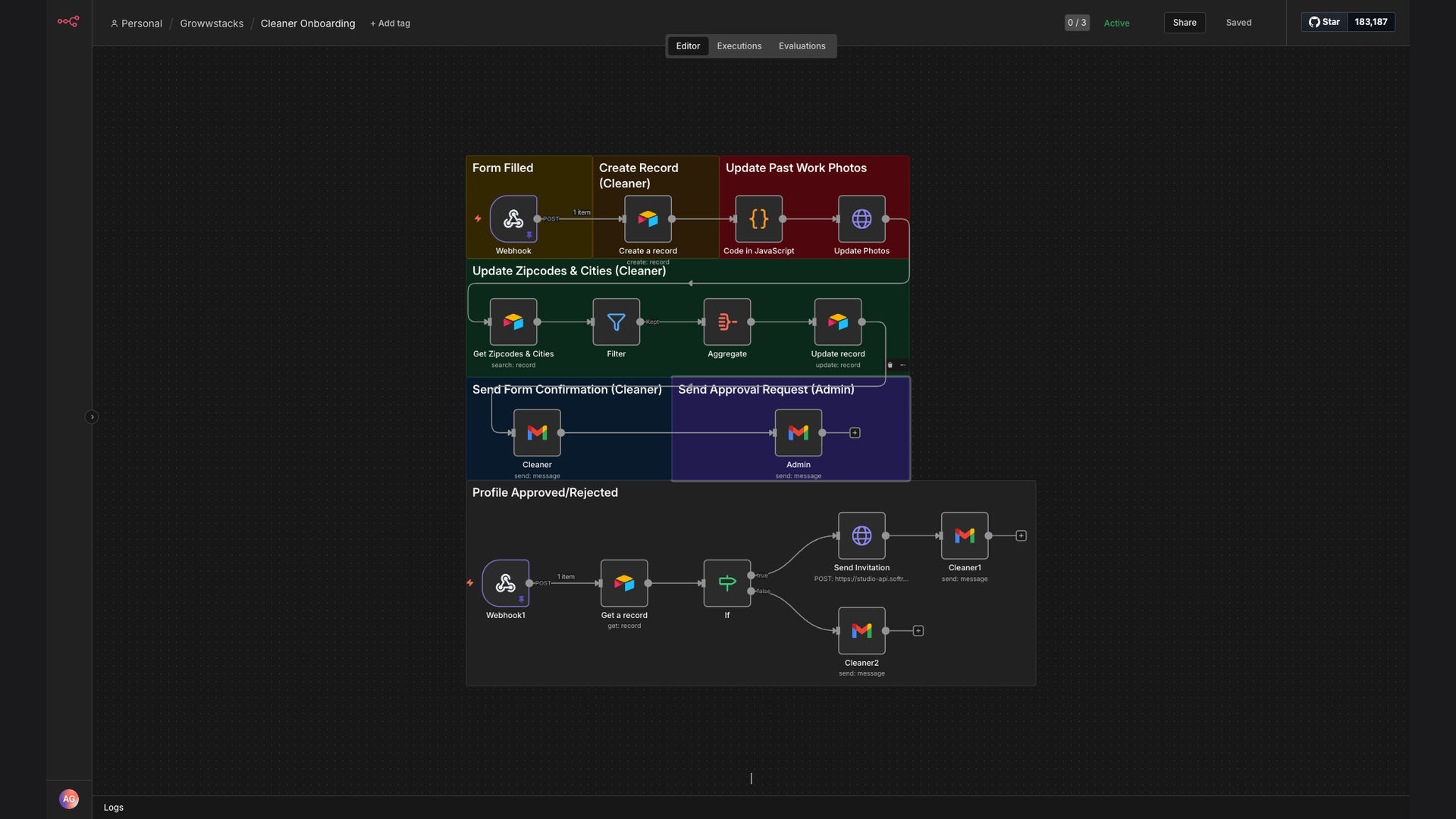
The automated cleaner onboarding system works by seamlessly connecting Typeform, Airtable, and Gmail through an n8n workflow. This integration ensures that every step of the onboarding process is automated, efficient, and error-free.
- Application Submission: A prospective cleaner fills out and submits the application form on Typeform.
- Data Capture: n8n automatically captures the data from the Typeform submission.
- Data Storage in Airtable: The captured data is then stored in a designated Airtable base, creating a centralized database of cleaner information.
- Photo Attachment: If the application includes a photo, n8n attaches the photo to the corresponding Airtable record.
- Service Area Update: n8n updates the cleaner's service area in Airtable based on the information provided in the application.
- Confirmation Email to Cleaner: An automated confirmation email is sent to the cleaner via Gmail, acknowledging receipt of their application.
- Approval Request to Admin: An email is sent to the administrative team, requesting approval of the new cleaner.
- Admin Review and Approval: The admin reviews the application details in Airtable and approves the cleaner, triggering further automated processes (e.g., scheduling training, assigning tasks).
💡 Centralized Data Management: By storing all cleaner information in Airtable, the business gains a single source of truth, making it easier to manage and track cleaner data throughout the onboarding process.
What This System Does That Manual Process Can't
Time Savings
Automated data entry and email communication reduce the time spent on manual tasks, freeing up administrative staff for more strategic activities.
Improved Accuracy
Automated data transfer eliminates the risk of human error, ensuring that cleaner information is accurate and up-to-date.
Instant Communication
Automated confirmation and approval emails ensure that cleaners and administrators are promptly informed of the application status.
Centralized Data
All cleaner information is stored in a centralized Airtable database, making it easy to manage and track cleaner data throughout the onboarding process.
Scalability
The automated system can easily handle a large volume of applications, making it ideal for growing cleaning businesses.
Better Reporting
With all data in Airtable, it's easier to generate reports and gain insights into the onboarding process, identifying areas for improvement.
Before vs. After: Streamlined Onboarding
Before: Onboarding a new cleaner took an average of 2 days, involving manual data entry, email communication, and multiple platforms, leading to delays and errors.
After: The automated system reduces the onboarding time to just a few minutes, with automated data capture, storage, and communication, resulting in faster onboarding and improved data accuracy.
Implementation: Live in 3 Weeks
- Planning and Design: Defining the scope of the automation, identifying the required data fields, and designing the workflow in n8n.
- Integration Setup: Connecting Typeform, Airtable, and Gmail to n8n and configuring the data flow between the platforms.
- Testing and Refinement: Thoroughly testing the workflow to ensure that it functions correctly and making any necessary adjustments.
- Deployment: Deploying the automated system and training the administrative team on how to use it.
The Right Fit — and When It Isn't
This automated cleaner onboarding system is an excellent fit for cleaning businesses that are experiencing rapid growth or struggling with inefficient manual processes. It is particularly beneficial for businesses that want to improve data accuracy, reduce administrative overhead, and accelerate the onboarding process.
However, it may not be the right fit for very small cleaning businesses with a low volume of applications, as the initial setup and configuration may require more effort than the potential time savings. In such cases, a manual process may be more cost-effective.