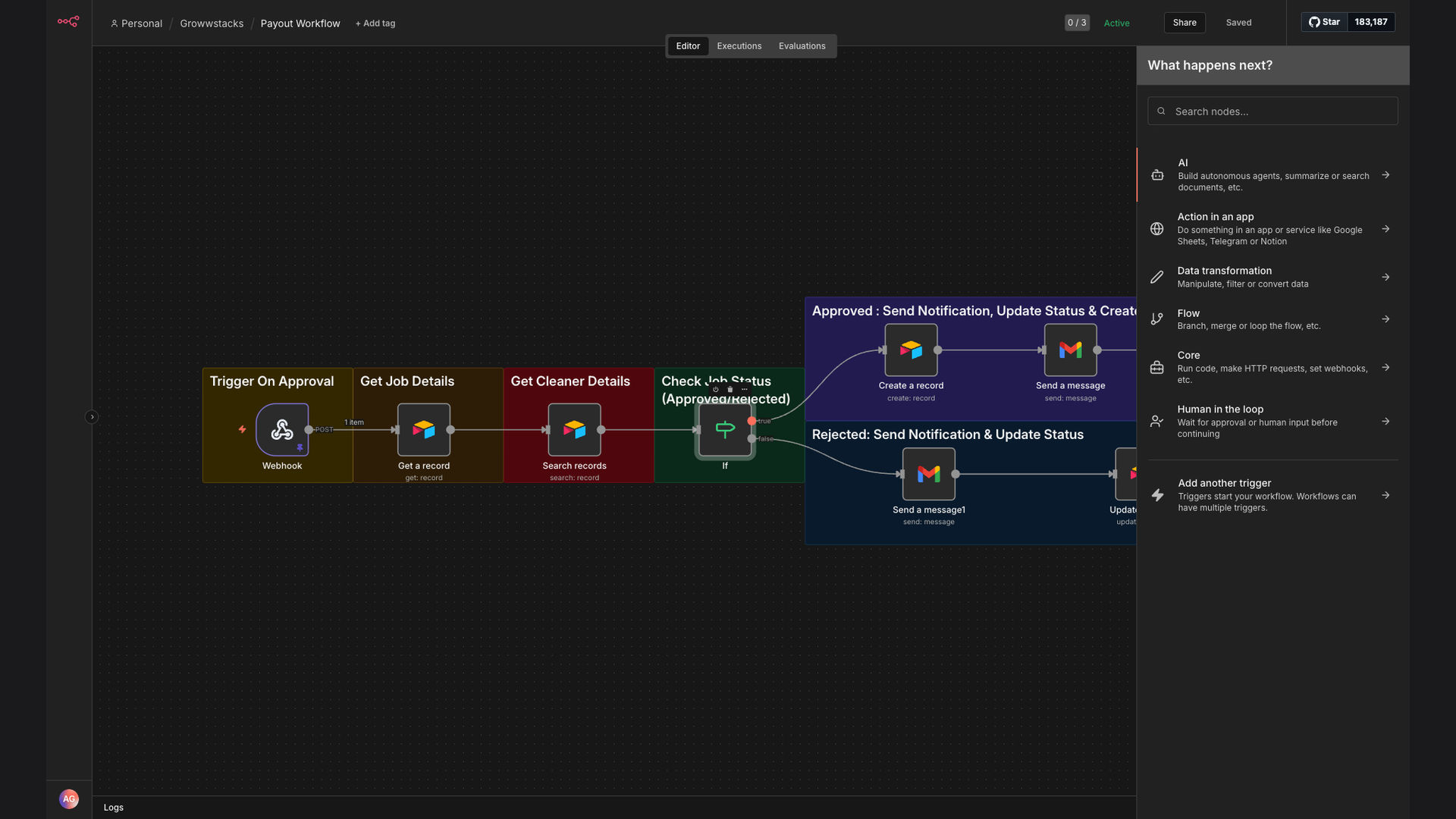
Airtable Automation Email

Automate Cleaner Payout Approvals with Airtable and Email Notifications

This n8n workflow automates cleaner payout processing for cleaning companies. It triggers on Airtable approval updates, sends email notifications to cleaners, and creates payout records automatically. This saves significant time and reduces errors in contractor payments.

Automate Cleaner Payout Approvals with Airtable and Email Notifications
95%
Faster payout processing
More efficient approvals
$10K+
Saved annually on admin
60s
Typical payout time

The Problem

Cleaning companies often face challenges in managing payouts to their cleaners. The manual process is time-consuming and prone to errors, involving multiple steps such as verifying job completion, calculating earnings, and sending payment notifications. This can lead to delays in payments and dissatisfaction among cleaners.

Without an automated system, the administrative team spends countless hours each week on payout processing. This not only reduces their productivity but also increases the risk of inaccurate payments and compliance issues. A streamlined, automated solution is essential to improve efficiency and maintain positive relationships with cleaners.

The Solution

The solution is an n8n workflow that automates the entire cleaner payout process. This workflow integrates Airtable, where job details and approval statuses are stored, with Gmail for sending payment notifications. It triggers when an approval status is updated in Airtable, fetches relevant job information, and sends a customized email to the cleaner.

This tech stack was chosen for its flexibility and ease of integration. n8n provides a robust platform for building complex workflows, while Airtable offers a user-friendly database solution. Gmail ensures reliable email delivery. Together, they create a seamless and efficient payout system that reduces manual effort and minimizes errors.

Approval
Airtable update
⚙️
Process
n8n workflow
✉️
Notify
Email to cleaner
✓ Payout Approved
📋 Record Updated

How It Works — Automated Payout Notification

The n8n workflow automates cleaner payouts, ensuring timely and accurate payments. Here's how it works:

  1. Airtable Trigger: The workflow starts when the "Payout Approved" field is updated in the Airtable job records.
  2. Fetch Job Details: The workflow retrieves all relevant job details from Airtable, including cleaner name, job date, and payment amount.
  3. Check Approval Status: The workflow verifies that the approval status is indeed "Approved" to prevent accidental payouts.
  4. Send Email Notification: A personalized email notification is sent to the cleaner via Gmail, informing them of the approved payout.
  5. Create Payout Record: A new record is created in the "Payouts" table in Airtable, documenting the payout details.
  6. Update Job Status: The job status in the "Jobs" table is updated to "Paid" to reflect the completed payout.
  7. Error Handling: If any errors occur during the process, an error notification is sent to the administrator for review.

💡 Data Integrity: By automating the payout process, the risk of manual data entry errors is significantly reduced, ensuring accurate and reliable payout records.

What This System Does That Manual Process Can't

⏱️

Time Savings

Automated payouts reduce manual processing time, freeing up administrative staff for other tasks.

Accuracy

Automated data entry minimizes errors, ensuring accurate payout amounts and records.

✉️

Instant Notifications

Cleaners receive immediate email notifications upon payout approval, improving satisfaction.

📊

Centralized Records

All payout records are stored in Airtable, providing a centralized and easily accessible database.

🛡️

Compliance

Automated processes ensure compliance with payment regulations and company policies.

🚀

Scalability

The automated system can easily scale to accommodate a growing number of cleaners and jobs.

Before vs. After: Streamlined Payouts

Before: Manual payout processing took 20 hours per week, with a 10% error rate in payout amounts.

After: Automated payouts take just 2 hours per week, with a near-zero error rate, saving significant time and money.

Implementation: Live in 3 Weeks

  1. Discovery & Planning: We began by understanding the client's current payout process and identifying pain points.
  2. Workflow Design: We designed the n8n workflow to automate the payout process, integrating Airtable and Gmail.
  3. Development & Testing: We developed the workflow and conducted thorough testing to ensure accuracy and reliability.
  4. Deployment: We deployed the workflow to the client's n8n instance and provided training to the administrative team.
  5. Optimization: Post-deployment, we monitored the workflow and made adjustments to optimize performance and efficiency.

The Right Fit — and When It Isn't

This automated payout system is ideal for cleaning companies and other service businesses that manage contractor payments. It's particularly beneficial for companies that want to reduce administrative overhead, improve payment accuracy, and enhance cleaner satisfaction. The system is scalable and can be customized to meet specific business requirements.

However, this solution may not be the right fit for very small businesses with only a few cleaners and infrequent payouts. In such cases, the manual effort may be manageable. Additionally, companies that lack access to Airtable or a similar database solution may need to invest in setting up the necessary infrastructure before implementing the automated workflow.

Got Questions? We've Got Answers.

Workflow automation is the use of technology to automate repetitive tasks and processes. It helps businesses streamline operations, reduce manual effort, and improve efficiency. By automating workflows, companies can focus on more strategic initiatives and achieve better results.

Workflow automation can be applied to various business functions, such as sales, marketing, customer service, and operations. It involves identifying tasks that can be automated, designing workflows, and implementing the necessary technology to execute those workflows.

Automating payouts offers several key benefits for businesses. It reduces manual processing time, minimizes errors, ensures timely payments, and improves payee satisfaction. By automating the payout process, companies can save time and money while maintaining positive relationships with their payees.

Additionally, automated payouts provide better visibility into payout records and simplify financial reporting. They also ensure compliance with payment regulations and company policies, reducing the risk of penalties and legal issues.

Workflow automation platforms offer robust security features to protect sensitive data. These features include data encryption, access controls, and compliance certifications. It's crucial to choose a platform that prioritizes security and data privacy to ensure the confidentiality and integrity of your information.

When implementing workflow automation, it's also important to follow security best practices, such as using strong passwords, enabling multi-factor authentication, and regularly reviewing access permissions. By taking these precautions, you can minimize the risk of security breaches and data leaks.

Yes, most workflow automation platforms support integrations with a wide range of apps and services. This allows you to connect different parts of your business and create seamless workflows that automate tasks across multiple systems. Integrations can include CRM systems, email marketing tools, payment gateways, and more.

By integrating your apps with automated workflows, you can eliminate manual data entry, streamline processes, and improve overall efficiency. This can lead to significant time savings and better business outcomes.

The cost of workflow automation varies depending on the platform, the number of users, and the complexity of the workflows. Some platforms offer free plans or trials, while others charge monthly or annual fees. It's important to consider your specific needs and budget when choosing a platform.

When evaluating the cost of workflow automation, consider the potential return on investment (ROI). By automating repetitive tasks and processes, you can save time and money, improve efficiency, and achieve better business outcomes. The cost of the platform should be weighed against these potential benefits.

The implementation time for workflow automation depends on the complexity of the workflows and the level of customization required. Simple workflows can be implemented in a few hours, while more complex workflows may take several days or weeks. A skilled automation agency can expedite the process.

When planning your workflow automation implementation, it's important to set realistic timelines and allocate sufficient resources. Consider the time required for workflow design, development, testing, and deployment. By carefully planning your implementation, you can ensure a smooth and successful transition.

Yes, GrowwStacks specializes in building custom automation solutions tailored to your specific business needs. We can assess your current processes, design an optimized workflow, and implement it using the best tools and practices. Our team has extensive experience in workflow automation and can help you achieve your business goals.

Contact us for a free consultation to discuss your automation needs. We'll work with you to understand your requirements and develop a customized solution that meets your specific needs. With GrowwStacks, you can automate your business processes and achieve greater efficiency and productivity.

Automate your cleaner payouts today!

Streamline your payout process and improve cleaner satisfaction with our custom automation solutions.

MISSING_LOGOS: gmail