The Problem
Many businesses struggle with keeping client data consistent across different platforms. When using Fatture in Cloud for accounting and Airtable for CRM, manually updating client information in both systems is time-consuming and prone to errors. This lack of synchronization can lead to inefficiencies, data discrepancies, and missed opportunities.
The manual process of transferring data between systems is not only tedious but also introduces the risk of human error. This can result in incorrect invoices, outdated contact information, and a general lack of data integrity, which negatively impacts business operations and customer relationships.
The Solution
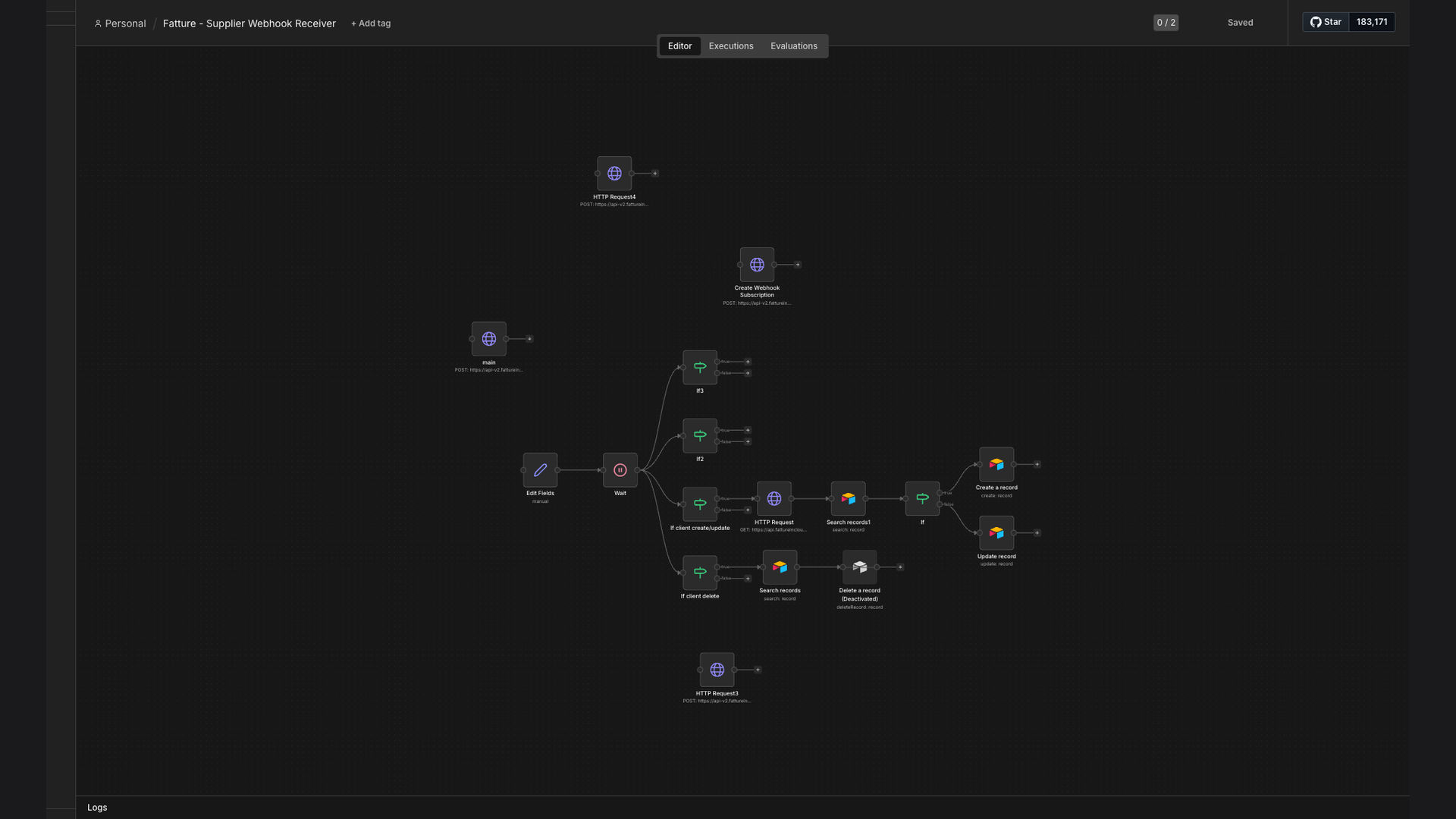
The solution is an automated n8n workflow that seamlessly synchronizes client data between Fatture in Cloud and Airtable. This workflow uses webhooks to listen for client creation, updates, and deletion events in Fatture in Cloud. When an event occurs, n8n automatically performs the corresponding action in Airtable, ensuring that both systems are always in sync.
This tech stack was chosen for its reliability, flexibility, and ease of integration. n8n provides a robust platform for building complex workflows, while Airtable offers a user-friendly interface for managing client data. Fatture in Cloud's webhook support allows for real-time updates, making this solution highly efficient and effective.
How It Works — Real-Time Client Data Synchronization
This workflow ensures that any changes made to client data in Fatture in Cloud are immediately reflected in Airtable, providing a single source of truth for all client information.
- Fatture in Cloud Event: When a new client is created, updated, or deleted in Fatture in Cloud, a webhook is triggered.
- Webhook Trigger: n8n receives the webhook, which contains the details of the event and the client data.
- Data Transformation: n8n transforms the data from Fatture in Cloud's format to Airtable's format.
- Airtable Lookup: n8n searches for the client in Airtable using a unique identifier (e.g., client ID or email).
- Update or Create: If the client exists, n8n updates the existing record. If the client does not exist, n8n creates a new record.
- Error Handling: n8n includes error handling to catch any issues during the data synchronization process.
- Logging: n8n logs all events and actions for auditing and troubleshooting purposes.
💡 Data Integrity: By automating the data synchronization process, businesses can ensure that their client data is always accurate and up-to-date, reducing the risk of errors and improving decision-making.
What This System Does That Manual Process Can't
Real-Time Updates
Webhooks ensure that client data is updated in Airtable as soon as changes are made in Fatture in Cloud, eliminating delays and ensuring data consistency.
Data Accuracy
Automating the data synchronization process reduces the risk of human error, ensuring that client data is always accurate and reliable.
Increased Efficiency
By automating the data entry process, businesses can save time and resources, allowing employees to focus on more strategic tasks.
Seamless Integration
The n8n workflow seamlessly integrates Fatture in Cloud and Airtable, providing a unified view of client data across both platforms.
Improved Data Security
Automating the data synchronization process reduces the risk of data breaches and ensures that client data is stored securely.
Better Reporting
With accurate and up-to-date client data, businesses can generate more insightful reports and make better data-driven decisions.
Before vs. After: Enhanced Data Management
Before: Manual data entry led to a 20% error rate and consumed 10 hours per week.
After: Automated sync reduced errors to less than 5% and saved 8 hours per week.
Implementation: Live in 3 Weeks
- Discovery and Planning: We start by understanding your current data management processes and identifying your specific needs and requirements.
- Workflow Design: Our team designs a custom n8n workflow that seamlessly integrates Fatture in Cloud and Airtable, ensuring data consistency and accuracy.
- Development and Testing: We develop and test the workflow to ensure that it meets your requirements and performs as expected.
- Deployment: We deploy the workflow to your n8n instance and provide training to your team on how to use and maintain it.
The Right Fit — and When It Isn't
This solution is ideal for businesses that use both Fatture in Cloud and Airtable and need to keep client data synchronized. It is particularly beneficial for businesses that have a large number of clients or that need to update client data frequently.
However, this solution may not be the right fit for businesses that do not use both Fatture in Cloud and Airtable or that have very simple data management needs. In these cases, a manual data entry process may be sufficient.