The Problem
Construction managers face a significant challenge in keeping clients informed about project progress. Manually tracking build schedules, extracting key dates, and sending individual notifications is time-consuming and prone to errors. This often leads to delayed updates, frustrated clients, and increased administrative overhead.
Without an automated system, construction companies struggle to maintain consistent and timely communication. The manual process requires dedicated staff to monitor schedules, prepare notifications, and send them via email or SMS. This not only diverts resources from core construction activities but also limits the ability to scale operations efficiently and provide personalized updates.
The Solution
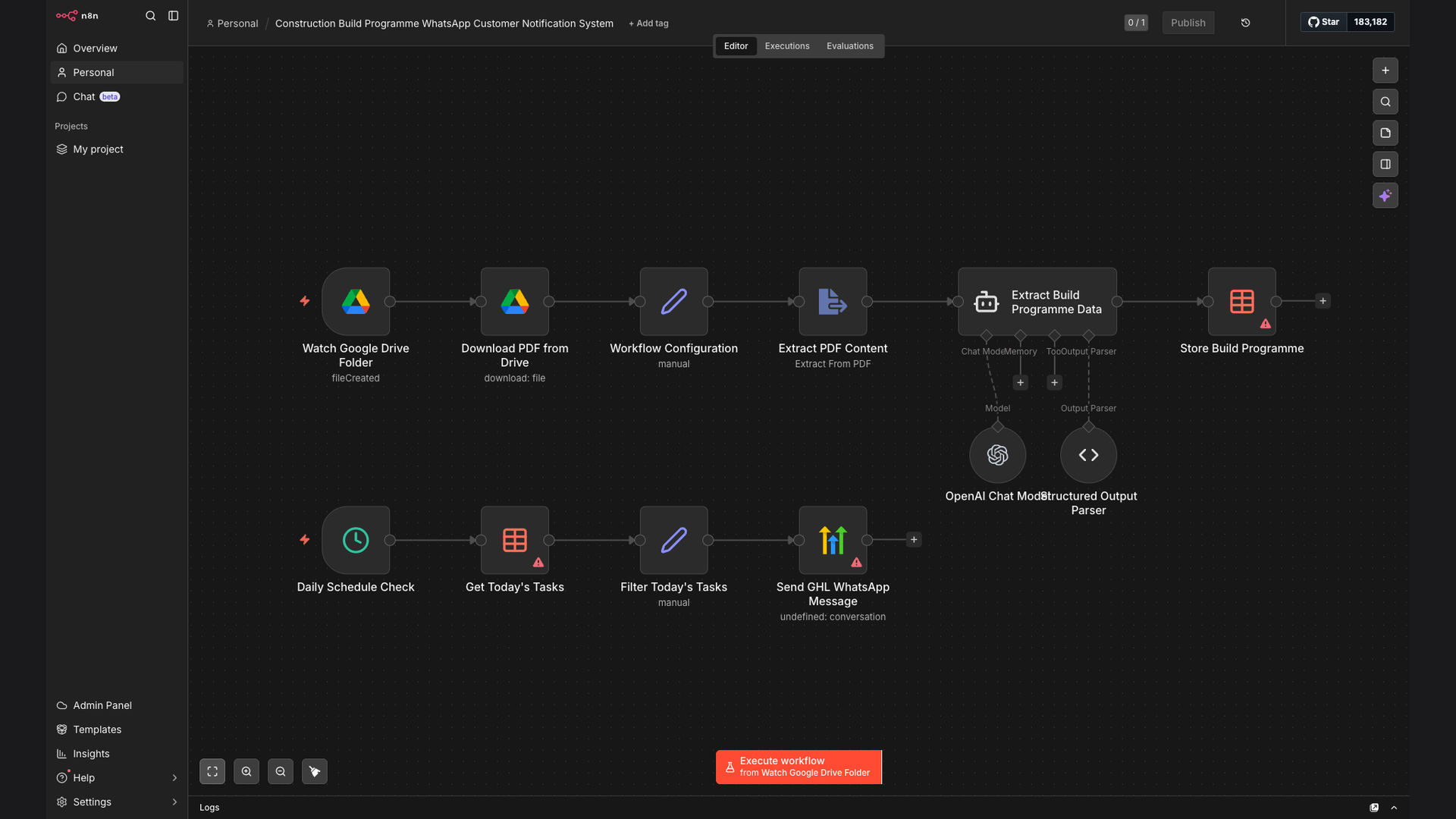
The solution is an automated workflow built with n8n that monitors a Google Drive folder for PDF build schedules, extracts key dates and tasks using AI, stores them in a database (Google Sheets), and sends daily WhatsApp reminders to customers via Go High Level. This system ensures timely and accurate notifications, enhancing client satisfaction and reducing manual workload.
n8n was chosen for its flexibility, scalability, and ability to integrate seamlessly with Google Drive, OpenAI, WhatsApp (via GHL), and Google Sheets. The workflow leverages AI to intelligently extract relevant information from build schedules, ensuring that clients receive personalized and up-to-date notifications without manual intervention.
How It Works — Automated Build Schedule Notifications
This workflow automates the process of notifying clients about their construction build schedules via WhatsApp. Here's how it works:
- Monitor Google Drive: The workflow starts by monitoring a specific folder in Google Drive for new PDF files containing build schedules.
- New File Trigger: When a new PDF file is added, it triggers the workflow to initiate the data extraction process.
- Extract Text from PDF: The PDF file is processed to extract all text content, making it available for further analysis.
- AI-Powered Data Extraction: OpenAI is used to analyze the extracted text and identify key dates, tasks, and client information.
- Store Data in Google Sheets: The extracted data is then stored in a Google Sheets database, organized by client and project.
- Daily Check for Updates: The workflow runs daily to check for upcoming tasks and deadlines for each client.
- Send WhatsApp Notifications: Using Go High Level (GHL), personalized WhatsApp notifications are sent to clients with relevant updates.
- Log Notifications: The workflow logs all sent notifications to ensure a record of communication and prevent duplicate messages.
💡 AI-Powered Extraction: Using OpenAI to extract key dates and tasks from unstructured PDF documents ensures accuracy and reduces manual data entry.
What This System Does That [Manual Process] Can't
Real-Time Updates
Provides clients with real-time updates on their build schedules, ensuring they are always informed of the latest progress.
Automated Notifications
Automates the entire notification process, eliminating the need for manual data entry and notification sending.
Improved Accuracy
Reduces the risk of human error by using AI to extract and verify key dates and tasks from build schedules.
Enhanced Communication
Enhances communication with clients by providing personalized and timely updates via WhatsApp.
Scalable Solution
Offers a scalable solution that can handle a growing number of clients and projects without increasing manual workload.
Cost Savings
Reduces administrative costs by automating the notification process and freeing up staff for other tasks.
Before vs. After: Automated WhatsApp Notifications
Before: Construction managers spent an average of 2 hours per day manually tracking build schedules and sending notifications, resulting in frequent delays and errors.
After: The automated system reduced manual effort by 90%, ensuring clients receive timely and accurate updates via WhatsApp, improving satisfaction and reducing administrative overhead.
Implementation: Live in 4 Weeks
- Planning and Setup: Defining the scope of the automation, identifying key data points, and setting up the necessary accounts and integrations.
- Workflow Design: Designing the n8n workflow to monitor Google Drive, extract data with AI, and send WhatsApp notifications via Go High Level.
- Testing and Refinement: Thoroughly testing the workflow with sample data to ensure accuracy and reliability, and making adjustments as needed.
- Deployment and Training: Deploying the workflow to a live environment and providing training to the construction management team on how to use and monitor the system.
The Right Fit — and When It Isn't
This automation is ideal for construction companies looking to streamline their client communication, reduce manual workload, and improve overall efficiency. It is particularly beneficial for companies that manage multiple projects and need a scalable solution to keep clients informed.
However, this system may not be the right fit for companies with very small project volumes or those that prefer a more hands-on approach to client communication. Additionally, companies that lack the technical expertise to manage and maintain the workflow may need to consider alternative solutions or seek external support.