The Problem
Sales teams often struggle with managing contacts across multiple platforms, leading to data silos and inefficiencies. Manually entering and updating contact information in both Monday.com and Pipedrive is time-consuming and prone to errors. This results in duplicate contacts, outdated information, and wasted resources.
The lack of seamless synchronization between these platforms creates inconsistencies in contact records, making it difficult to maintain a single source of truth. This can lead to missed opportunities, poor customer experiences, and reduced sales productivity. The need for an automated solution to streamline contact management and ensure data accuracy is critical.
The Solution
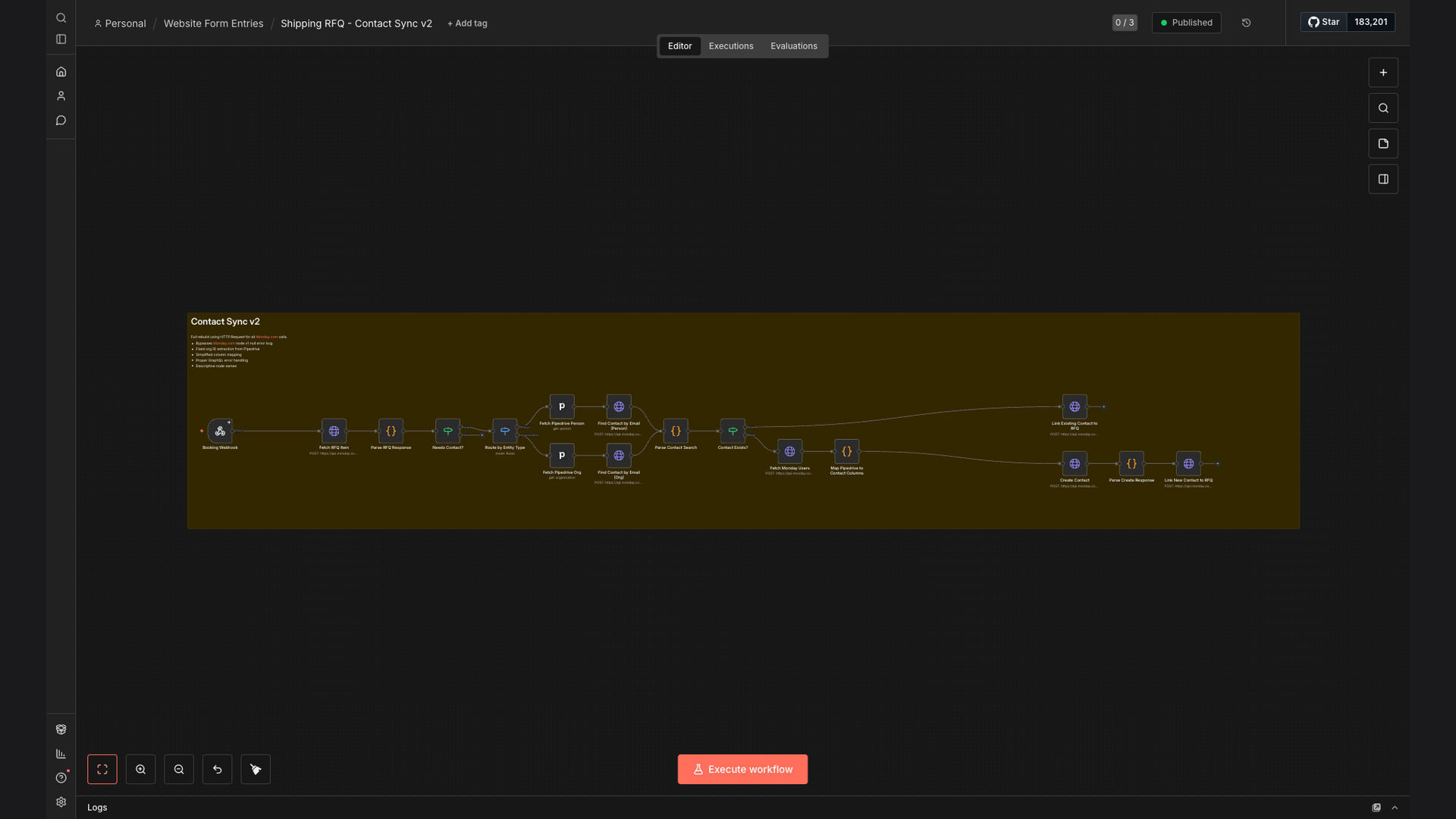
An n8n workflow was developed to automatically synchronize and deduplicate contacts between Monday.com and Pipedrive. When a new Request for Quote (RFQ) is created in Monday.com, the workflow checks for existing contacts in Pipedrive, prevents duplicates, and creates new contact records when needed. This ensures that contact information is consistent and up-to-date across both platforms.
n8n was chosen for its flexibility, scalability, and ability to integrate seamlessly with both Monday.com and Pipedrive. Its visual interface and robust API support made it easy to design and implement a workflow that meets the specific needs of the sales team. The workflow eliminates manual data entry, reduces errors, and improves overall efficiency in contact management.
How It Works — Streamlining Contact Management
The n8n workflow automates the process of synchronizing and deduplicating contacts between Monday.com and Pipedrive, ensuring data accuracy and consistency. Here's a step-by-step breakdown of how it works:
- New RFQ in Monday.com: The workflow is triggered when a new Request for Quote (RFQ) is created in Monday.com.
- Extract Contact Information: The workflow extracts relevant contact information from the new RFQ, such as name, email, and company.
- Search for Existing Contact in Pipedrive: The workflow searches for an existing contact in Pipedrive using the extracted contact information.
- Check for Duplicates: The workflow checks for potential duplicates based on email address and other identifying information.
- Create New Contact (If Needed): If no existing contact is found, the workflow creates a new contact record in Pipedrive with the extracted information.
- Update Existing Contact (If Needed): If an existing contact is found, the workflow updates the contact record in Pipedrive with any new or changed information from the RFQ.
- Log Activity: The workflow logs the activity, including whether a new contact was created or an existing contact was updated, for tracking and auditing purposes.
- Notify Team (Optional): The workflow can optionally notify the sales team via Slack or email about the new or updated contact in Pipedrive.
💡 Data Consistency: By automating contact synchronization, the workflow ensures that contact information is consistent and up-to-date across both Monday.com and Pipedrive, reducing errors and improving data accuracy.
What This System Does That [Manual Process] Can't
Saves Time
Automates contact synchronization, eliminating manual data entry and reducing the time spent on managing contacts.
Ensures Data Accuracy
Prevents duplicate contacts and ensures that contact information is consistent and up-to-date across both platforms.
Improves Efficiency
Streamlines contact management, allowing sales teams to focus on building relationships and closing deals.
Provides Better Insights
Offers a single source of truth for contact information, enabling better reporting and analysis.
Enhances Collaboration
Facilitates collaboration between sales and marketing teams by providing a shared view of contact information.
Reduces Errors
Minimizes the risk of human error associated with manual data entry and contact management.
Before vs. After: Streamlined Contact Management
Before: Sales teams spent an average of 2 hours per day manually entering and updating contact information in both Monday.com and Pipedrive, resulting in frequent errors and duplicate contacts.
After: The n8n workflow automates contact synchronization, reducing the time spent on contact management by 90% and ensuring data accuracy across both platforms.
Implementation: Live in 3 Weeks
- Discovery and Planning: We begin by understanding your specific contact management needs and defining the scope of the automation project.
- Workflow Design: Our team designs a custom n8n workflow that integrates seamlessly with your Monday.com and Pipedrive accounts.
- Development and Testing: We develop and test the workflow to ensure it meets your requirements and performs flawlessly.
- Deployment: We deploy the workflow to your n8n instance and provide training to your team on how to use and maintain it.
- Ongoing Support: We offer ongoing support and maintenance services to ensure your automated workflow continues to run smoothly.
The Right Fit — and When It Isn't
This solution is ideal for sales teams that use both Monday.com and Pipedrive to manage contacts and want to streamline their contact management process. It's also a good fit for businesses that struggle with duplicate contacts, outdated information, and manual data entry.
However, this solution may not be the right fit for businesses that only use one platform for contact management or have very simple contact management needs. In those cases, a simpler solution or manual process may be sufficient.