The Problem
Customer support teams often struggle with the time-consuming task of manually summarizing chat sessions. This process is not only inefficient but also prone to human error, leading to inconsistent documentation. The lack of quick, accurate summaries makes it difficult to review past interactions, identify trends, and improve overall service quality.
Without an automated solution, teams spend countless hours sifting through chat logs, missing critical insights and delaying response times. This manual effort also diverts resources from more strategic activities, impacting productivity and potentially leading to customer dissatisfaction due to slow or inaccurate information retrieval.
The Solution
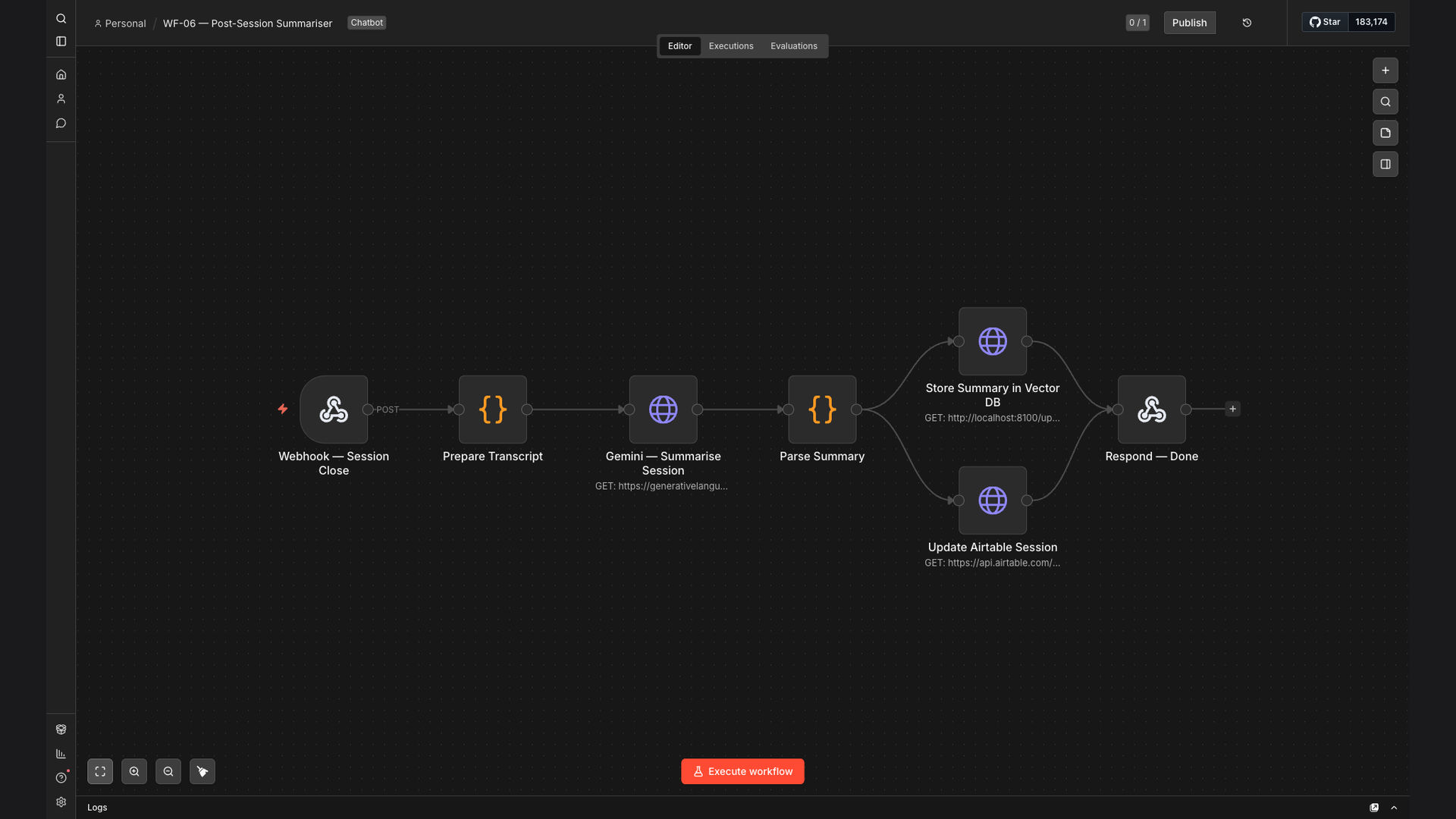
We built an n8n workflow that automates the summarization of customer support chat sessions using Google Gemini AI. The workflow processes session transcripts, generates concise summaries, and stores them in both a vector database and Airtable. This allows for quick retrieval and analysis of customer interactions.
n8n was chosen for its flexibility and ability to integrate seamlessly with various AI models and data storage solutions. By leveraging n8n, we created a robust and scalable solution that significantly reduces the manual effort required for conversation documentation, while also ensuring data integrity and accessibility.
How It Works — Streamlining Conversation Documentation
This automated workflow efficiently summarizes customer support chat sessions, saving time and improving data accessibility.
- Fetch Chat Transcript: The workflow begins by retrieving the complete transcript of the customer support chat session from the relevant platform.
- Prepare Data for AI: The transcript is cleaned and formatted to ensure it is compatible with the Google Gemini AI model.
- Generate AI Summary: The formatted transcript is sent to Google Gemini AI, which generates a concise summary of the conversation.
- Store in Vector Database: The AI-generated summary is stored in a vector database for efficient semantic search and retrieval.
- Store in Airtable: The summary is also stored in Airtable, providing a structured and easily accessible record of the conversation.
- Notify Team (Optional): The workflow can optionally notify the customer support team via Slack or email that a new summary has been generated.
- Log Activity: All steps of the workflow are logged for auditing and troubleshooting purposes.
💡 Data Accessibility: Storing summaries in both a vector database and Airtable ensures that the information is easily searchable and accessible to the customer support team.
What This System Does That [Manual Process] Can't
Speed & Efficiency
AI-powered summarization is significantly faster than manual methods, reducing the time spent on documentation.
Accuracy & Consistency
AI ensures consistent and accurate summaries, minimizing human error and bias in documentation.
Improved Searchability
Storing summaries in a vector database enhances search capabilities, allowing for quick retrieval of relevant information.
Data-Driven Insights
Automated summaries enable data-driven insights into customer interactions, helping identify trends and improve service quality.
Scalability
The automated workflow can easily scale to handle a large volume of customer support chat sessions without additional manual effort.
Cost Savings
Reducing manual effort translates to significant cost savings by freeing up resources for more strategic activities.
Before vs. After: Streamlined Customer Support Documentation
Before: Customer support teams spent an average of 15 minutes per chat session manually summarizing conversations, resulting in inconsistent documentation and delayed response times.
After: AI-powered automation reduces summary time to under 60 seconds per session, ensuring accurate and consistent documentation, and freeing up valuable time for team members.
Implementation: Live in 4 Weeks
- Requirements Gathering: We collaborate with the client to understand their specific needs and data sources.
- Workflow Design: We design the n8n workflow, including integrations with Google Gemini AI, vector database, and Airtable.
- Testing & Refinement: We thoroughly test the workflow and refine it based on client feedback to ensure optimal performance.
- Deployment: We deploy the workflow to the client's environment and provide training to the customer support team.
The Right Fit — and When It Isn't
This solution is ideal for customer support teams that handle a high volume of chat sessions and need to improve their documentation processes. It is particularly beneficial for organizations looking to leverage AI to enhance efficiency and gain data-driven insights.
However, this solution may not be the right fit for organizations with very low chat volumes or those that require highly customized summaries that cannot be generated by AI. In such cases, a manual approach may be more appropriate.