The Problem
Many SaaS companies and service platforms face challenges in efficiently onboarding new customers. The manual process of creating accounts, generating secure passwords, and sending welcome emails is time-consuming and prone to errors. This can lead to delays in customer access, resulting in a poor initial experience and potentially impacting user activation rates.
Furthermore, managing user credentials securely is a critical concern. Manually generated passwords may not always adhere to security best practices, increasing the risk of unauthorized access and data breaches. The lack of automation in this process can also strain IT resources, diverting them from more strategic initiatives.
The Solution
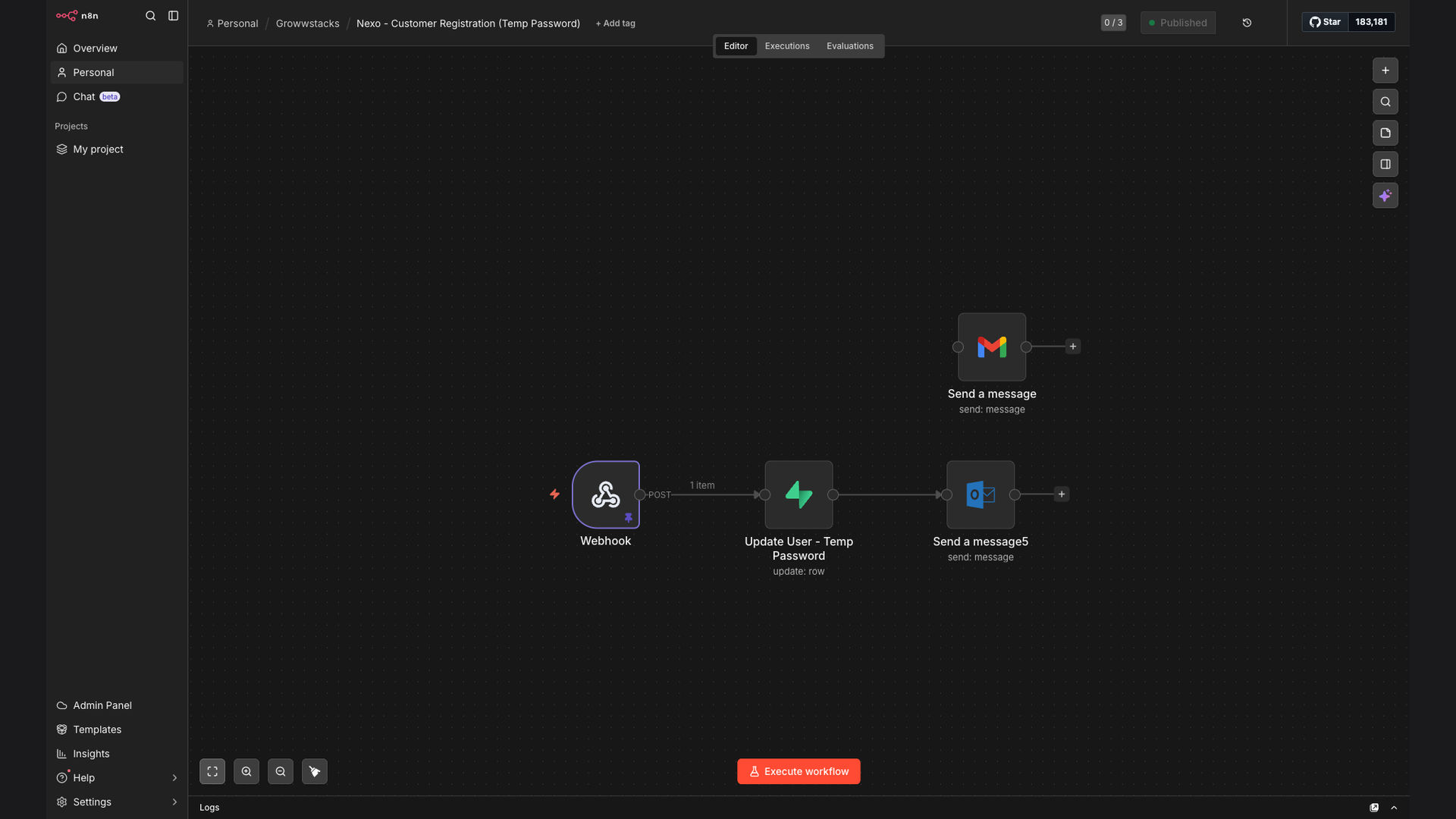
The solution is an automated customer onboarding workflow built with n8n. This system automatically generates temporary passwords upon registration, updates user records in Supabase with formatted credentials, and sends professional welcome emails via Gmail and Outlook. This ensures a secure and streamlined onboarding process for new customers.
n8n was chosen for its flexibility and ability to integrate seamlessly with Supabase, Gmail, and Outlook. Its open-source nature allows for customization and self-hosting, providing greater control over data security and workflow management. The workflow leverages n8n's robust features to handle user data securely and efficiently.
How It Works — Automated Onboarding Sequence
The automated customer onboarding workflow streamlines the process of registering new users and providing them with secure access to the platform. Here's a detailed breakdown of each step:
- Registration Submission: A new user submits their registration form on the platform. This triggers the workflow to initiate the onboarding process.
- Data Capture: The workflow captures the user's registration data, including their name, email address, and any other relevant information provided in the form.
- Temporary Password Generation: A secure, temporary password is automatically generated using a random password generator. This ensures that the initial password meets security best practices.
- Supabase Update: The user's record is updated in Supabase with the generated temporary password. This allows the user to log in to their account using the temporary credentials.
- Welcome Email Composition: A personalized welcome email is composed, including the user's name, temporary password, and instructions on how to log in and set a permanent password.
- Email Delivery via Gmail/Outlook: The welcome email is sent to the user's email address via Gmail or Outlook, providing them with all the necessary information to access their account.
- User Login: The user logs in to their account using the temporary password provided in the welcome email.
- Password Reset Prompt: Upon their first login, the user is prompted to reset their password and create a permanent, unique password for their account.
💡 Enhanced Security: By automatically generating temporary passwords and prompting users to create permanent ones, the system significantly reduces the risk of unauthorized access and data breaches.
What This System Does That Manual Process Can't
Time Savings
Automates the entire onboarding process, saving significant time compared to manual methods.
Enhanced Security
Generates strong, temporary passwords automatically, reducing the risk of weak or compromised credentials.
Personalized Communication
Sends customized welcome emails, providing a professional and engaging onboarding experience.
Scalability
Handles a high volume of new user registrations efficiently, without delays or bottlenecks.
Data Accuracy
Updates user records in Supabase automatically, ensuring accurate and up-to-date information.
Improved User Experience
Streamlines the onboarding process, making it easier and more convenient for new users to get started.
Before vs. After: Streamlined Onboarding
Before: Manual customer onboarding took approximately 15 minutes per user, with a 20% chance of errors in password generation and data entry.
After: Automated onboarding reduces the process to under a minute, with near-zero error rates, resulting in faster user activation and improved data accuracy.
Implementation: Live in 3 Weeks
- Planning & Design: Defining the scope of the automation, identifying key integration points, and designing the workflow architecture.
- Development & Configuration: Building the n8n workflow, configuring the Supabase integration, and setting up email templates in Gmail and Outlook.
- Testing & Refinement: Thoroughly testing the workflow to identify and resolve any issues, ensuring smooth and reliable operation.
- Deployment & Training: Deploying the automated onboarding system and providing training to the client's team on how to manage and maintain it.
The Right Fit — and When It Isn't
This automated customer onboarding solution is ideal for SaaS companies, service platforms, and any business that requires efficient and secure user provisioning. It's particularly beneficial for organizations that handle a large volume of new user registrations and need to streamline their onboarding process.
However, it may not be the right fit for businesses with very low registration volumes or those that require highly customized onboarding processes that cannot be easily automated. In such cases, a manual or semi-automated approach may be more appropriate.