The Problem
Local authorities publish planning applications daily, but keeping track of relevant projects can be a time-consuming and tedious task. Planners, developers, and consultants often spend hours manually checking local authority planning portals for new applications that might impact their projects or clients. This manual process is prone to errors, can lead to missed opportunities, and delays in project timelines.
The challenge lies in the lack of a centralized system to automatically collect and organize this information. Without automation, professionals must rely on daily manual checks, which is not only inefficient but also prevents them from focusing on more strategic tasks. The need for a reliable, automated solution is evident to streamline the process and ensure timely access to critical planning application data.
The Solution
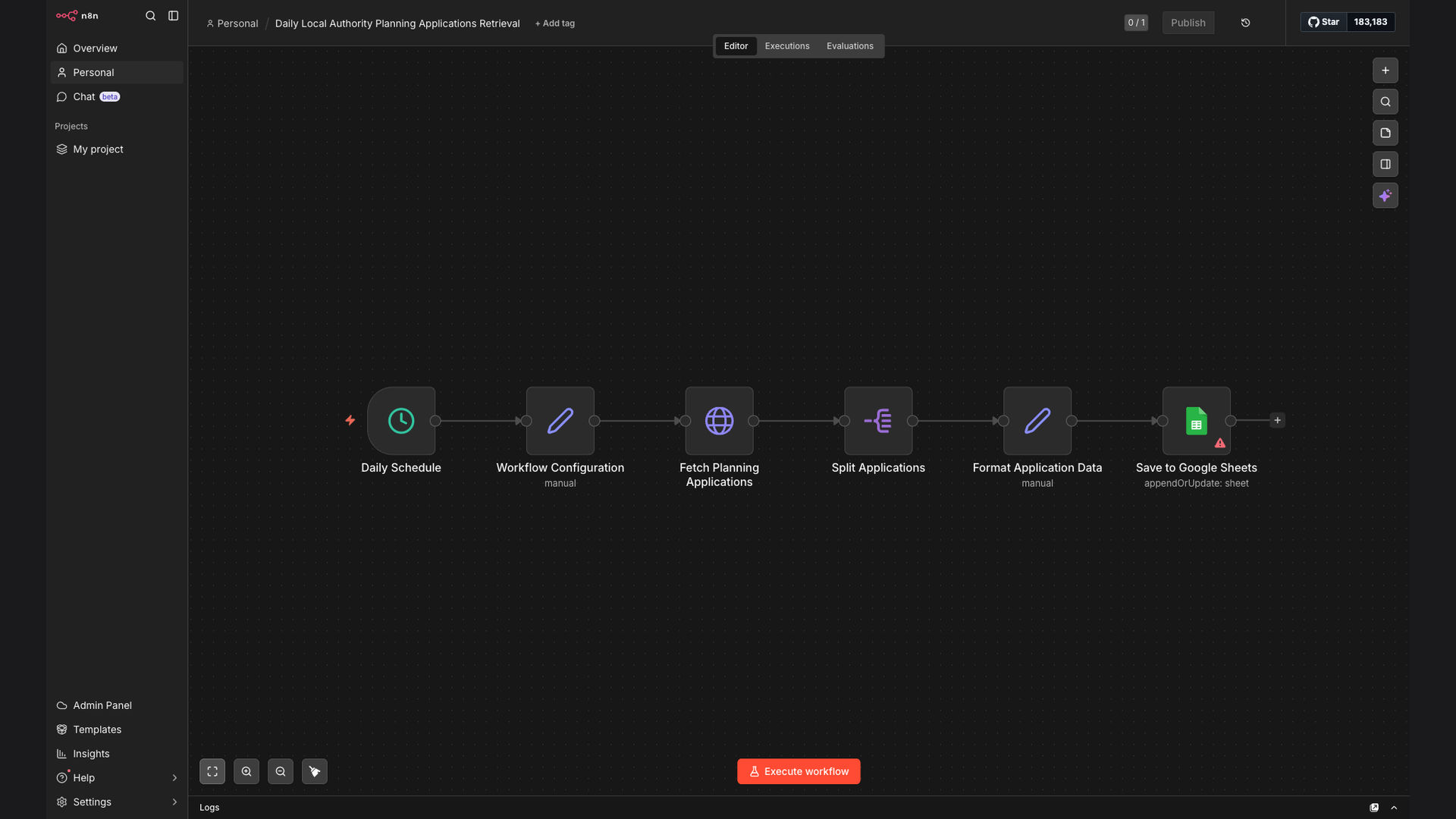
The solution is an automated workflow built using n8n that retrieves daily planning applications from a Local Authority Planning Portal API and saves the data to a Google Sheet. This system eliminates the need for manual checks, providing a centralized, up-to-date repository of planning application data. The workflow is designed to be easily configurable and scalable, accommodating different API structures and data requirements.
n8n was chosen as the primary platform due to its flexibility, ease of integration with various APIs and Google Sheets, and its ability to handle complex data transformations. By leveraging n8n, the workflow can efficiently extract, transform, and load (ETL) data from the API into a structured format within Google Sheets, making it accessible and actionable for users. The use of Google Sheets ensures that the data is easily shareable and can be analyzed using familiar tools.
How It Works — Streamlining Data Collection and Organization
The automated workflow efficiently collects and organizes planning application data, ensuring that users have access to the latest information without manual effort.
- API Authentication: The workflow starts by authenticating with the Local Authority Planning Portal API using the necessary credentials.
- Data Retrieval: It then sends a request to the API to retrieve the daily planning applications, specifying the required parameters.
- Data Parsing: The retrieved data is parsed to extract relevant information such as application number, address, description, and submission date.
- Data Transformation: The extracted data is transformed into a structured format suitable for insertion into Google Sheets.
- Google Sheets Authentication: The workflow authenticates with Google Sheets using the appropriate credentials.
- Data Insertion: The transformed data is inserted into the designated Google Sheet, creating new rows for each planning application.
- Error Handling: The workflow includes error handling mechanisms to catch any issues during the process, such as API errors or data validation failures.
- Notification: In case of errors, a notification is sent to the administrator to investigate and resolve the issue.
💡 Real-Time Updates: The automated workflow ensures that the Google Sheet is updated daily with the latest planning application data, providing users with real-time access to critical information.
What This System Does That Manual Process Can't
Saves Time
Automates the daily task of checking planning portals, freeing up valuable time for other tasks.
Reduces Errors
Eliminates manual data entry errors, ensuring accurate and reliable information.
Centralizes Data
Consolidates all planning application data into a single, easily accessible Google Sheet.
Provides Real-Time Updates
Ensures that the Google Sheet is updated daily with the latest planning application data.
Improves Visibility
Offers better visibility into planning application trends and patterns.
Enhances Efficiency
Streamlines the planning application tracking process, improving overall efficiency.
Before vs. After: Streamlined Data Access
Before: Planners spent 2-3 hours daily manually checking multiple local authority portals, often missing critical applications.
After: The automated workflow updates a Google Sheet daily, saving 95% of the manual effort and ensuring no applications are missed.
Implementation: Live in 2 Weeks
- Requirements Gathering: Understanding the specific data requirements and API specifications of the Local Authority Planning Portal.
- Workflow Design: Designing the n8n workflow to retrieve, transform, and load the data into Google Sheets.
- API Integration: Configuring the API connection and data retrieval process within n8n.
- Testing and Refinement: Thoroughly testing the workflow to ensure accurate data retrieval and transformation.
- Deployment: Deploying the workflow to a production environment and scheduling it to run daily.
The Right Fit — and When It Isn't
This solution is ideal for planners, developers, and consultants who need to track local authority planning applications regularly. It's particularly beneficial for those who want to save time, reduce errors, and centralize their data in a Google Sheet. The workflow is scalable and can be adapted to different API structures and data requirements.
However, this solution may not be the right fit for organizations that do not require daily updates or have very limited data needs. Additionally, if the Local Authority Planning Portal does not offer an API, alternative data collection methods may be necessary.