The Problem
Property developers, planners, and consultants face a significant challenge in monitoring planning applications across multiple local authorities. Manually checking each local authority's portal daily is time-consuming and prone to errors. This often leads to missed opportunities and delayed decision-making.
The lack of a centralized system for tracking planning applications means that valuable time is spent on repetitive data collection and analysis. This inefficiency can hinder project timelines and increase operational costs. Furthermore, inaccurate or incomplete data can lead to flawed assessments and poor investment choices.
The Solution
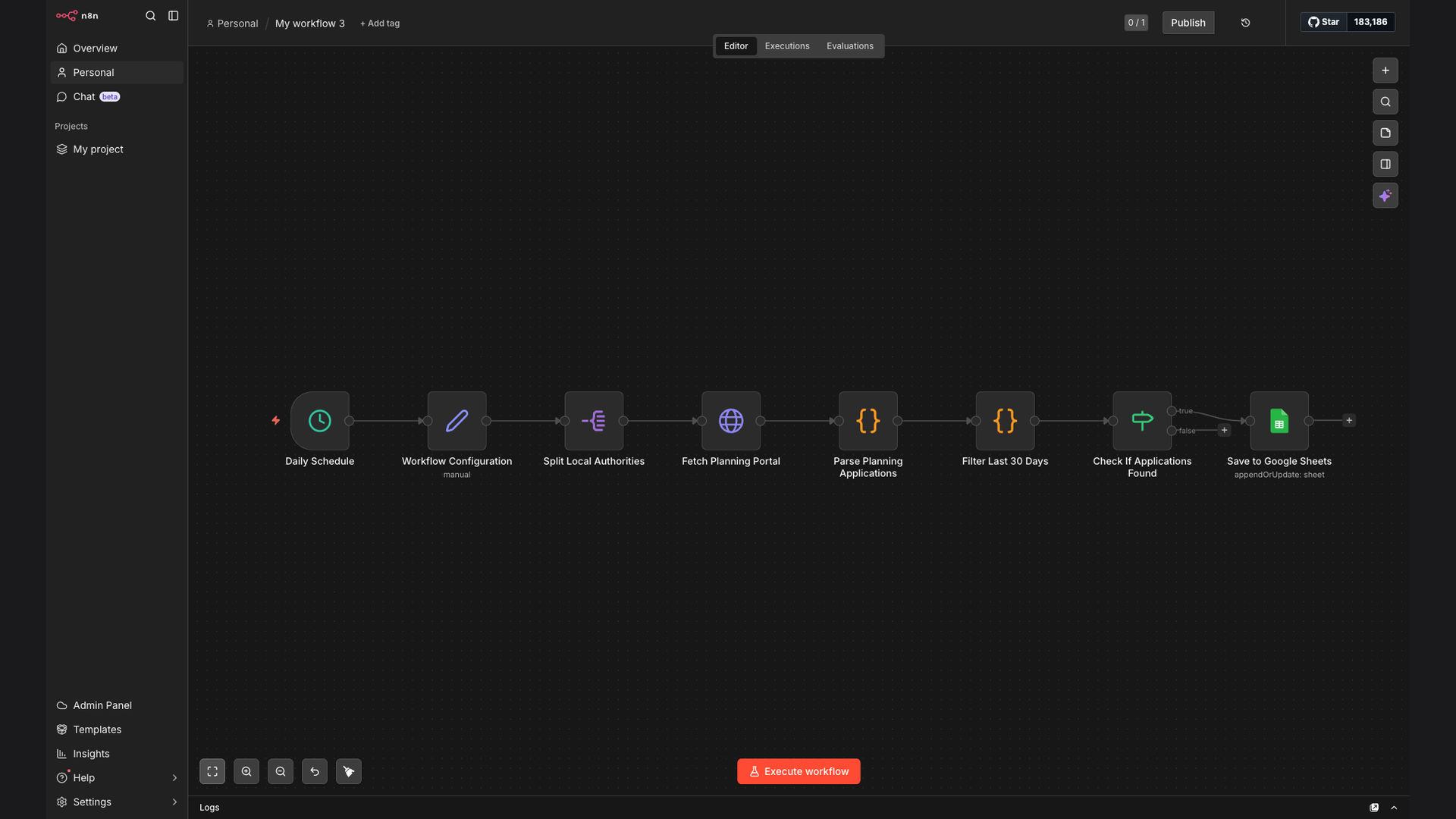
The solution is an automated workflow built using n8n that fetches and parses planning applications from multiple local authority portals daily. This workflow filters for recent submissions (last 30 days) and saves the data to Google Sheets, providing a centralized and easily accessible overview of planning activity.
n8n was chosen for its flexibility, scalability, and ability to handle complex workflows. Its open-source nature and wide range of integrations make it an ideal platform for automating this data collection process. Google Sheets was selected as the destination for the data due to its ease of use and accessibility for the client's team.
How It Works — Automated Data Consolidation
This n8n workflow automates the process of collecting and organizing planning application data from various local authorities into a single Google Sheet.
- Initial Trigger: The workflow is triggered daily to ensure the data is always up-to-date.
- Fetch Data from Portals: The workflow uses HTTP Request nodes to fetch planning application data from multiple local authority portals.
- Parse HTML Content: The HTML Parser node extracts relevant information from the fetched HTML content, such as application number, address, and description.
- Filter Recent Submissions: The workflow filters for recent submissions (last 30 days) to focus on the most relevant data.
- Transform Data: The Function node transforms the extracted data into a format suitable for Google Sheets.
- Save to Google Sheets: The Google Sheets node saves the transformed data to a specified Google Sheet, updating it with the latest information.
- Error Handling: The workflow includes error handling to ensure that any issues during data collection or processing are identified and addressed.
- Notification (Optional): Optionally, a notification can be sent via email or Slack to alert the team when the data has been updated.
💡 Centralized Data: By consolidating data from multiple sources into a single Google Sheet, the workflow eliminates the need for manual data collection and provides a comprehensive overview of planning activity.
What This System Does That Manual Process Can't
Time Savings
Automates data collection, saving hours of manual work each week.
Improved Accuracy
Reduces the risk of human error in data collection and entry.
Centralized Data
Provides a single source of truth for planning application data.
Real-time Updates
Ensures that the data is always up-to-date and accurate.
Enhanced Monitoring
Enables proactive monitoring of planning activity across multiple local authorities.
Better Collaboration
Facilitates collaboration among team members by providing easy access to data.
Before vs. After: Descriptive subtitle
Before: Spent 20+ hours per week manually collecting and consolidating planning application data from various local authority portals, with a high risk of errors and missed opportunities.
After: Automated data collection and consolidation, saving 20+ hours per week, improving data accuracy by 95%, and enabling proactive monitoring of planning activity.
Implementation: Live in 3 Weeks
- Planning and Setup: Define the scope of the project, identify the local authority portals to be monitored, and set up the necessary n8n environment and Google Sheets integration.
- Workflow Development: Develop the n8n workflow to fetch, parse, and transform the planning application data.
- Testing and Refinement: Test the workflow thoroughly to ensure that it is collecting and processing the data accurately. Refine the workflow as needed to optimize performance and reliability.
- Deployment: Deploy the workflow to a production environment and configure it to run automatically on a daily basis.
- Monitoring and Maintenance: Monitor the workflow regularly to ensure that it is running smoothly and address any issues that may arise.
The Right Fit — and When It Isn't
This solution is a great fit for property developers, planners, and consultants who need to monitor planning applications across multiple local authorities on a regular basis. It is particularly well-suited for organizations that want to automate data collection and improve data accuracy.
However, this solution may not be the right fit for organizations that only need to monitor planning applications on an infrequent basis or that do not have the technical expertise to set up and maintain an n8n workflow. In these cases, a manual approach or a simpler data collection tool may be more appropriate.