The Problem
Many businesses face the challenge of manually processing large volumes of documents such as NRICs, payslips, and EOP forms. This process is not only time-consuming but also prone to errors, leading to inefficiencies and increased operational costs. Manual data entry creates bottlenecks and delays critical business processes.
The need to accurately extract and categorize data from these documents is crucial for various functions, including compliance, HR, and finance. However, the lack of an automated solution often results in significant resource allocation and potential compliance risks due to human error. Inability to scale document processing further compounds the problem as business grows.
The Solution
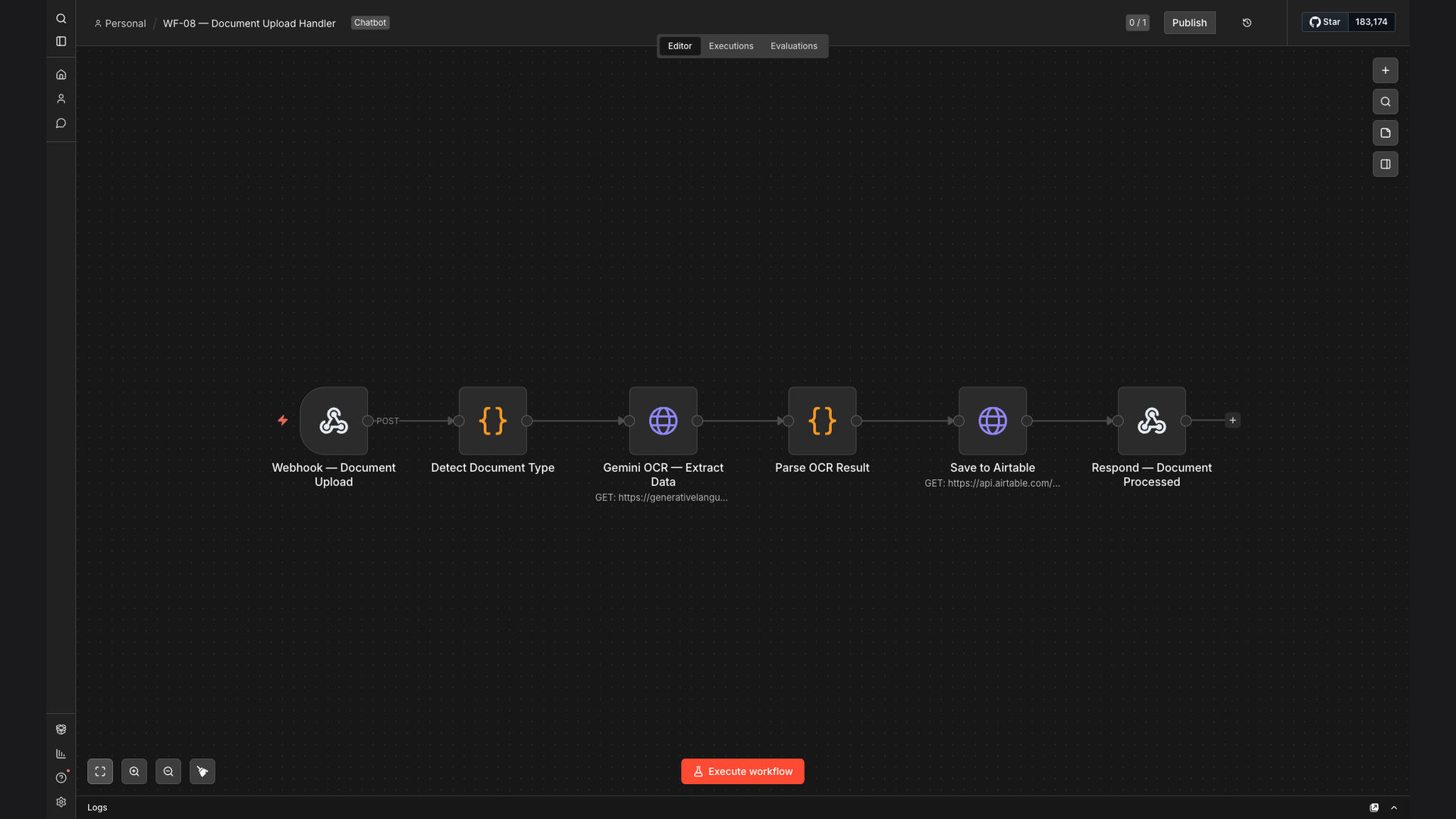
The solution involves an automated document processing workflow built using n8n, leveraging Gemini AI for OCR and Airtable for data storage and management. This system automates the extraction of structured data from uploaded documents, categorizes the files based on their type, and updates the corresponding records in Airtable.
n8n was chosen as the primary platform due to its flexibility, scalability, and ability to seamlessly integrate with Gemini AI and Airtable. Gemini AI provides accurate OCR capabilities, while Airtable offers a user-friendly database solution for storing and managing the extracted data. This combination ensures a streamlined and efficient document processing workflow.
How It Works — Automated Data Extraction and Storage
The automated document processing workflow efficiently extracts and stores data from various document types, ensuring accuracy and saving time.
- Document Upload: Users upload documents (NRIC, Payslip, EOP) to a designated location.
- File Categorization: The system automatically categorizes the uploaded files based on their type using AI.
- OCR Processing: Gemini AI OCR extracts text and structured data from the documents.
- Data Validation: The extracted data is validated to ensure accuracy and completeness.
- Airtable Update: The validated data is then used to update the corresponding records in Airtable.
- Notification: A notification is sent to the relevant stakeholders upon successful data extraction and update.
- Error Handling: In case of errors, the system flags the document for manual review.
💡 Data Accuracy: Implementing automated validation checks ensures that the extracted data meets predefined criteria, minimizing errors and improving data quality.
What This System Does That Manual Process Can't
Speed
Automated processing significantly reduces the time required to extract and categorize data from documents.
Accuracy
AI-powered OCR ensures high accuracy in data extraction, minimizing errors associated with manual entry.
Efficiency
The automated workflow streamlines the entire document processing pipeline, improving overall efficiency.
Scalability
The system can easily handle large volumes of documents, making it suitable for growing businesses.
Compliance
Automated data extraction ensures compliance with data protection regulations and internal policies.
Cost Savings
Reduced manual labor and improved efficiency translate into significant cost savings for the business.
Before vs. After: Automated vs. Manual Document Processing
Before: Manual document processing took an average of 15 minutes per document, resulting in 20 hours per week spent on data entry and a high error rate of 5%.
After: Automated document processing reduces the time to 3 minutes per document, freeing up 16 hours per week and decreasing the error rate to less than 1%.
Implementation: Live in 4 Weeks
- Planning & Design: Defining the scope, requirements, and workflow design.
- Configuration: Setting up n8n, integrating Gemini AI, and configuring Airtable.
- Testing & Validation: Thoroughly testing the workflow to ensure accuracy and reliability.
- Deployment: Deploying the automated workflow to production.
The Right Fit — and When It Isn't
This solution is ideal for businesses that handle a large volume of documents and require accurate and efficient data extraction. It is particularly beneficial for industries such as finance, healthcare, and HR, where compliance and data accuracy are critical.
However, it may not be the right fit for businesses with very low document processing volumes or those that require highly specialized data extraction that cannot be achieved with standard OCR technology. In such cases, a manual or hybrid approach may be more suitable.