The Problem
Agencies managing domestic helper contracts face significant challenges in organizing and tracking employment contracts. The manual process of capturing contract data, storing PDF documents, and logging details in spreadsheets is time-consuming and prone to errors. This can lead to compliance issues and difficulties in retrieving information when needed.
Furthermore, the lack of a centralized system makes it difficult to monitor contract status and ensure timely renewals. The risk of losing important documents or misplacing critical data is a constant concern. This inefficiency not only impacts productivity but also increases the risk of non-compliance with regulatory requirements.
The Solution
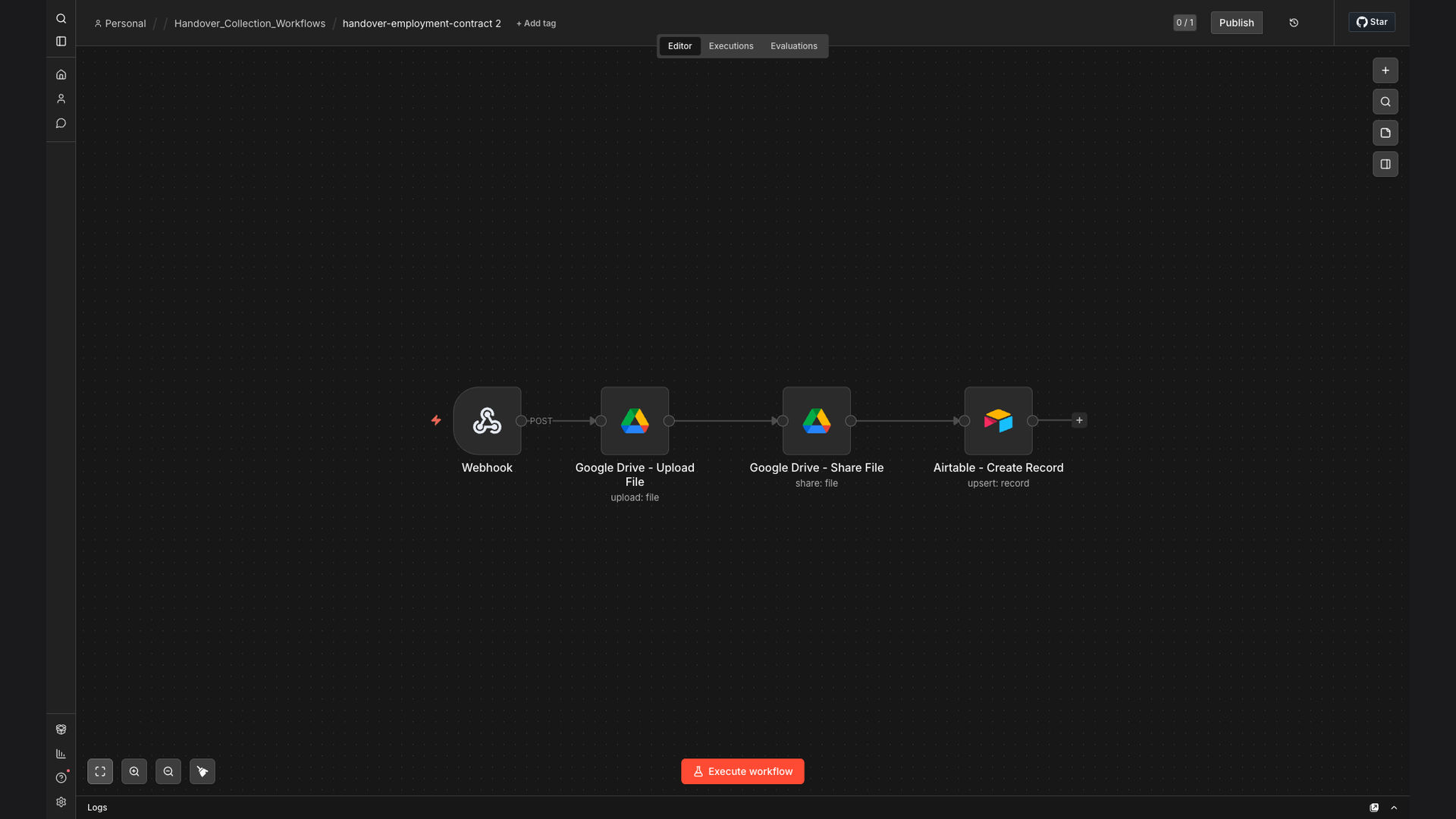
The solution is an automated workflow built with n8n that captures employment contract data via webhook, uploads the PDF to Google Drive, generates a shareable link, and logs all details in Airtable. This system eliminates manual data entry, ensures secure document storage, and provides a centralized platform for tracking contract status. The tech stack was chosen for its flexibility, scalability, and ease of integration with existing systems.
n8n was selected as the primary automation platform due to its ability to handle complex workflows and integrate seamlessly with Google Drive and Airtable. The webhook trigger allows for real-time data capture, while the Google Drive integration ensures secure document storage and easy access. Airtable provides a structured database for tracking contract details and generating reports.
How It Works — Automated Contract Management
This workflow automates the entire process of capturing, storing, and tracking employment contract data, ensuring efficiency and accuracy.
- Webhook Trigger: A webhook is set up to capture data from the contract submission form.
- PDF Upload to Google Drive: The submitted PDF contract is automatically uploaded to a designated folder in Google Drive.
- Generate Shareable Link: A shareable link is generated for the uploaded PDF, allowing easy access and sharing.
- Extract Contract Data: Key data points from the contract are extracted, such as employee name, contract start date, and salary.
- Log Data in Airtable: The extracted data, along with the Google Drive link, is logged in an Airtable base for easy tracking.
- Update Contract Status: The contract status is automatically updated in Airtable based on predefined criteria.
- Send Confirmation Email: A confirmation email is sent to the HR department, notifying them of the new contract submission.
💡 Centralized Data: All contract data and PDF documents are stored in a centralized system, making it easy to access and manage information.
What This System Does That Manual Process Can't
Time Savings
Automates data entry and document storage, saving significant time for HR staff.
Accuracy
Reduces the risk of human error in data entry and document management.
Security
Ensures secure storage of sensitive contract documents in Google Drive.
Easy Access
Provides easy access to contract data and documents through a centralized Airtable base.
Scalability
Scales easily to accommodate growing volumes of contract data.
Compliance
Helps ensure compliance with regulatory requirements by maintaining organized records.
Before vs. After: Streamlined Contract Management
Before: Manual data entry and document storage resulted in an average of 2 hours per contract and a 10% error rate.
After: Automated workflow reduced processing time to under 2 minutes per contract and eliminated data entry errors.
Implementation: Live in 4 Weeks
- Requirements Gathering: Detailed discussions with the client to understand their specific needs and requirements.
- Workflow Design: Designing the automation workflow in n8n, including webhook setup, Google Drive integration, and Airtable configuration.
- Testing and Refinement: Thorough testing of the workflow to ensure accuracy and reliability, followed by refinements based on feedback.
- Deployment: Deploying the workflow to production and providing training to the HR staff on how to use the system.
The Right Fit — and When It Isn't
This solution is ideal for agencies managing a high volume of employment contracts who need to streamline their HR processes and ensure compliance. It's also a good fit for businesses looking to reduce manual data entry and improve data accuracy.
However, this solution may not be suitable for businesses with very low contract volumes or those who require highly customized document management systems. In such cases, a simpler solution or a custom-built system may be more appropriate.