The Problem
Many businesses struggle with time-consuming manual lead generation. Sales teams spend hours searching Google Maps for potential clients, manually copying contact details, and verifying information. This process is not only inefficient but also prone to errors, leading to wasted time and missed opportunities.
Furthermore, data enrichment is a significant challenge. Simply extracting basic contact information is not enough. Sales teams need additional data points, such as website URLs, social media profiles, and industry classifications, to effectively qualify and engage with leads. Manually gathering this information is a tedious and often inaccurate process.
The Solution
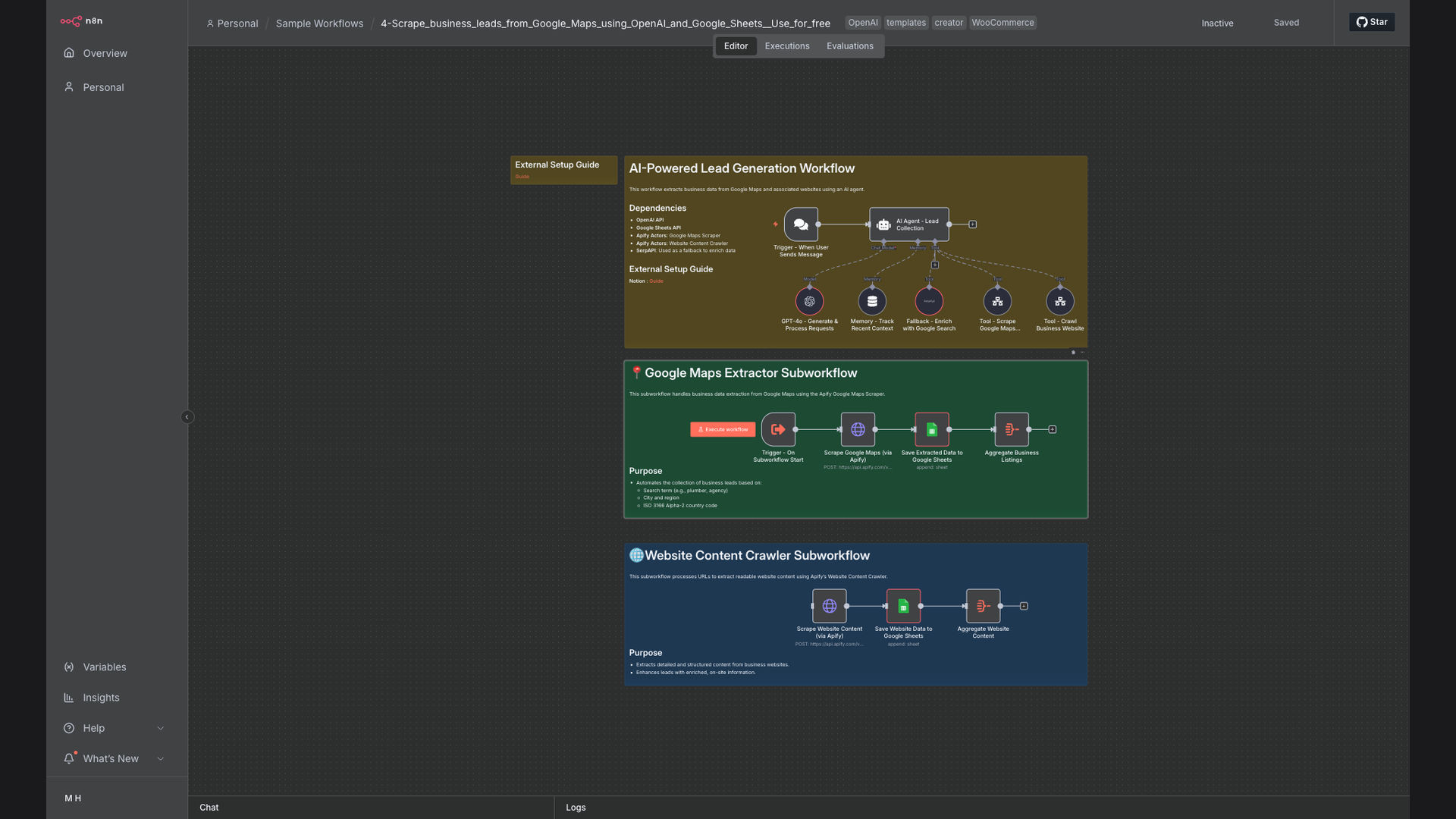
We developed an automated workflow that scrapes business leads from Google Maps using AI agents, extracts contact details, and stores them in Google Sheets. This system leverages n8n for workflow orchestration, OpenAI for data extraction and validation, and Google Sheets for data storage and management. By automating these processes, we significantly reduced the time and effort required for lead generation.
The workflow is designed to automatically validate and enrich lead data by visiting each business's website and extracting relevant information. This ensures that sales teams have access to accurate and comprehensive lead data, enabling them to focus on building relationships and closing deals. The use of n8n allows for easy customization and scalability, making it a perfect fit for businesses of all sizes.
How It Works — Automated Lead Data Pipeline
This workflow automates the entire lead generation process, from scraping Google Maps to enriching data and saving it to Google Sheets.
- Scrape Google Maps: The workflow starts by scraping Google Maps for businesses based on specific keywords and locations.
- Extract Business Details: It extracts key details such as business name, address, phone number, and website URL.
- Validate Website: The workflow then validates the website URL to ensure it is active and accessible.
- Extract Data with AI: Using OpenAI, the system extracts additional data points from the website, such as industry classification and social media profiles.
- Enrich Contact Information: The AI agent enriches contact information by finding email addresses and other relevant details.
- Format Data: The extracted and enriched data is formatted for easy import into Google Sheets.
- Save to Google Sheets: The formatted data is saved to a Google Sheets spreadsheet, ready for sales teams to use.
- Monitor and Update: The workflow continuously monitors for new leads and updates existing data as needed.
💡 AI-Powered Data Extraction: By using OpenAI, the workflow can extract and validate data from websites with high accuracy, reducing the need for manual review and correction.
What This System Does That Manual Process Can't
Automated Scraping
Automatically scrapes Google Maps for business leads, eliminating the need for manual searching and data entry.
AI-Powered Extraction
Uses OpenAI to extract and validate contact details from websites, ensuring high accuracy and completeness.
Data Validation
Automatically validates website URLs and contact information, reducing the risk of working with outdated or incorrect data.
Data Enrichment
Enriches lead data with additional information such as industry classification and social media profiles, providing a more complete picture of each lead.
Customizable Workflows
n8n allows for easy customization of the workflow to meet specific business needs and requirements.
Seamless Integration
Integrates seamlessly with Google Sheets for easy data storage and management, providing a centralized location for all lead data.
Before vs. After: Automated Lead Generation
Before: Sales teams spent 20+ hours per week manually searching Google Maps for leads, resulting in only 50-100 leads generated per month.
After: The automated workflow generates 500+ leads per month with minimal manual effort, freeing up sales teams to focus on closing deals.
Implementation: Live in 3 Weeks
- Discovery and Planning: We start by understanding your specific lead generation needs and requirements, defining the scope of the project and identifying key data points.
- Workflow Design: Our team designs the automated workflow in n8n, configuring the necessary nodes and integrations to scrape Google Maps, extract data with AI, and save to Google Sheets.
- Testing and Validation: We thoroughly test the workflow to ensure it is functioning correctly and accurately, validating data extraction and enrichment processes.
- Deployment and Training: Once testing is complete, we deploy the workflow and provide training to your team on how to use and manage the system.
- Ongoing Support: We provide ongoing support and maintenance to ensure the workflow continues to function effectively and efficiently, addressing any issues or bugs that may arise.
The Right Fit — and When It Isn't
This solution is ideal for sales teams, marketers, and business owners who need to automate lead generation and improve data accuracy. It is particularly well-suited for businesses that rely on Google Maps for finding potential clients and need to enrich lead data with additional information.
However, this solution may not be the right fit for businesses that do not use Google Maps for lead generation or have very specific data requirements that cannot be met by AI-powered extraction. In such cases, a more customized solution may be necessary.