The Problem
Many businesses face significant challenges in managing their invoicing processes, especially when dealing with multiple QuickBooks accounts. The manual creation of invoices from data stored in Google Sheets is time-consuming and prone to errors. This often leads to discrepancies, delays in payments, and increased administrative overhead.
The lack of a streamlined system for validating customer and item information across different QuickBooks accounts results in inconsistent data and compliance issues. Furthermore, the absence of automated error handling and logging makes it difficult to identify and resolve issues promptly, leading to inefficiencies and potential financial losses.
The Solution
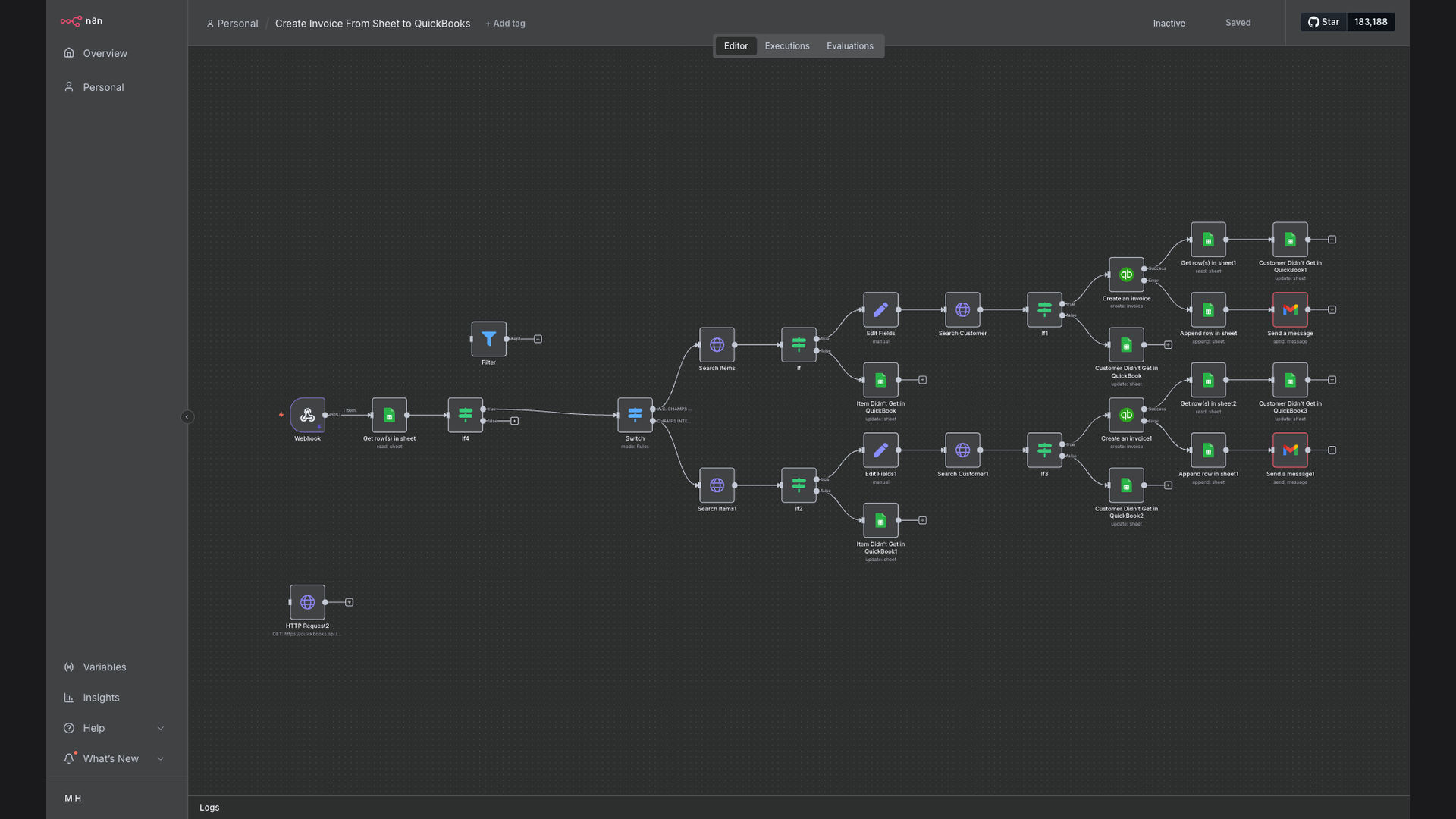
To address these challenges, we developed an automated workflow using n8n that seamlessly integrates Google Sheets with QuickBooks. This system automatically processes invoice data from Google Sheets, creates corresponding invoices in QuickBooks, and validates customer and item information across multiple accounts.
n8n was chosen for its flexibility, scalability, and ability to handle complex data transformations and integrations. By leveraging n8n's robust features, we were able to create a reliable and efficient solution that streamlines the entire invoice creation process, reduces manual effort, and improves data accuracy.
How It Works — Streamlined Invoice Processing
The automated workflow streamlines invoice processing by extracting data from Google Sheets, validating it, and creating invoices in QuickBooks.
- Extract Data from Google Sheets: The workflow starts by extracting invoice data from a specified Google Sheet, including customer details, item descriptions, quantities, and prices.
- Validate Customer Information: The system validates customer information against existing QuickBooks accounts to ensure accuracy and consistency.
- Validate Item Information: The workflow validates item descriptions and prices against the QuickBooks item list to prevent discrepancies.
- Create Invoice in QuickBooks: Once the data is validated, the system automatically creates an invoice in QuickBooks with the extracted and validated information.
- Handle Errors: If any errors occur during the process, such as invalid customer data or missing item information, the system logs the error and sends a notification to the administrator.
- Log Issues: All issues encountered during the invoice creation process are logged for future analysis and improvement.
- Send Email Notifications: Email notifications are sent to relevant stakeholders to inform them of successful invoice creation or any errors that need to be addressed.
- Update Google Sheets: The Google Sheet is updated with the status of the invoice creation, providing a clear overview of the process.
💡 Data Validation: The system's ability to validate customer and item information against QuickBooks accounts ensures data accuracy and consistency, reducing errors and improving compliance.
What This System Does That Manual Process Can't
Time Savings
Automates the invoice creation process, saving significant time compared to manual data entry and invoice generation.
Accuracy
Validates customer and item information, reducing errors and ensuring data consistency across multiple QuickBooks accounts.
Automated Notifications
Sends email notifications for successful invoice creation and error alerts, keeping stakeholders informed.
Scalability
Easily scales to handle increasing invoice volumes and multiple QuickBooks accounts without requiring additional manual effort.
Error Handling
Automatically detects and logs errors, allowing for quick resolution and minimizing disruptions to the invoicing process.
Reporting
Provides detailed logs and reports on invoice creation status, enabling better tracking and analysis of invoicing operations.
Before vs. After: Streamlined Accounting Operations
Before: Manual invoice creation took approximately 15 minutes per invoice, with a 10% error rate due to manual data entry and validation issues.
After: Automated invoice creation takes less than 2 minutes per invoice, with a less than 1% error rate, significantly reducing time and improving accuracy.
Implementation: Live in 4 Weeks
- Planning and Design: The initial phase involved a detailed analysis of the existing invoicing process, identification of pain points, and design of the automated workflow.
- Configuration and Integration: The n8n workflow was configured to extract data from Google Sheets, integrate with QuickBooks, and validate customer and item information.
- Testing and Validation: Thorough testing was conducted to ensure the accuracy and reliability of the automated invoice creation process.
- Deployment and Training: The automated workflow was deployed, and training was provided to the accounting team on how to use and monitor the system.
The Right Fit — and When It Isn't
This solution is ideal for businesses that manage a high volume of invoices and require seamless integration between Google Sheets and QuickBooks. It is particularly beneficial for companies with multiple QuickBooks accounts and a need for accurate and consistent data.
However, this solution may not be the best fit for businesses with very low invoice volumes or those that do not use Google Sheets for invoice data management. In such cases, a simpler invoicing solution may be more appropriate.