The Problem
Accounts payable teams often face the tedious task of manually extracting data from invoices. This process is time-consuming, error-prone, and resource-intensive. Finance departments spend countless hours sifting through email attachments, downloading PDFs, and manually entering invoice details into spreadsheets or accounting systems.
The manual approach not only leads to delayed payments and missed discounts but also hinders real-time financial visibility. Inaccurate data entry can result in discrepancies, compliance issues, and ultimately, financial losses. Businesses need a more efficient and reliable way to manage their invoice processing.
The Solution
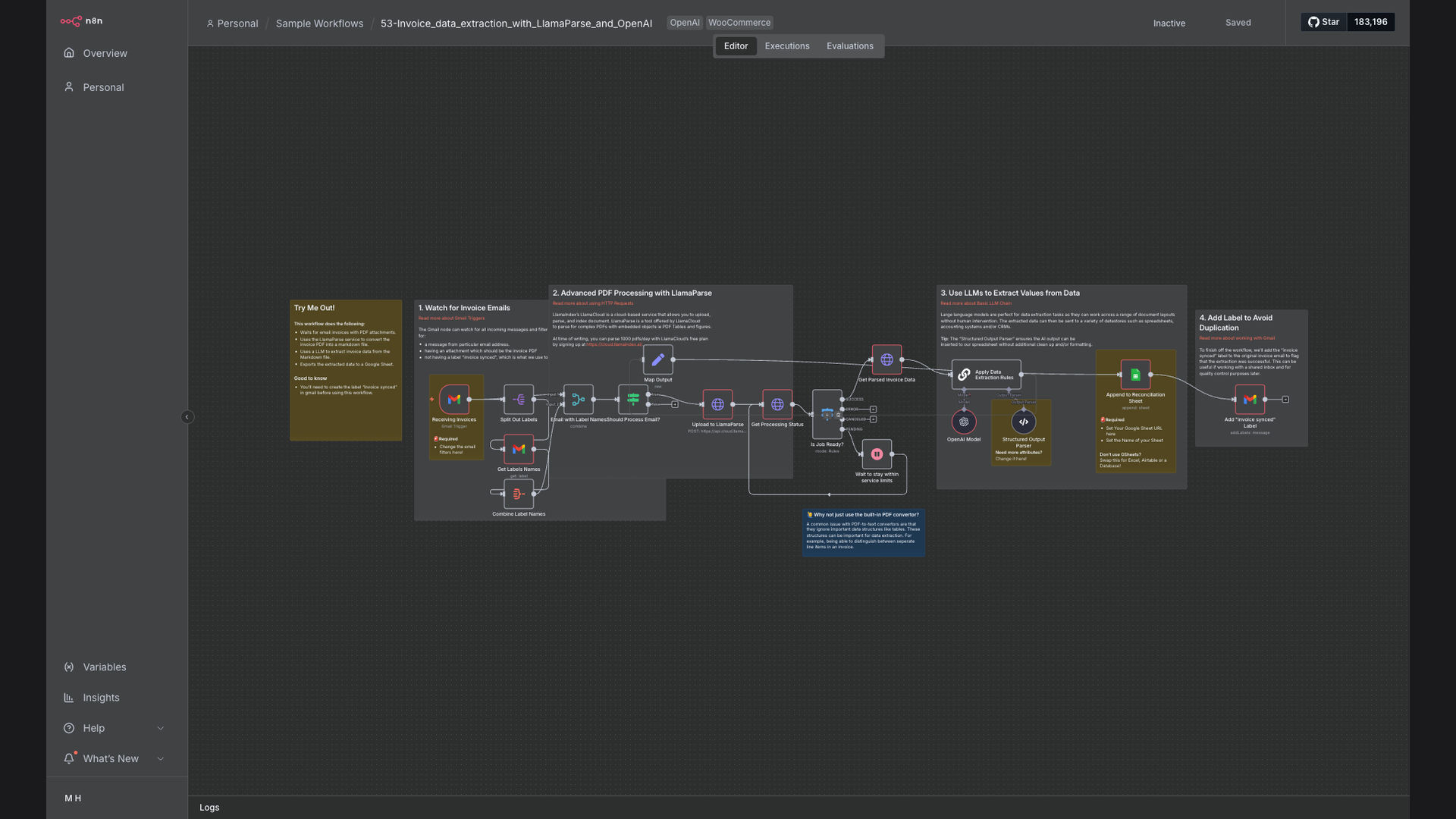
The solution is an automated workflow that leverages n8n, LlamaParse, OpenAI, and Google Sheets to streamline invoice data extraction. This system monitors a designated Gmail inbox for new emails with invoice PDF attachments. It then uses LlamaParse to extract tabular data from the PDFs, OpenAI to structure and validate the extracted information, and finally, appends the data to a Google Sheet for easy access and analysis.
This tech stack was chosen for its robust capabilities in handling unstructured data, extracting information from complex documents, and providing a user-friendly interface for data management. n8n serves as the central automation platform, orchestrating the entire process and ensuring seamless integration between the different tools.
How It Works — Automated Invoice Processing
The automation monitors a Gmail inbox for new emails containing invoice PDFs and automatically extracts the relevant data.
- Monitor Gmail: The workflow starts by monitoring a specified Gmail inbox for new emails with PDF attachments.
- Download PDF: When a new email with a PDF attachment is detected, the workflow automatically downloads the PDF file.
- Extract Table Data: LlamaParse is used to extract tabular data from the PDF invoice, accurately capturing line items and other relevant information.
- Structure Data with OpenAI: The extracted data is then sent to OpenAI to structure and validate the information, ensuring consistency and accuracy.
- Append to Google Sheets: The structured invoice data is appended to a designated Google Sheet, creating a centralized repository of invoice information.
- Error Handling: If any errors occur during the process, notifications are sent to the appropriate personnel for review and resolution.
- Archive Email: After successful processing, the email is archived to prevent duplicate processing.
💡 Data Validation: OpenAI ensures that the extracted data is accurate and consistent, reducing the risk of errors and discrepancies.
What This System Does That Manual Process Can't
Speed & Efficiency
Automated data extraction significantly reduces processing time compared to manual data entry.
Accuracy
AI-powered data validation minimizes errors and ensures data consistency.
Real-Time Visibility
Centralized data in Google Sheets provides real-time insights into financial information.
Scalability
The automated system can easily handle increasing volumes of invoices without additional manual effort.
Compliance
Improved data accuracy and consistency help ensure compliance with financial regulations.
Cost Savings
Reduced manual labor and improved efficiency result in significant cost savings for the organization.
Before vs. After: Automated Invoice Processing
Before: Manual invoice processing took an average of 15 minutes per invoice, with a 10% error rate.
After: Automated invoice processing takes just 1 minute per invoice, with a less than 1% error rate.
Implementation: Live in 3 Weeks
- Discovery & Planning: Initial consultation to understand the client's specific requirements and define the scope of the project.
- Workflow Design: Designing the n8n workflow, including setting up the Gmail trigger, LlamaParse integration, OpenAI configuration, and Google Sheets connection.
- Testing & Optimization: Thorough testing of the workflow with sample invoices to identify and resolve any issues.
- Deployment: Deploying the automated workflow to the client's n8n instance and providing training on how to use the system.
The Right Fit — and When It Isn't
This automation is ideal for businesses that process a high volume of invoices and want to reduce manual data entry, improve accuracy, and gain real-time financial visibility. It's particularly well-suited for finance teams, accounting departments, and small businesses looking to streamline their accounts payable processes.
However, this automation may not be the right fit for businesses that only process a small number of invoices per month or those that require complex, custom integrations with legacy systems. In such cases, a manual approach or a more tailored solution may be more appropriate.