Google Drive Airtable Form Automation

Automate Maid Safety Agreement PDF Upload to Google Drive and Airtable

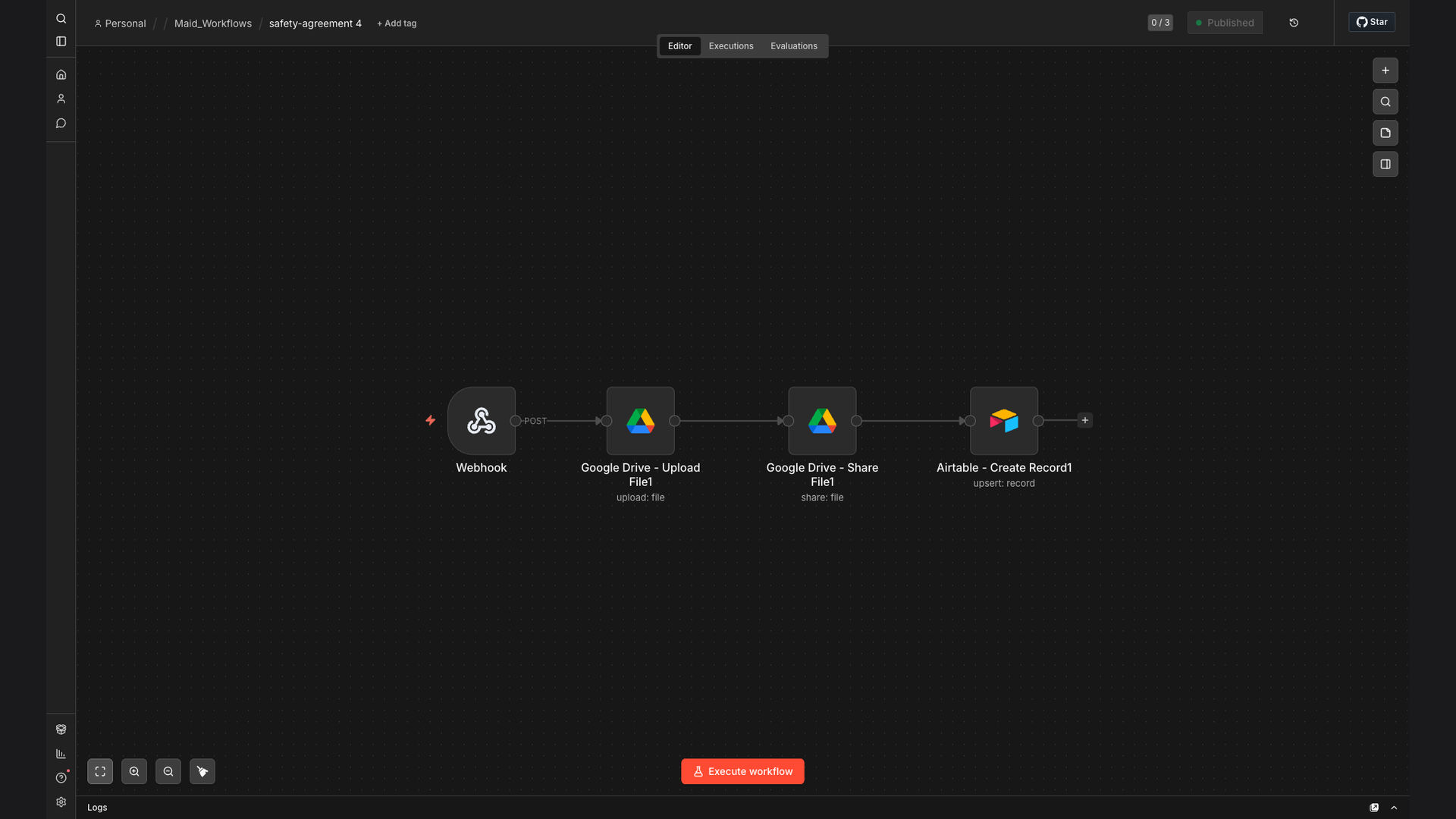
This workflow automates the processing of maid safety agreement form submissions. It uploads generated PDFs to Google Drive, sets public sharing permissions, and updates records in Airtable, streamlining compliance documentation and record-keeping for employment agencies.

Automate Maid Safety Agreement PDF Upload to Google Drive and Airtable
90%
Faster document processing
More efficient record-keeping
$25K+
Annual savings estimated
60s
Average processing time

The Problem

Employment agencies face significant challenges in managing compliance documentation, especially maid safety agreements. The traditional process involves manual data entry, prone to errors and delays. This is further complicated by the need to store documents securely and ensure they are easily accessible for audits and compliance checks.

Without automation, agencies spend countless hours on repetitive tasks, diverting resources from core business activities. The lack of a streamlined system also increases the risk of non-compliance, leading to potential fines and legal issues. The need for a more efficient and reliable solution is critical for maintaining operational efficiency and regulatory compliance.

The Solution

The solution is an automated workflow built with n8n that streamlines the entire process of handling maid safety agreement form submissions. This workflow automatically uploads generated PDFs to Google Drive, sets public sharing permissions, and updates corresponding records in Airtable. This ensures that all documents are stored securely and are easily accessible.

n8n was chosen for its flexibility and ability to integrate seamlessly with Google Drive and Airtable. Its visual interface makes it easy to design and maintain the workflow, while its robust error handling ensures that the process runs smoothly and reliably. This automation eliminates manual data entry, reduces the risk of errors, and saves valuable time for the agency.

📝
Form Submission
Webhook trigger
☁️
Upload to Drive
Set permissions
📊
Update Airtable
Record updated
✓ Compliance
📋 Audit Ready

How It Works — Automated Document Management

This workflow automates the processing of maid safety agreement forms, ensuring compliance and efficient record-keeping.

  1. Webhook Trigger: The workflow is initiated when a new maid safety agreement form is submitted via webhook.
  2. Generate PDF: The submitted form data is used to automatically generate a PDF document.
  3. Upload to Google Drive: The generated PDF is uploaded to a designated folder in Google Drive.
  4. Set Permissions: Public sharing permissions are automatically set for the uploaded PDF, ensuring easy access.
  5. Update Airtable: The corresponding record in Airtable is updated with the Google Drive link.
  6. Error Handling: The workflow includes robust error handling to manage any issues during the process.
  7. Notification: A notification is sent to the relevant personnel upon successful completion of the workflow.

💡 Compliance Assurance: Automating the document management process ensures that all maid safety agreements are processed consistently and accurately, reducing the risk of non-compliance.

What This System Does That Manual Process Can't

⏱️

Time Savings

Automates the entire process, saving significant time compared to manual data entry and document management.

Accuracy

Reduces the risk of errors associated with manual data entry and ensures consistent document processing.

🔒

Security

Ensures secure storage of documents in Google Drive with appropriate sharing permissions.

🚀

Efficiency

Streamlines the workflow, making it more efficient and reducing the workload on staff.

📊

Centralization

Centralizes all maid safety agreement documents and data in Google Drive and Airtable, making them easily accessible.

🛡️

Compliance

Ensures compliance with regulatory requirements by maintaining accurate and up-to-date records.

Before vs. After: Streamlined Document Management

Before: Manual processing of maid safety agreements took approximately 20 minutes per form, leading to delays and errors.

After: Automated workflow processes each form in under 1 minute, reducing processing time by 90% and improving accuracy.

Implementation: Live in 3 Weeks

  1. Discovery and Planning: Initial consultation to understand the agency's specific requirements and workflow.
  2. Workflow Design: Designing the automated workflow in n8n, including integrations with Google Drive and Airtable.
  3. Testing and Refinement: Thorough testing of the workflow to ensure accuracy and reliability, with necessary refinements.
  4. Deployment: Deploying the automated workflow into the agency's production environment.
  5. Training and Support: Providing training to the agency's staff on how to use and maintain the automated workflow.

The Right Fit — and When It Isn't

This automation is ideal for employment agencies that handle a large volume of maid safety agreements and need to ensure compliance with regulatory requirements. It is also suitable for agencies looking to improve efficiency and reduce the risk of errors in their document management process.

However, this automation may not be the right fit for agencies that handle a very small number of forms or have highly complex and unique requirements that cannot be easily automated. In such cases, a manual process or a more customized solution may be more appropriate.

Got Questions? We've Got Answers.

Efficiency is key. Workflow automation involves using technology to automate tasks and processes that are typically done manually. It reduces errors, saves time, and improves overall productivity by streamlining operations and freeing up employees to focus on more strategic work.

By automating repetitive tasks, businesses can optimize their resources and achieve greater efficiency. This leads to cost savings, improved accuracy, and increased employee satisfaction. Workflow automation is essential for businesses looking to stay competitive and adapt to changing market conditions.

Flexibility is the advantage. n8n is a versatile platform that can automate a wide range of tasks, including data entry, email marketing, social media management, customer relationship management (CRM), e-commerce operations, and much more. If a task is repetitive and rule-based, it can likely be automated with n8n.

n8n's visual interface and extensive library of integrations make it easy to design and deploy automated workflows. Whether you need to automate a simple task or a complex process, n8n provides the tools and flexibility to get the job done. Its open-source nature also allows for customization and extensibility.

Security is paramount. The security of workflow automation depends on the platform and security measures implemented. Robust platforms offer encryption, access controls, and regular security audits to protect sensitive data. It's crucial to choose a provider with strong security protocols and to follow best practices for data protection.

When implementing workflow automation, it's important to assess the security risks and take appropriate measures to mitigate them. This includes using strong passwords, enabling multi-factor authentication, and regularly updating software. By prioritizing security, businesses can ensure that their automated workflows are protected from unauthorized access and data breaches.

Centralization is the benefit. Integrating Google Drive with Airtable enhances document management and collaboration. It allows you to automatically store and organize files in Google Drive, link them to records in Airtable, and easily access them from a centralized location. This integration streamlines workflows, improves data accuracy, and saves time.

By integrating these two powerful tools, businesses can create a seamless document management system that improves efficiency and collaboration. This integration eliminates the need for manual data entry and reduces the risk of errors. It also provides a single source of truth for all documents and data, making it easier to manage and access information.

Scalability affects cost. The cost of workflow automation varies depending on the complexity of the automation, the platform used, and the level of customization required. Some platforms offer free plans for basic automation, while others charge monthly fees based on usage or features. Custom-built solutions may involve development costs but can offer greater flexibility and scalability.

When evaluating the cost of workflow automation, it's important to consider the long-term benefits and potential ROI. While there may be upfront costs associated with implementing automation, the time savings, reduced errors, and improved efficiency can quickly offset these costs. Businesses should also consider the cost of not automating, which can include lost productivity, increased errors, and missed opportunities.

Custom solutions are our expertise. Yes, GrowwStacks specializes in building custom automation solutions tailored to your specific business needs. We work with you to understand your unique requirements and design an automation that streamlines your workflows, improves efficiency, and drives growth. Contact us for a free consultation to discuss your automation needs.

Our team of experienced automation experts can help you identify opportunities to automate your document management processes and design a solution that meets your specific needs. We offer a range of services, including workflow design, implementation, testing, and support. With our help, you can transform your business and achieve greater efficiency and productivity.

Automate Your Document Management Today

Streamline your processes, ensure compliance, and save time with our custom automation solutions. Contact us for a free consultation to get started.

MISSING_LOGOS: none