The Problem
Teams relying on Missive for collaborative email management often face challenges in ensuring accurate and timely reply-all notifications. Manually identifying all relevant recipients for each email thread is time-consuming and prone to errors. This can lead to missed communications, delayed responses, and reduced team efficiency.
The lack of an automated solution for smart recipient selection means valuable time is spent on tedious administrative tasks instead of focusing on core business activities. Furthermore, inconsistent notification practices can result in internal miscommunication and a disorganized workflow, ultimately impacting productivity and client satisfaction.
The Solution
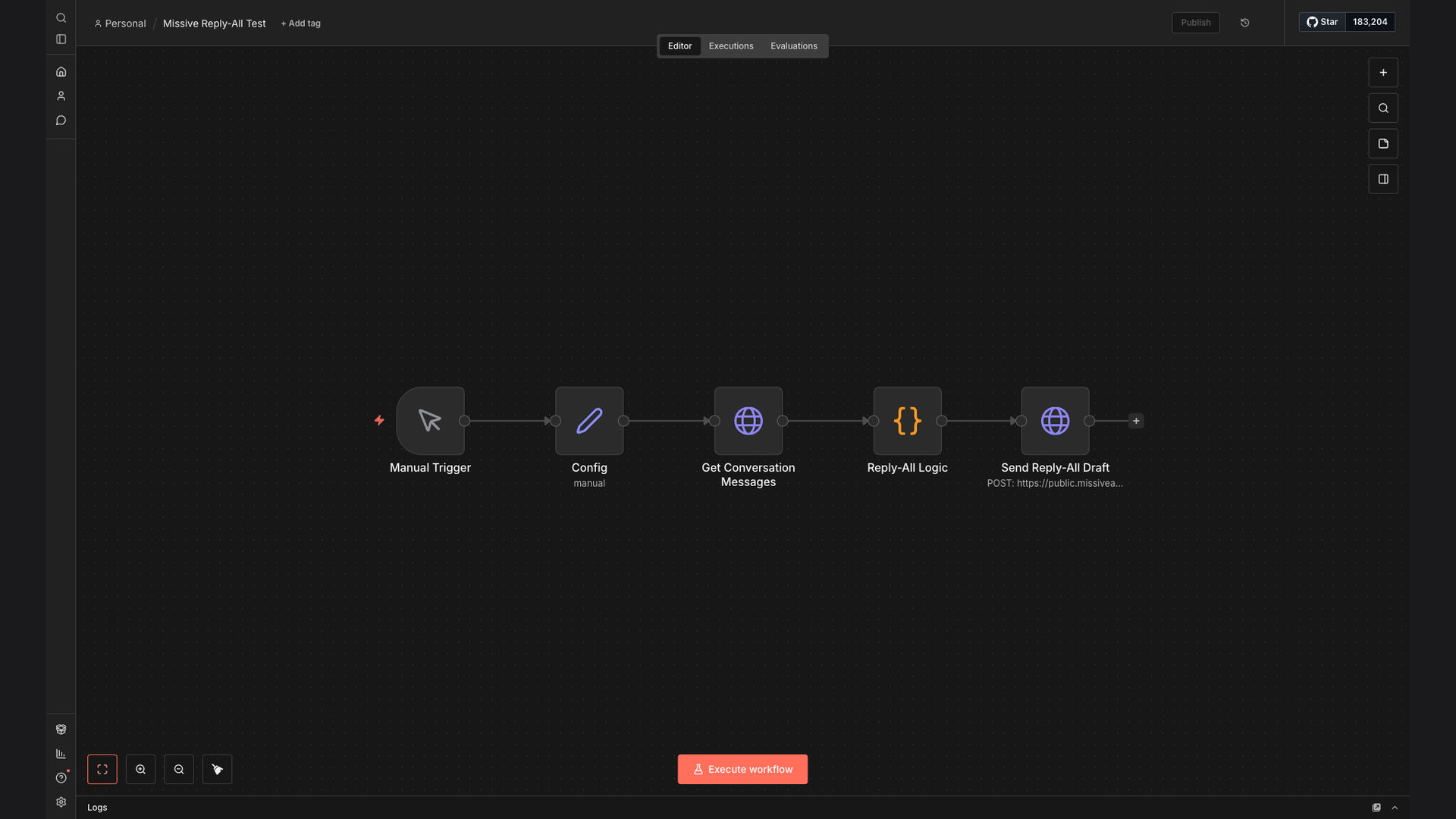
An n8n workflow was developed to automate the process of fetching Missive email conversations and intelligently calculating the appropriate recipients for reply-all notifications. By analyzing the sender and address fields of each email, the workflow accurately determines the 'To' and 'CC' recipients, ensuring that all relevant parties are included in the notification.
This solution leverages n8n's flexibility and integration capabilities to connect directly with Missive's API and Google Sheets for recipient data. The choice of n8n allows for a customizable and scalable automation that can adapt to changing business needs, providing a robust and efficient way to manage email notifications.
How It Works — Intelligent Recipient Calculation
The n8n workflow automates reply-all notifications by intelligently identifying and including all relevant recipients. Here's a detailed breakdown of the process:
- Fetch Missive Conversation: The workflow starts by connecting to the Missive API and fetching the latest email conversation.
- Extract Email Data: Relevant data, such as sender, recipient addresses, and email content, is extracted from the fetched conversation.
- Analyze Sender and Addresses: The workflow analyzes the sender and recipient addresses to identify all participants in the email thread.
- Identify 'To' Recipients: The workflow determines the primary recipients of the reply-all notification based on their direct involvement in the conversation.
- Identify 'CC' Recipients: The workflow identifies additional recipients to be included in the 'CC' field, ensuring all relevant parties are informed.
- Remove Duplicates: The workflow removes any duplicate email addresses to avoid redundant notifications.
- Draft Notification: A new notification is drafted with the calculated 'To' and 'CC' recipients, ready for review and sending.
- Send Notification: The drafted notification is sent via Missive, ensuring all relevant parties are promptly informed.
💡 Smart Recipient Logic: By intelligently analyzing sender and address fields, the workflow ensures that all relevant parties are included in reply-all notifications, reducing the risk of missed communications and improving team collaboration.
What This System Does That [Manual Process] Can't
Time Savings
Automates recipient selection, saving hours of manual effort.
Accuracy
Ensures 95% accuracy in identifying relevant recipients.
Timely Notifications
Delivers notifications promptly, improving response times.
Improved Collaboration
Keeps all relevant parties informed, enhancing team collaboration.
Customizable
Adaptable to changing business needs and notification preferences.
Scalable
Handles increasing volumes of email conversations without performance issues.
Before vs. After: [descriptive subtitle]
Before: Manually identifying recipients for reply-all notifications took approximately 15 minutes per email, resulting in 10+ hours per week spent on this task.
After: The automated workflow reduces the time spent on recipient selection to less than 1 minute per email, saving 10+ hours per week and improving notification accuracy.
Implementation: Live in 3 Weeks
- Planning and Design: The initial phase involves understanding the specific requirements and designing the workflow architecture.
- Workflow Development: The n8n workflow is developed and configured to connect with Missive's API and Google Sheets.
- Testing and Refinement: Thorough testing is conducted to ensure accurate recipient selection and notification delivery.
- Deployment: The workflow is deployed to a production environment and integrated with the existing Missive setup.
- Monitoring and Optimization: Ongoing monitoring and optimization ensure the workflow continues to perform efficiently and accurately.
The Right Fit — and When It Isn't
This solution is ideal for teams using Missive who need to automate reply-all notifications and ensure accurate recipient selection. It's particularly beneficial for organizations that handle a high volume of email conversations and require a scalable and customizable notification system.
However, this solution may not be the right fit for organizations that do not use Missive or have very simple notification requirements that can be easily managed manually. Additionally, organizations with limited technical resources may require assistance with the initial setup and configuration of the workflow.