The Problem
Many teams using Monday.com for CRM struggle with duplicate contact entries. This leads to inaccurate reporting, wasted time, and potential communication errors. Manually identifying and merging these duplicates is a time-consuming and error-prone process, especially when dealing with large datasets and complex relationships between boards.
Furthermore, maintaining data integrity across multiple linked boards is a challenge. When a duplicate contact is identified, updating all related records and relationships manually is tedious and often overlooked. This results in inconsistent data and a fragmented view of customer interactions, hindering effective CRM management.
The Solution
We built an n8n workflow that automates the entire contact deduplication process in Monday.com. The workflow intelligently identifies duplicate contacts based on predefined criteria, such as email address and phone number. It then selects the most complete and accurate record as the "survivor" and merges all related information into it.
This solution leverages n8n's flexibility and integration capabilities to connect to Monday.com and Google Sheets. N8n was chosen for its ability to handle complex data transformations and its robust error handling, ensuring data integrity throughout the deduplication process. Google Sheets is used for reporting and manual review of complex cases.
How It Works — Automated Contact Deduplication Process
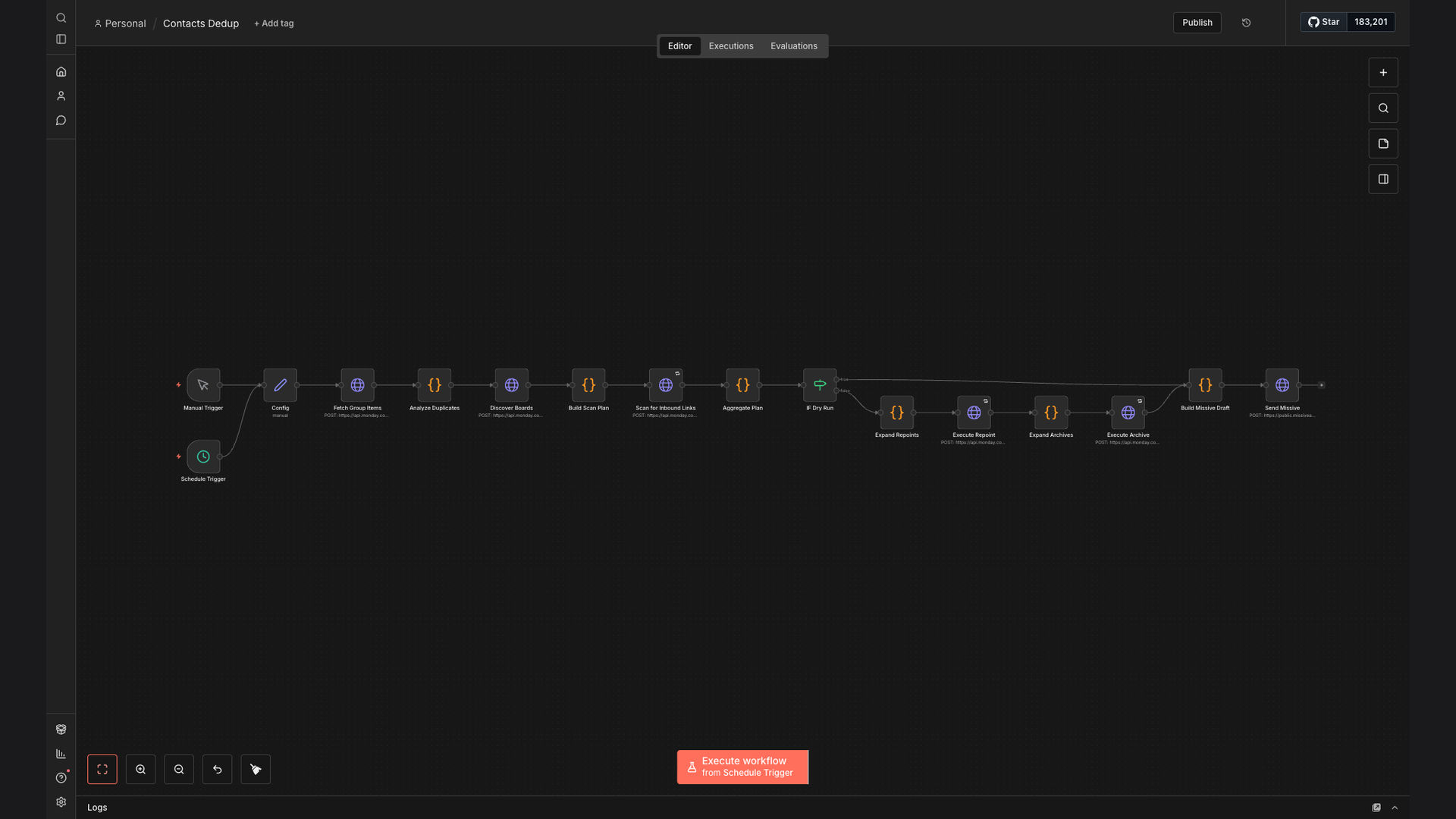
The n8n workflow automates the entire contact deduplication process, ensuring data integrity and saving valuable time. Here's a breakdown of how it works:
- Fetch Contacts: The workflow starts by fetching all contacts from the specified Monday.com board.
- Identify Potential Duplicates: The workflow identifies potential duplicates based on email address and phone number.
- Score Matches: A scoring system is used to rank potential matches based on the completeness and accuracy of the data.
- Automated Merge: If the score exceeds a predefined threshold, the workflow automatically merges the duplicate records.
- Update Relationships: The workflow updates all related records and relationships in other boards to reflect the merged contact.
- Manual Review: If the score is below the threshold, the potential duplicates are flagged for manual review.
- Generate Report: A report is generated in Google Sheets, detailing the deduplication process and any manual actions required.
- Archive Duplicates: The duplicate records are archived to maintain a clean and organized CRM.
💡 Data Integrity: By automating the deduplication process and updating related relationships, the workflow ensures data integrity across all Monday.com boards.
What This System Does That [Manual Process] Can't
Saves Time
Automates the entire deduplication process, freeing up valuable time for other tasks.
Ensures Accuracy
Reduces the risk of human error by automating data validation and merging.
Updates Relationships
Automatically updates related records and relationships across multiple boards.
Provides Reporting
Generates detailed reports on the deduplication process and any manual actions required.
Maintains Data Integrity
Ensures data integrity across all Monday.com boards by automating data validation and cleanup.
Customizable
The workflow can be customized to meet specific business needs and deduplication criteria.
Before vs. After: Automated Contact Deduplication
Before: Teams spent an average of 10 hours per week manually identifying and merging duplicate contacts, resulting in inaccurate reporting and wasted time.
After: The automated workflow reduced the time spent on deduplication by 90%, resulting in more accurate reporting and significant time savings.
Implementation: Live in 3 Weeks
- Discovery and Planning: We worked with the client to understand their specific needs and deduplication criteria.
- Workflow Design: We designed the n8n workflow to automate the entire deduplication process, including data validation and relationship updates.
- Testing and Refinement: We tested the workflow thoroughly to ensure accuracy and reliability, refining it based on client feedback.
- Deployment and Training: We deployed the workflow to the client's Monday.com environment and provided training on how to use it.
The Right Fit — and When It Isn't
This solution is ideal for teams using Monday.com for CRM who are struggling with duplicate contact entries and want to automate the deduplication process. It's also a good fit for teams that need to maintain data integrity across multiple linked boards.
However, this solution may not be the right fit for teams that have very complex deduplication criteria or require a high degree of manual intervention. In these cases, a more customized solution may be required.