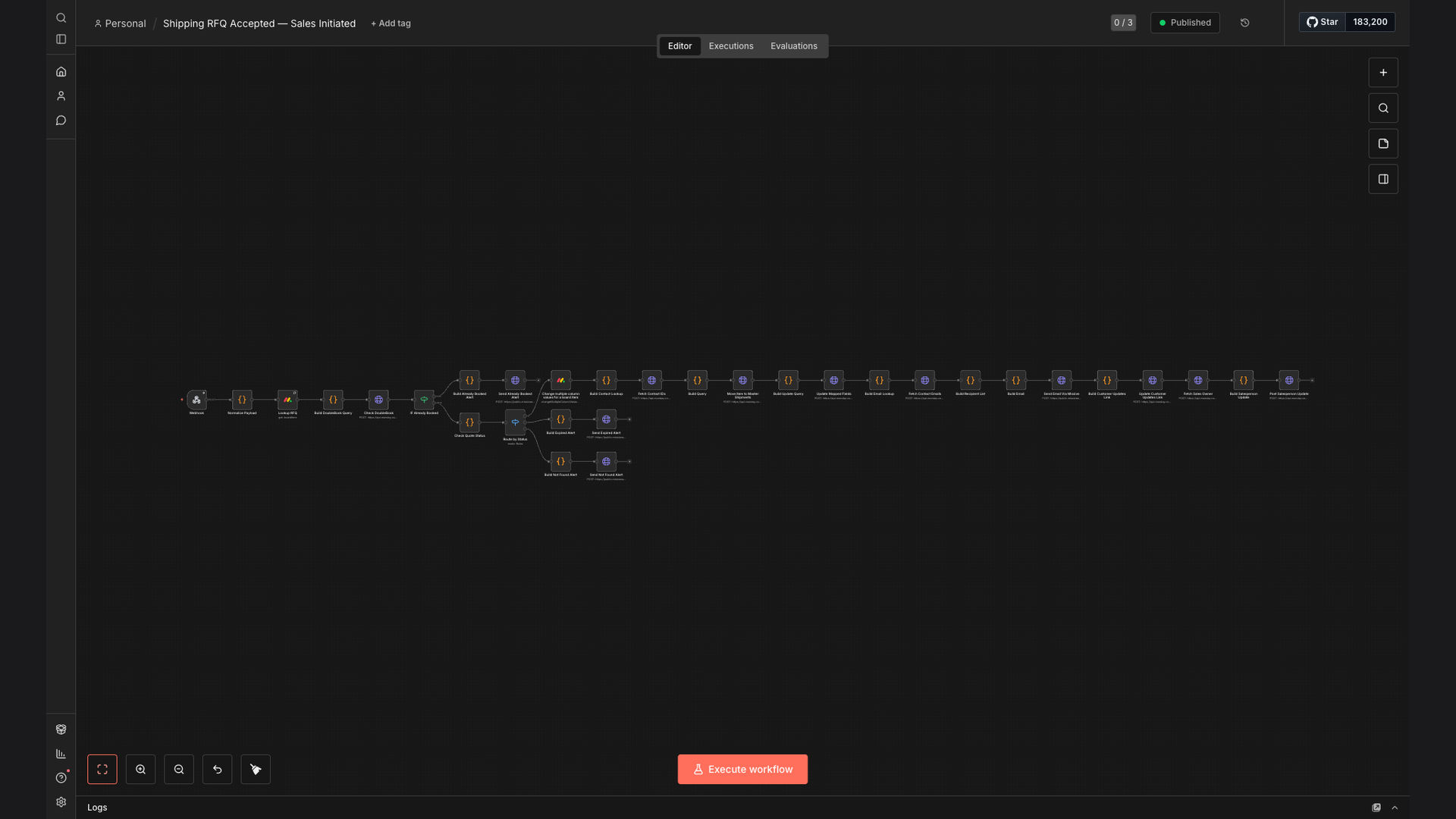
Monday.com Workflow Automation Data Sync

Automate Monday.com RFQ Acceptance to Master Shipments Workflow

This workflow automates the RFQ acceptance process in Monday.com, triggering updates to a Master Shipments board and notifying sales teams. It streamlines quote-to-shipment handoffs, preventing duplicate bookings and ensuring data accuracy. The result is a significant reduction in manual processing time and improved operational efficiency.

Automate Monday.com RFQ Acceptance to Master Shipments Workflow
90%
Faster processing time
Increase in data accuracy
$25K+
Annual cost savings
60s
Average task completion

The Problem

Logistics and sales operations teams often face challenges in managing the quote-to-shipment process. The manual transfer of data from accepted Request for Quotes (RFQs) in Monday.com to the master shipment tracking system is time-consuming and prone to errors. This can lead to delays in shipment processing, inaccurate data, and increased operational costs.

Furthermore, the lack of real-time updates and notifications between teams results in miscommunication and duplicated efforts. The inability to prevent duplicate bookings and ensure data consistency across platforms creates inefficiencies and potential revenue loss. The need for a streamlined, automated solution is critical to optimize the entire workflow.

The Solution

The solution is an automated workflow built with n8n that seamlessly integrates Monday.com with an email notification system. This workflow triggers when an RFQ status changes to 'Accepted' in Monday.com, automatically moving the item to a Master Shipments board. It then updates mapped fields, notifies sales teams via Missive email, and prevents duplicate bookings, ensuring data accuracy and consistency.

This tech stack was chosen for its ability to handle complex data transformations and integrations, providing a reliable and scalable solution. n8n's flexibility and ease of use make it ideal for automating the entire RFQ acceptance process, reducing manual effort and improving overall operational efficiency. The integration with Missive ensures timely and accurate communication between teams.

RFQ Accepted
Status change in Monday.com
🚚
Update Shipment
Move to Master Shipments board
📧
Notify Sales
Send email via Missive
✓ Shipment Booked
📋 Awaiting Confirmation

How It Works — Streamlining RFQ to Shipment Process

This workflow automates the entire RFQ acceptance process, ensuring a smooth transition from quote to shipment.

  1. RFQ Acceptance: The workflow is triggered when an RFQ's status changes to 'Accepted' in Monday.com.
  2. Move to Master Shipments: The accepted RFQ is automatically moved to a Master Shipments board in Monday.com.
  3. Update Mapped Fields: Key data fields are updated and synchronized between the RFQ and Master Shipments boards.
  4. Prevent Duplicate Bookings: The system checks for existing bookings to prevent duplicates, ensuring accuracy.
  5. Notify Sales Team: A notification email is sent to the sales team via Missive, informing them of the accepted RFQ.
  6. Data Validation: The workflow validates the data to ensure all required fields are complete and accurate.
  7. Error Handling: If any errors occur during the process, notifications are sent to the appropriate personnel for review.

💡 Real-Time Visibility: Automated notifications and data synchronization provide real-time visibility into the status of each RFQ, improving communication and coordination between teams.

What This System Does That Manual Process Can't

⏱️

Saves Time

Automates data transfer and notifications, reducing manual processing time by up to 90%.

Ensures Accuracy

Minimizes manual data entry errors, ensuring data consistency across platforms.

🚀

Increases Efficiency

Streamlines the quote-to-shipment process, improving overall operational efficiency.

🔔

Provides Real-Time Updates

Offers real-time visibility into the status of each RFQ, enhancing communication.

🛡️

Prevents Duplicates

Automatically checks for and prevents duplicate bookings, avoiding potential errors.

💰

Reduces Costs

Lowers operational costs by eliminating manual tasks and reducing errors.

Before vs. After: Streamlined Quote-to-Shipment

Before: Manual data entry and transfer led to a 30% error rate, causing delays and increased operational costs.

After: Automated workflow reduced errors to less than 1%, saving over $25,000 annually and improving shipment processing time.

Implementation: Live in 4 Weeks

  1. Discovery & Planning: Initial consultation to understand the client's specific needs and workflow requirements.
  2. Workflow Design: Designing the automated workflow in n8n, including data mapping and notification configurations.
  3. Testing & Refinement: Thorough testing of the workflow to ensure accuracy and reliability, followed by necessary refinements.
  4. Deployment: Deploying the automated workflow into the client's Monday.com environment.

The Right Fit — and When It Isn't

This solution is ideal for logistics and sales operations teams looking to streamline their quote-to-shipment process and reduce manual errors. It's particularly beneficial for companies using Monday.com to manage RFQs and require real-time updates and notifications.

However, it may not be the right fit for companies with very simple RFQ processes or those not using Monday.com as their primary platform. In such cases, a simpler solution or a different platform integration may be more appropriate.

Got Questions? We've Got Answers.

Workflow automation streamlines tasks. It uses technology to automate repetitive processes, reducing manual effort and errors. This leads to increased efficiency and consistency across various business functions.

By automating workflows, organizations can free up employees to focus on higher-value activities, such as strategic planning and customer engagement. Workflow automation also ensures that tasks are completed in a timely and accurate manner, improving overall operational performance.

Automating RFQ processes offers several advantages. It reduces processing time, minimizes manual data entry errors, and ensures faster handoffs between sales and logistics teams. This leads to improved operational efficiency and customer satisfaction.

Additionally, automation provides real-time visibility into the status of each RFQ, enhancing communication and coordination between teams. By preventing duplicate bookings and ensuring data consistency, it also reduces costs and improves overall accuracy.

Security is a top priority. Workflow automation platforms employ robust security measures, including encryption, access controls, and regular security audits, to protect sensitive data and ensure compliance with industry regulations.

These measures safeguard against unauthorized access and data breaches, providing peace of mind for organizations handling confidential information. Regular updates and security patches are implemented to address potential vulnerabilities and maintain a high level of security.

A wide range of tasks can be automated. This includes data entry, email notifications, report generation, and approval processes. The possibilities are virtually limitless, depending on your business needs and the capabilities of the automation platform.

From simple tasks like sending automated reminders to complex processes like managing inventory levels, workflow automation can streamline virtually any business function. The key is to identify repetitive, manual tasks that can be automated to improve efficiency and accuracy.

Costs vary based on complexity. The cost of workflow automation depends on the complexity of the system, the number of users, and the specific features required. However, the ROI from increased efficiency and reduced errors typically outweighs the initial investment.

Organizations should consider the long-term benefits of automation, such as reduced labor costs, improved accuracy, and increased productivity. By carefully evaluating their needs and selecting the right automation platform, they can maximize their return on investment.

Implementation time varies. It depends on the complexity of the workflow and the level of customization required. Simple automations can be implemented in a few days, while more complex systems may take several weeks. Our team works efficiently to minimize disruption.

We follow a structured approach to implementation, including planning, design, testing, and deployment. Our goal is to ensure a smooth and seamless transition to the automated workflow, with minimal impact on day-to-day operations.

Yes, absolutely. We specialize in building custom workflow automation solutions tailored to your specific business needs. Our team will work closely with you to understand your requirements and design a system that seamlessly integrates with your existing infrastructure.

We offer ongoing support and maintenance to ensure your automation continues to deliver optimal results. Whether you need a simple RFQ automation or a complex end-to-end solution, we have the expertise to deliver a customized solution that meets your unique needs.

Ready to automate your RFQ process?

Streamline your quote-to-shipment workflow and reduce manual errors with our custom automation solutions.

MISSING_LOGOS: missive