The Problem
Content creators and social media managers often struggle with the time-consuming process of manually selecting and storing the best video clips from Opus Clips. This involves sifting through numerous clips, evaluating their virality, and then uploading them to storage platforms like Dropbox. This manual effort not only consumes valuable time but also introduces the risk of human error in selecting the most engaging content.
The lack of an automated system leads to delays in content deployment, missed opportunities for timely engagement, and inefficient use of resources. The need for a streamlined, automated solution is critical to optimize content workflows and ensure that the best video clips are promptly available for distribution.
The Solution
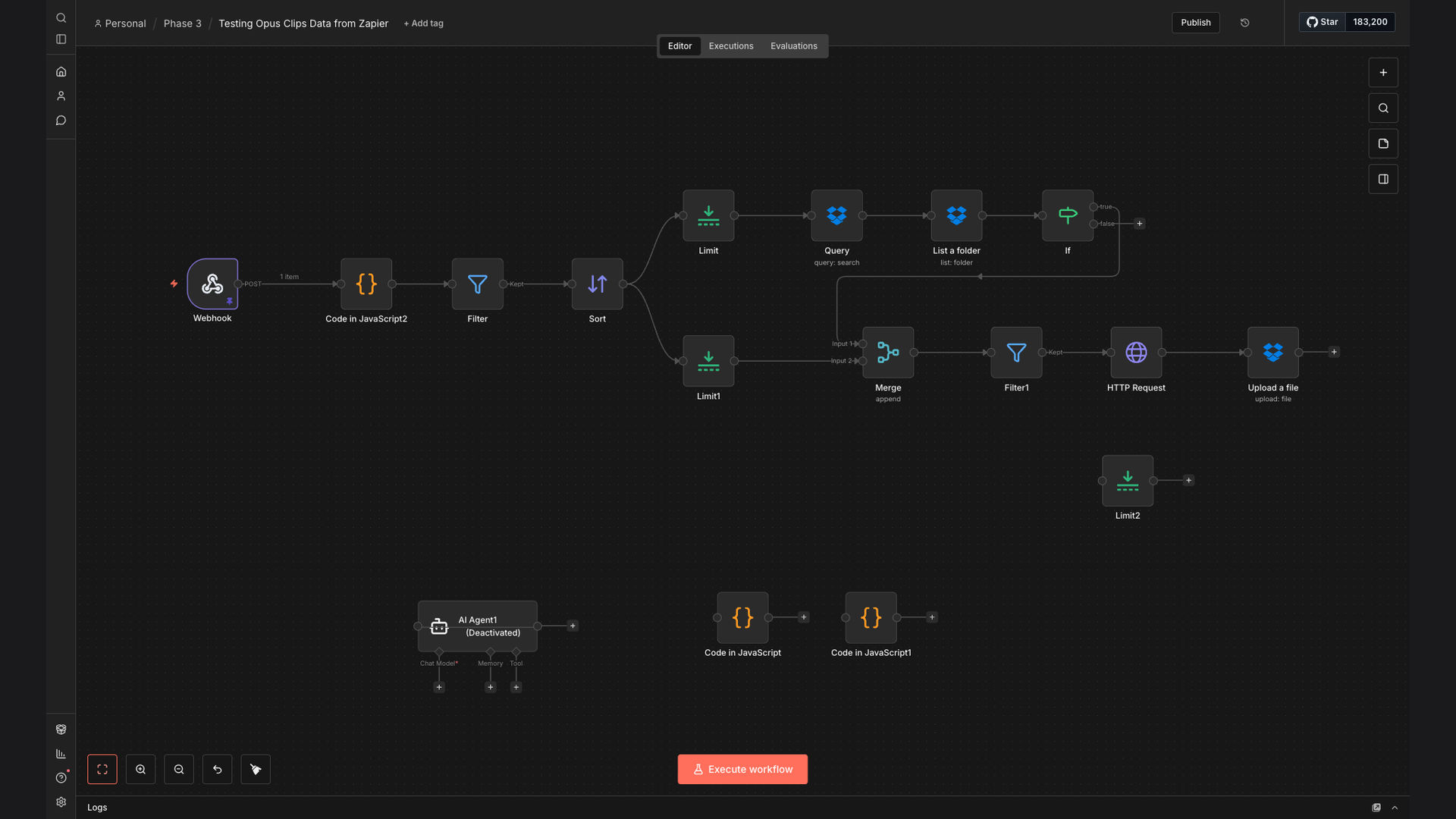
The solution is an automated n8n workflow that processes Opus Clips video data received via webhook, filters clips based on virality scores, selects the highest-ranked video, and automatically uploads it to Dropbox. This system eliminates the manual effort involved in video clip selection and storage, ensuring that only the most engaging content is promptly available.
n8n was chosen for its flexibility and robust integration capabilities, allowing seamless connection between Opus Clips, webhook triggers, and Dropbox. This tech stack ensures a reliable and efficient automation process, providing content creators with a streamlined workflow that saves time and reduces errors.
How It Works — Automated Video Clip Selection and Storage
This workflow automates the entire process of selecting and storing the best video clips from Opus Clips, ensuring efficient content management and deployment.
- Webhook Trigger: The workflow starts with a webhook trigger that listens for new video data from Opus Clips.
- Receive Data: Once a new video is processed by Opus Clips, the webhook receives the video data, including the virality score and other relevant metadata.
- Filter Clips: The workflow filters the received clips based on their virality score, selecting only those that meet a predefined threshold.
- Select Best Clip: Among the filtered clips, the workflow identifies the clip with the highest virality score, ensuring that the most engaging content is prioritized.
- Prepare for Upload: The selected clip is prepared for upload to Dropbox, including any necessary formatting or metadata adjustments.
- Upload to Dropbox: The workflow automatically uploads the highest-ranked video clip to a designated folder in Dropbox.
- Notification (Optional): A notification can be sent to the content creator or social media manager, informing them that the video clip has been successfully uploaded and is ready for use.
💡 Efficiency Boost: By automating the video selection and storage process, content creators can save significant time and focus on other strategic tasks, such as content creation and audience engagement.
What This System Does That Manual Process Can't
Saves Time
Automates the selection and storage process, eliminating manual effort and saving valuable time for content creators.
Reduces Errors
Ensures consistent and accurate selection of the best video clips, minimizing the risk of human error.
Increases Efficiency
Streamlines the content workflow, allowing for faster deployment of engaging video content.
Data-Driven Selection
Filters clips based on virality scores, ensuring that only the most engaging content is prioritized.
Automated Storage
Automatically uploads selected clips to Dropbox, ensuring secure and organized storage.
Real-Time Notifications
Provides notifications upon successful upload, keeping content creators informed and ready to act.
Before vs. After: Streamlined Video Content Workflow
Before: Content creators spent approximately 2-3 hours per day manually selecting and storing video clips, often missing timely engagement opportunities.
After: The automated n8n workflow reduced the selection and storage process to just minutes, allowing for faster content deployment and increased engagement.
Implementation: Live in 2 Weeks
- Planning and Setup: Define the scope of the automation, identify the necessary tools and integrations, and set up the n8n environment.
- Webhook Configuration: Configure the webhook trigger to receive video data from Opus Clips, ensuring seamless data transfer.
- Filter and Selection Logic: Implement the filtering logic based on virality scores and select the highest-ranked video clip.
- Dropbox Integration: Integrate Dropbox to automate the upload process, ensuring secure and organized storage of the selected clips.
- Testing and Deployment: Thoroughly test the workflow to ensure accuracy and reliability, then deploy it to a live environment.
The Right Fit — and When It Isn't
This automated workflow is ideal for content creators, social media managers, and marketing teams who regularly use Opus Clips and need a streamlined solution for selecting and storing the best video content. It is particularly beneficial for those looking to save time, reduce errors, and increase efficiency in their content workflows.
However, this solution may not be the right fit for businesses that do not use Opus Clips or do not require automated video clip selection and storage. Additionally, organizations with highly customized or complex video processing needs may require a more tailored automation solution.