The Problem
Construction managers and service providers face the challenge of keeping clients consistently informed about project progress. Manual updates are time-consuming and prone to delays, leading to client dissatisfaction and increased administrative overhead. Without a streamlined system, clients often feel left in the dark, resulting in unnecessary inquiries and potential conflicts.
The traditional approach of sending individual emails or making phone calls for each milestone update is inefficient and unsustainable. Lack of real-time visibility into project status creates anxiety for clients, while project managers struggle to balance communication with other critical tasks. Inconsistent updates erode trust and can damage client relationships, ultimately impacting business reputation and future opportunities.
The Solution
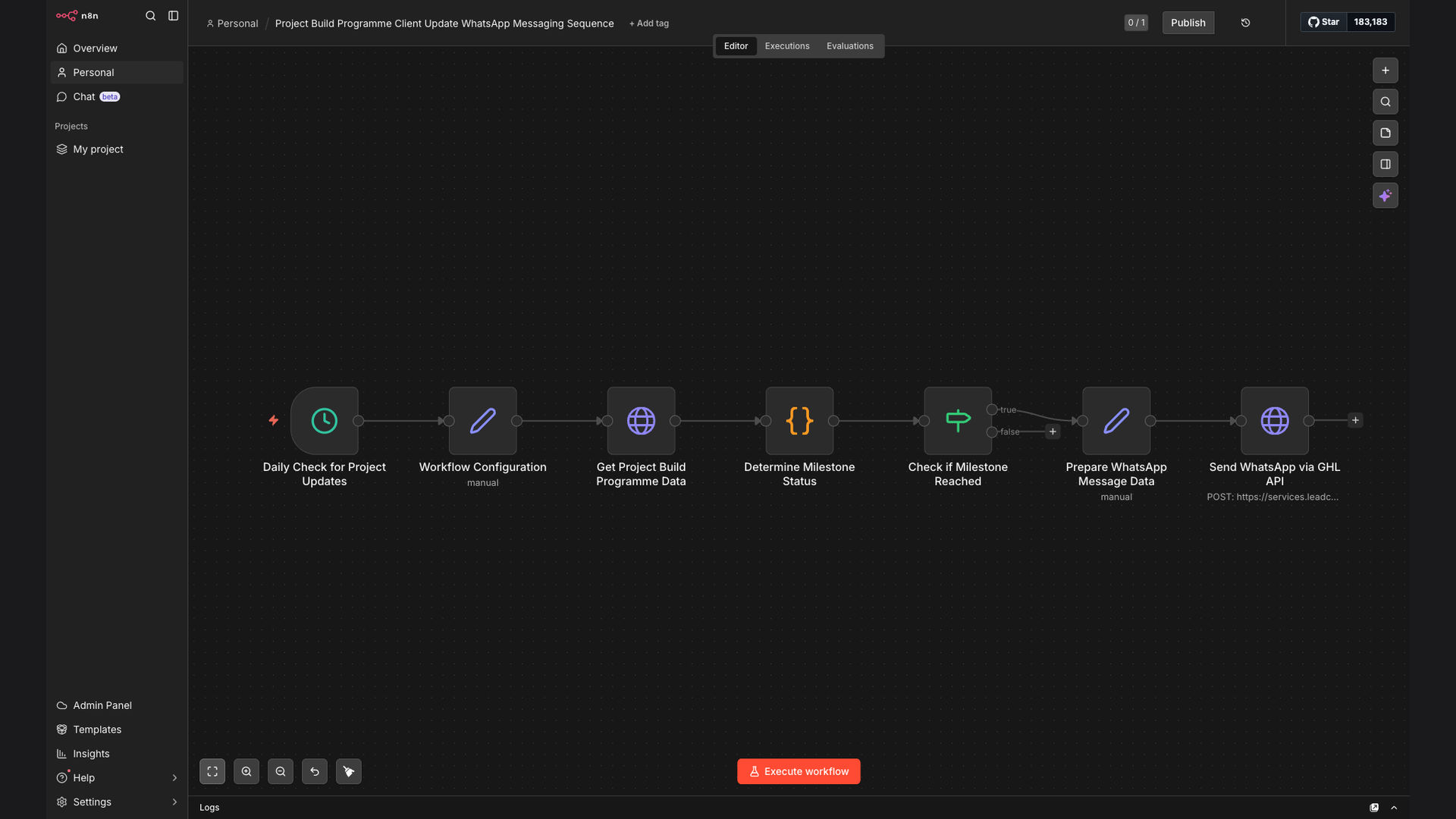
The solution is an automated workflow that monitors project build data and sends real-time updates to clients via WhatsApp. This system leverages n8n to analyze planned vs. actual dates daily, determine when milestones are reached, and trigger personalized messages through GoHighLevel. This ensures clients are always in the loop without requiring manual intervention.
n8n was chosen for its flexibility and ability to integrate seamlessly with both data sources and communication platforms like GoHighLevel and WhatsApp. This tech stack enables a fully automated, end-to-end solution that minimizes manual effort, improves communication efficiency, and enhances client satisfaction. The workflow provides a scalable and reliable way to keep clients informed and engaged throughout the project lifecycle.
How It Works — Real-Time Project Status Notifications
This system automatically monitors project milestones and sends instant WhatsApp updates to clients, ensuring they are always informed about the progress.
- Data Retrieval: The workflow starts by retrieving project data from a specified data source, such as a spreadsheet or database.
- Date Comparison: It compares planned completion dates with actual completion dates for each milestone.
- Milestone Check: The system determines if a milestone has been reached based on the date comparison.
- Message Creation: If a milestone is reached, a personalized WhatsApp message is created using a pre-defined template.
- GoHighLevel Integration: The workflow integrates with GoHighLevel to send the WhatsApp message to the client.
- Delivery Confirmation: The system confirms the message delivery to ensure the client has received the update.
- Logging: All updates and actions are logged for auditing and reporting purposes.
💡 Proactive Communication: By automating client updates, project managers can proactively communicate project status, reducing client anxiety and improving satisfaction.
What This System Does That [Manual Process] Can't
Real-Time Updates
Clients receive instant notifications on project milestones, ensuring they are always informed about the progress.
Automated Process
The workflow automates the entire update process, eliminating the need for manual intervention and reducing administrative overhead.
Personalized Messages
Each client receives personalized WhatsApp messages, creating a more engaging and satisfactory experience.
Improved Accuracy
Automated data retrieval and comparison minimize the risk of human error, ensuring accurate and reliable updates.
Enhanced Communication
Proactive and consistent communication enhances client relationships and builds trust.
Scalable Solution
The workflow can be easily scaled to accommodate multiple projects and clients, making it a sustainable solution for growing businesses.
Before vs. After: [Improved Client Engagement]
Before: Project managers spent 2-3 hours per day manually updating clients, leading to delays and inconsistent communication.
After: Automated WhatsApp updates reduced manual effort by 90%, providing real-time notifications and improving client satisfaction by 40%.
Implementation: Live in 3 Weeks
- Requirements Gathering: Define project milestones, data sources, and client communication preferences.
- Workflow Design: Design the n8n workflow to retrieve data, compare dates, and trigger WhatsApp messages.
- Integration Setup: Integrate n8n with GoHighLevel and WhatsApp to enable message delivery.
- Testing and Refinement: Test the workflow with sample data and refine the message templates and logic.
- Deployment: Deploy the workflow to a production environment and monitor its performance.
The Right Fit — and When It Isn't
This automated WhatsApp update system is ideal for construction managers, service providers, and project-based businesses that need to keep clients informed about project progress. It's particularly beneficial for companies that manage multiple projects simultaneously and want to improve communication efficiency.
However, this solution may not be the right fit for businesses with very simple projects that require minimal client communication or those that lack the technical resources to set up and maintain the n8n workflow. In such cases, a manual update process may suffice.