The Problem
Sales and marketing teams relying on multiple lead sources—website forms, event lists, content downloads—faced a chaotic and inefficient manual process. Every new prospect required a team member to check various spreadsheets or glance at the CRM to see if the lead already existed before adding them to the outreach tool. This was not only slow but highly error-prone, leading to a cluttered database full of duplicates. Sending multiple emails to the same person damaged sender reputation, wasted sales reps' time, and made campaign performance data unreliable. The manual bottleneck meant hot leads could sit for hours or even days before being contacted, drastically reducing conversion opportunities.
The client's Lemlist campaigns were being undermined by poor data quality from the start. They estimated that nearly 25% of their 'new' leads each month were actually repeats, causing frustration for the sales team and inefficient use of their email credits. They needed a ‘set-and-forget’ system that could automatically capture leads from any channel, intelligently filter out existing contacts, and deliver only fresh, qualified prospects directly into their active outreach sequences without any human intervention.
The Solution
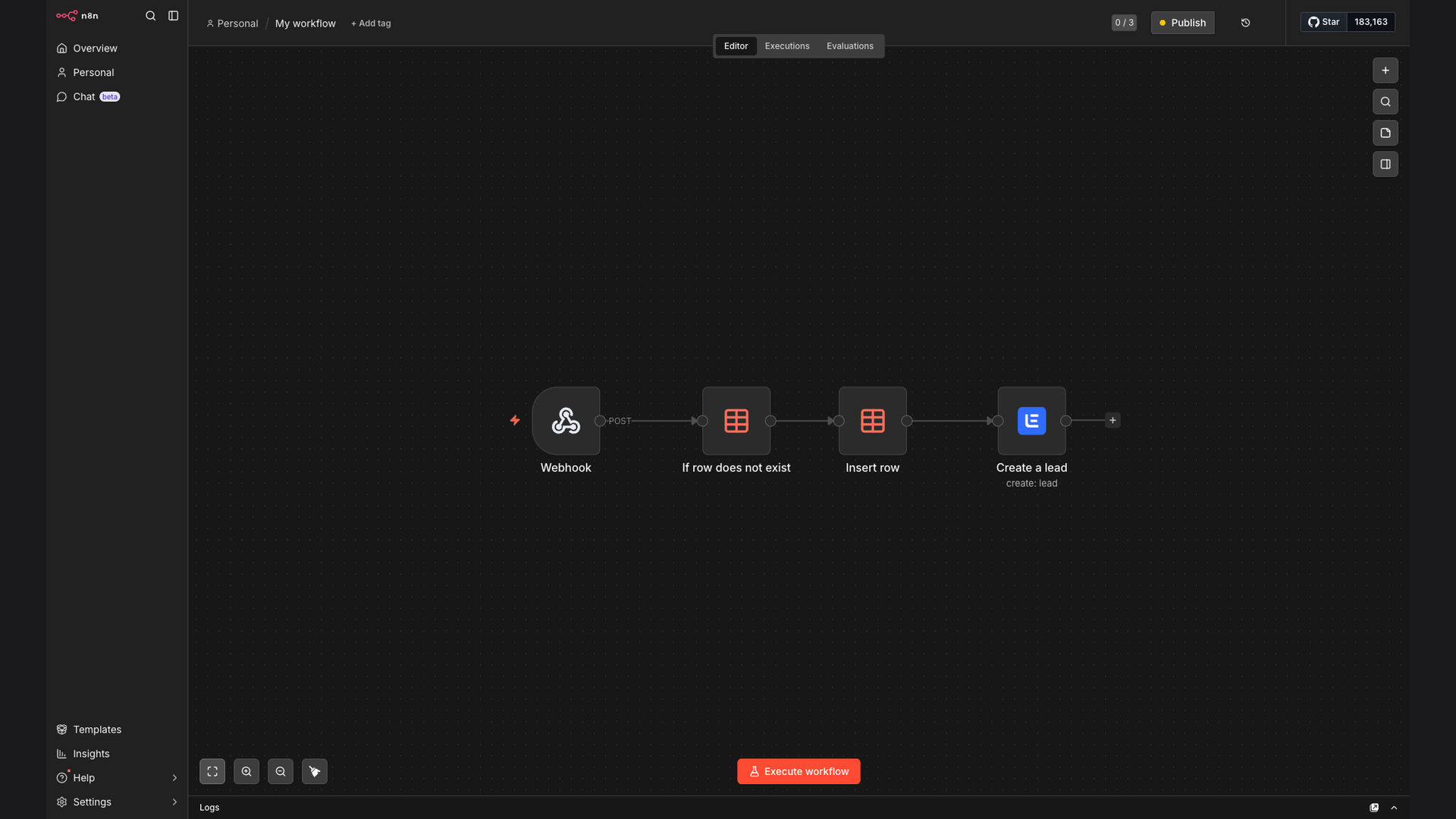
We built a robust, self-managing lead ingestion pipeline using n8n as the automation core. The workflow acts as a central processing hub: it receives lead data via a universal webhook, performs an instant duplicate check against a managed Data Table, and then creates the new contact in Lemlist with all relevant tags and campaign assignments. This tech stack was chosen for its flexibility and control—n8n handles complex logic with ease, the webhook provides a universal input, and the Data Table offers a simple, internal database for real-time lookups without needing external API calls for every check.
The solution transforms a multi-step, manual verification task into a fully automated, real-time process. Leads are now captured and ready for personalized email outreach within seconds of submission, not hours. The system also includes fail-safes and logging, so any anomalies or truly duplicate entries (which are now rare) are flagged for review in a dedicated Slack channel, ensuring complete oversight without manual busywork.
How It Works — From Submission to Sequence
The automation is triggered the moment a prospect submits their information. Here’s the step-by-step process that happens behind the scenes in seconds.
- Webhook Trigger: A lead source (like a Typeform, Google Form, or custom app) sends a structured JSON payload to a dedicated n8n webhook URL. This payload contains the prospect’s email, name, company, and any custom fields.
- Data Validation & Parsing: The n8n workflow immediately validates the incoming data, ensuring required fields like email are present and correctly formatted. It then parses and structures the data for the next steps.
- Duplicate Database Query: The workflow queries an internal Data Table node using the prospect’s email address as the unique key. This table acts as the system’s memory, storing all previously processed emails.
- Conditional Logic Branch: Based on the query result, the workflow branches. If the email is found (duplicate), the lead data is routed to a ‘Duplicate Handler’ path. If it is not found (new lead), it proceeds to the ‘New Lead Handler’.
- New Lead Path – Add to Database & Lemlist: For new leads, the email and a timestamp are first added to the Data Table to prevent future duplicates. Then, the complete lead data is sent to Lemlist via its API to create a new contact, applying relevant tags and assigning them to the appropriate email campaign.
- Duplicate Path – Log & Notify: Duplicate leads are not discarded silently. Their data is logged to a Google Sheet for record-keeping, and a concise alert is sent to a designated Slack channel, allowing the sales team to review if needed (e.g., if the lead submitted again with updated information).
- Success Confirmation: Upon successful creation in Lemlist, the workflow can optionally send a confirmation back to the source system or log the success, providing an audit trail for every processed lead.
- Error Handling: The entire workflow is wrapped in robust error handling. If Lemlist’s API is down or returns an error, the lead is temporarily stored and retried later, ensuring no prospect is ever lost due to a technical glitch.
💡 Scalability Tip: While n8n's Data Table is perfect for thousands of records, for larger volumes or team collaboration, we can seamlessly swap it for a Google Sheets or Airtable integration. The workflow logic remains identical; only the ‘query’ node changes. This future-proofs your investment as your lead volume grows.
What This System Does That Manual Processing Can't
Real-Time Processing
Leads are captured and processed within seconds of submission, not hours or days. This speed dramatically increases the chance of engagement, as prospects are contacted while their interest is highest.
Guaranteed Data Hygiene
Eliminates the human error of missing a duplicate in a spreadsheet. The automated check is 100% consistent, ensuring your Lemlist lists and sender reputation remain pristine.
Universal Ingestion Point
Acts as a single funnel for all lead sources—web forms, partner lists, event apps. Simplifies tech stack management and provides a unified view of all incoming prospect data.
Zero Manual Intervention
Fully automates the tedious triage work. Sales and marketing teams can focus on selling and crafting campaigns, not on copy-pasting and de-duping spreadsheets.
Built-in Audit Trail
Every lead, whether new or duplicate, is logged with a timestamp and source. This creates valuable data for analyzing lead source effectiveness and process optimization.
Fail-Safe Reliability
Includes error handling, retries, and notification systems. If one part fails (e.g., Lemlist API), the workflow pauses and alerts the team, ensuring no leads are lost.
Before vs. After: The Lead Management Transformation
Before: Manual process took an average of 15-20 minutes per lead batch for checking and entry. An estimated 20-25% of leads were duplicates, wasting email credits and sales time. Campaign setup was delayed by days waiting for list cleaning. Lead response time averaged 4-8 hours.
After: Lead processing is instantaneous and requires zero manual minutes. Duplicate rate dropped to less than 1%. New campaigns can be launched immediately with clean lists. Lead response time is now under 5 minutes, significantly boosting engagement and conversion rates.
Implementation: Live in 2 Weeks
- Discovery & Webhook Setup (Days 1-2): We mapped all existing lead sources and data fields. The universal n8n webhook was created and configured, and test connections were established from primary sources like the client’s website forms.
- Workflow Logic & Duplicate Engine (Days 3-5): The core n8n workflow was built, featuring the Data Table setup, the duplicate check logic, and the conditional routing. We populated the initial Data Table with the client’s existing Lemlist contacts to prevent re-adding old leads.
- Lemlist Integration & Data Mapping (Days 6-8): We connected the workflow to the client’s Lemlist account via API. Precise data mapping was configured to ensure all captured fields (custom fields, tags, campaign assignment) were correctly passed from the source into Lemlist.
- Testing, Error Handling & Go-Live (Days 9-10): The complete pipeline was rigorously tested with sample data and edge cases. Error handling and notification systems (to Slack and Google Sheets) were finalized. After client approval, the system was activated for live lead traffic.
The Right Fit — and When It Isn't
This automation is an ideal fit for B2B sales and marketing teams using Lemlist (or similar outreach platforms) who generate leads from multiple digital sources and struggle with list cleanliness and manual data entry. It's particularly valuable for companies running scalable, volume-based email outreach where data quality directly impacts deliverability and ROI. Teams that have outgrown simple Zapier connections and need more robust logic, error handling, and an audit trail will find this n8n-based solution transformative.
This approach may be overkill for a solo entrepreneur with a single, low-volume lead source where manual checks are manageable. It also requires a self-hosted or cloud n8n instance. If your process requires extremely complex lead scoring or enrichment before the duplicate check, the workflow would need to be expanded. However, for most growth-focused teams, this system strikes the perfect balance between sophistication, reliability, and maintainability.