The Problem
Many marketplace platforms struggle with inefficient onboarding processes for both clients and service providers. Manually sending welcome emails and onboarding materials is time-consuming and prone to errors, leading to a poor user experience and delayed engagement.
Without a streamlined system, it's difficult to ensure that each user receives relevant information tailored to their specific role. This can result in confusion, frustration, and ultimately, lower platform adoption rates. The lack of personalization also makes it challenging to build strong relationships with new users from the outset.
The Solution
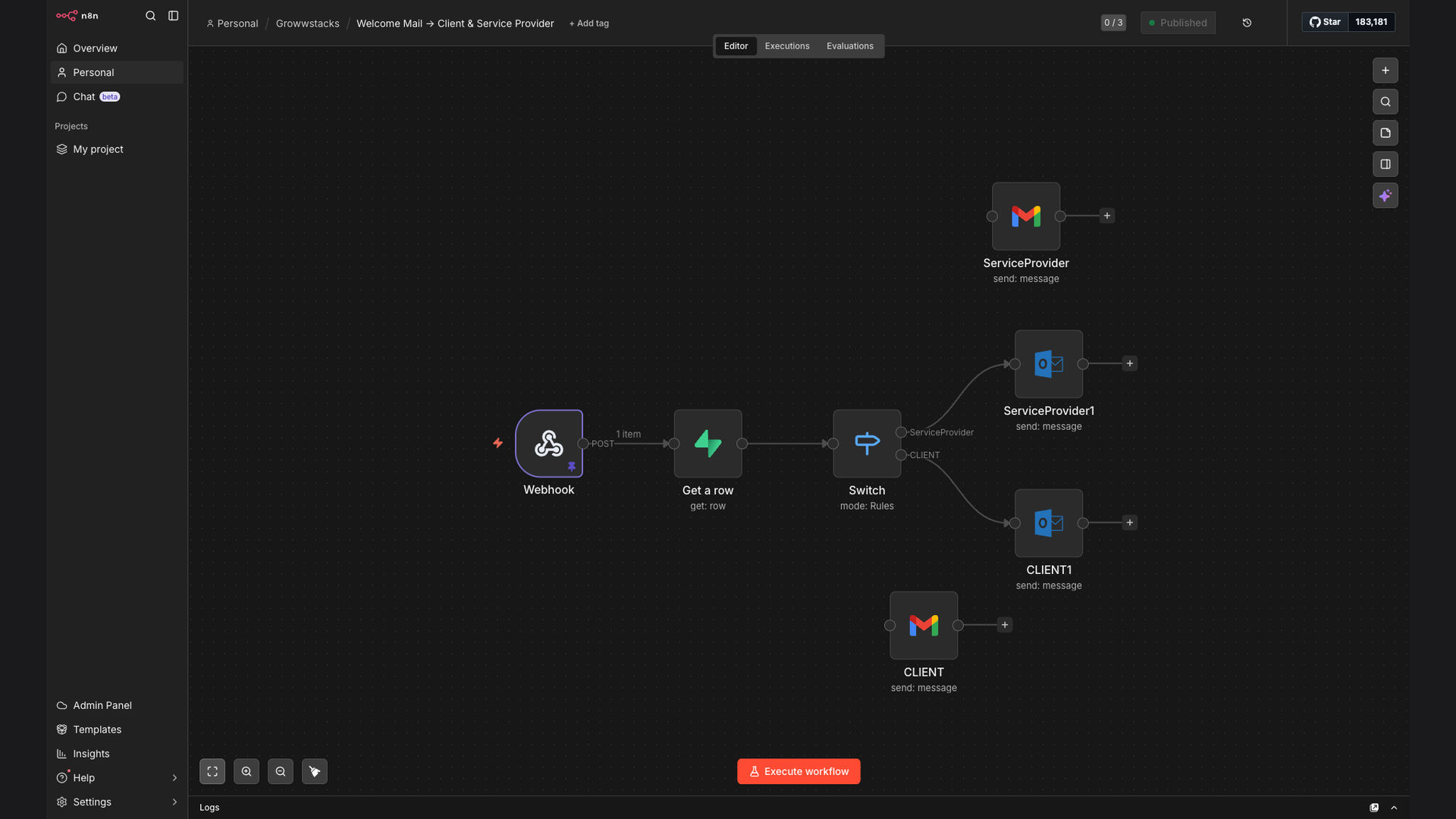
We developed an automated welcome email workflow using n8n, a powerful open-source automation platform. This workflow triggers when a new user is added to the Supabase database, fetches user details, and sends a personalized welcome email via Gmail or Microsoft Outlook, depending on the user's role (client or service provider).
n8n was chosen for its flexibility, scalability, and ability to integrate seamlessly with Supabase and email services. The visual workflow builder made it easy to design and implement the logic for conditional email content, ensuring that each user receives the most relevant onboarding information. This approach significantly reduced manual effort and improved the overall onboarding experience.
How It Works — Personalized Onboarding Sequence
The n8n workflow automates the entire welcome email process, ensuring a consistent and personalized experience for every new user.
- Webhook Trigger: The workflow starts when a new user signs up on the platform, triggering a webhook event.
- Supabase Lookup: The workflow queries the Supabase database to retrieve the new user's details, including their role (client or service provider).
- Conditional Logic: Based on the user's role, the workflow branches to different email templates and content.
- Client Welcome Email: If the user is a client, a welcome email is sent with information about platform features, benefits, and how to get started.
- Service Provider Onboarding Email: If the user is a service provider, an onboarding email is sent with instructions on how to set up their profile, list their services, and connect with clients.
- Email Delivery: The appropriate email is sent via Gmail or Microsoft Outlook, ensuring reliable and timely delivery.
- Logging: The workflow logs the email sending event in a separate database for tracking and reporting purposes.
💡 Personalization is Key: By tailoring the welcome email content to each user's role, we significantly improved engagement and reduced the time it takes for new users to become active on the platform.
What This System Does That Manual Process Can't
Saves Time
Automated emails eliminate the need for manual sending, freeing up valuable time for the team.
Ensures Consistency
Every new user receives a welcome email, ensuring a consistent onboarding experience.
Personalized Content
Emails are tailored to each user's role, providing relevant and engaging information.
Improved Tracking
Email sending events are logged for tracking and reporting, providing insights into onboarding effectiveness.
Scalable Solution
The automated workflow can easily handle a growing number of new users without requiring additional manual effort.
Reduces Errors
Automation minimizes the risk of human error in sending welcome emails and onboarding materials.
Before vs. After: Streamlined Onboarding
Before: Manual onboarding took an average of 15 minutes per user, with a 20% chance of errors or delays.
After: Automated onboarding takes less than 1 minute per user, with near-zero error rate and instant delivery.
Implementation: Live in 3 Weeks
- Planning & Design: We worked with the client to define the specific requirements for the welcome email workflow, including the content for each user role and the desired integrations.
- Workflow Development: Our team built the n8n workflow, configuring the webhook trigger, Supabase integration, conditional logic, and email delivery settings.
- Testing & Refinement: We thoroughly tested the workflow to ensure that it functioned correctly and delivered the expected results for both clients and service providers.
- Deployment & Monitoring: The workflow was deployed to a production environment, and we set up monitoring to track its performance and identify any potential issues.
The Right Fit — and When It Isn't
This solution is ideal for marketplace platforms, SaaS businesses, and any organization that needs to onboard different types of users with personalized content. It's particularly well-suited for businesses that use Supabase as their database and Gmail or Microsoft Outlook for email communication.
However, this approach may not be the best fit for businesses with very simple onboarding processes or those that require highly customized, one-on-one interactions with every new user. In those cases, a more manual approach may be more appropriate.