The Problem
Many web and mobile applications require secure user authentication. Traditional password-based systems are vulnerable to breaches and phishing attacks. Implementing a robust OTP (One-Time Password) system can significantly enhance security, but manual implementation is time-consuming and prone to errors.
Developers often struggle with integrating multiple services for OTP generation, storage, and delivery. Ensuring reliable delivery via both email and SMS adds complexity, and failure to deliver OTPs promptly can lead to user frustration and abandonment. A streamlined, automated solution is needed to simplify this process and improve security.
The Solution
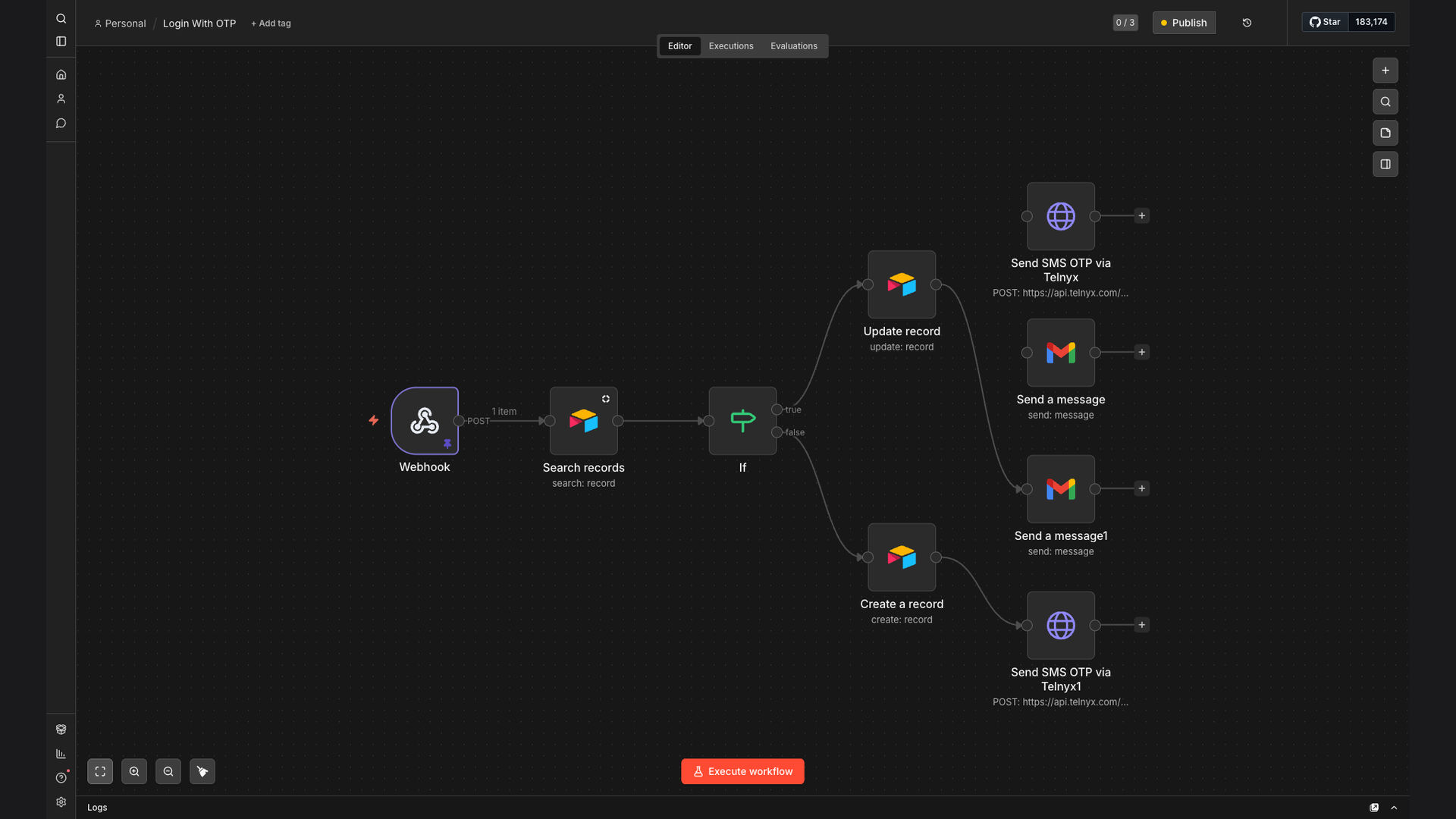
We developed an automated OTP login system using n8n, a powerful workflow automation platform. The workflow is triggered via webhook, checks for existing user records in Airtable, generates a new 6-digit OTP, and delivers it simultaneously via both Gmail and SMS (Telnyx). This solution provides a secure and reliable multi-channel verification process.
n8n was chosen for its flexibility and ability to integrate seamlessly with Airtable, Gmail, and Telnyx. This allowed for a custom-built solution that meets the specific security and delivery requirements of the application. The visual workflow builder in n8n made it easy to design, test, and deploy the automation.
How It Works — Streamlined OTP Verification
The automated OTP login system works by triggering a workflow when a user attempts to log in. The system then checks for the user's record, generates a unique OTP, and delivers it via email and SMS.
- Webhook Trigger: The workflow is initiated when a user attempts to log in, sending a request to a designated webhook URL.
- Airtable Check: The system verifies if the user exists in the Airtable database using the provided credentials.
- OTP Generation: A unique 6-digit OTP is generated using a random number generator within n8n.
- OTP Storage: The generated OTP is temporarily stored in a data table, associated with the user's ID and a timestamp.
- Email Delivery (Gmail): The OTP is sent to the user's registered email address via Gmail, using a pre-defined email template.
- SMS Delivery (Telnyx): Simultaneously, the OTP is sent to the user's mobile number via SMS using the Telnyx integration.
- Verification: The user enters the received OTP on the login page, which is then compared against the stored OTP in the data table.
- Access Granted: If the entered OTP matches the stored OTP and is within the valid timeframe, the user is granted access to the application.
💡 Multi-Channel Delivery: Delivering OTPs via both email and SMS ensures higher reliability and provides users with multiple options to receive their verification code, improving the overall user experience.
What This System Does That Manual Process Can't
Time Savings
Automates the entire OTP generation and delivery process, saving significant time and resources compared to manual methods.
Enhanced Security
Provides a secure multi-channel verification process, reducing the risk of unauthorized access and improving overall security.
Improved Reliability
Ensures reliable OTP delivery via both email and SMS, minimizing the chances of users not receiving their verification codes.
Customization
Offers a flexible and customizable solution that can be tailored to meet the specific requirements of different applications.
Centralized Management
Provides a centralized platform for managing OTP generation, storage, and delivery, simplifying the overall verification process.
Scalability
Easily scales to handle increasing user volumes and OTP requests, ensuring consistent performance and reliability.
Before vs. After: Enhanced Security and Efficiency
Before: Manual OTP implementation led to inconsistent delivery, taking up to 5 minutes, and a 20% failure rate in SMS delivery, causing user frustration and security vulnerabilities.
After: Automated system delivers OTPs in under 60 seconds with a 99.9% delivery rate, significantly improving user experience and enhancing security with multi-channel verification.
Implementation: Live in 3 Weeks
- Planning & Design: Defining the scope, requirements, and architecture of the OTP automation system, including integration points and security considerations.
- Workflow Development: Building the n8n workflow, configuring the Airtable integration, and setting up the Gmail and Telnyx connections.
- Testing & Optimization: Thoroughly testing the workflow to ensure reliable OTP generation and delivery, and optimizing performance for speed and efficiency.
- Deployment: Deploying the automated OTP system to the production environment and integrating it with the target web or mobile application.
The Right Fit — and When It Isn't
This automated OTP login system is ideal for businesses that require secure user authentication for their web or mobile applications. It is particularly well-suited for organizations that need a reliable and customizable solution that can be easily integrated with existing systems.
However, this solution may not be the best fit for very small businesses with limited technical resources or those that do not require a high level of security. In such cases, a simpler, off-the-shelf OTP solution may be more appropriate.