The Problem
Many organizations rely on manual data entry and validation processes for service provider compliance, which is time-consuming and prone to errors. Compliance managers often struggle with keeping data accurate and up-to-date across multiple systems, leading to inefficiencies and potential compliance issues.
The manual effort required to process new compliance form submissions, validate existing records, and create structured contractor profiles can be overwhelming. This often results in delayed updates and increased operational costs, making it difficult to maintain a reliable and efficient compliance management system.
The Solution
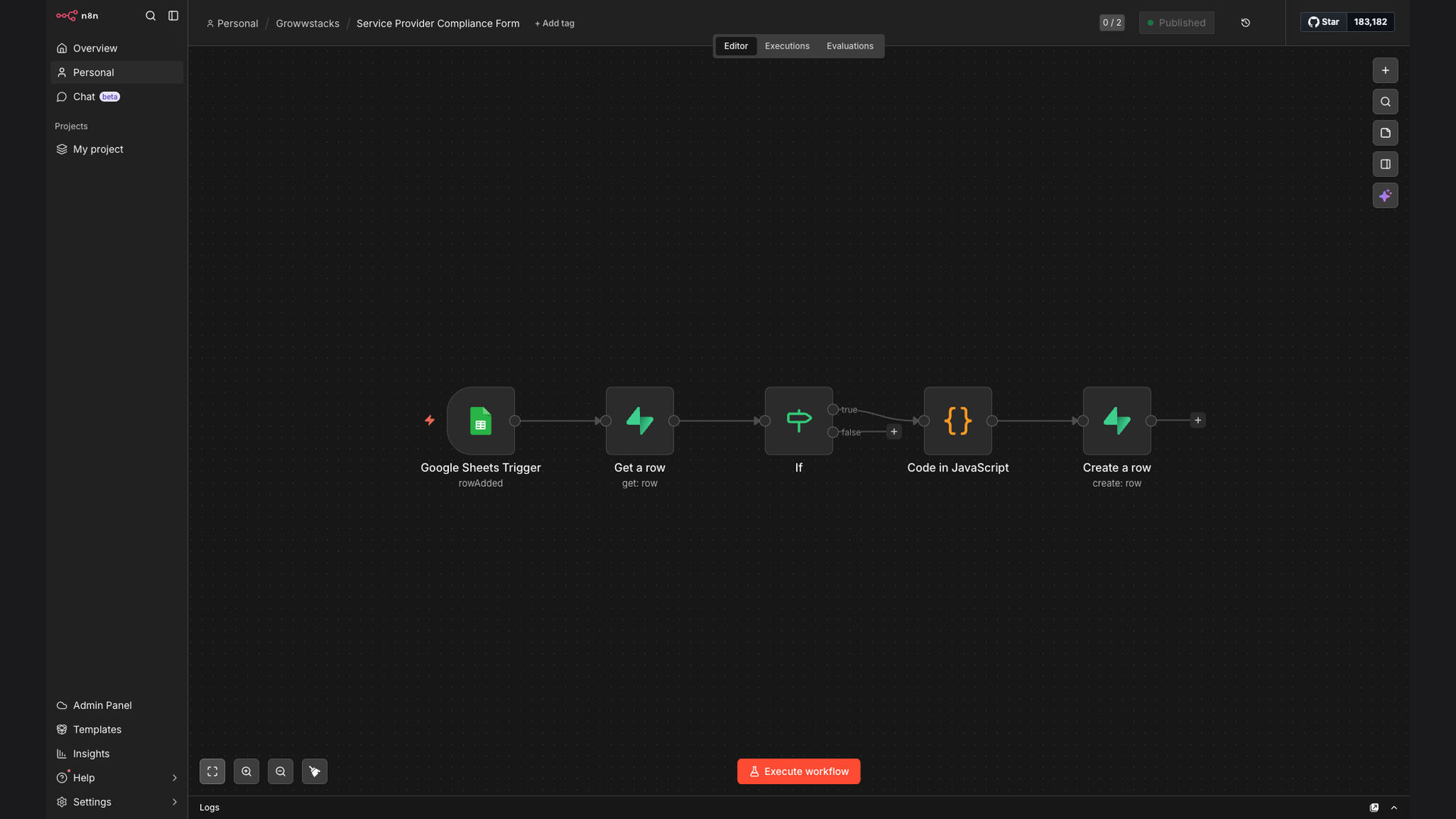
The solution is an automated workflow that processes new service provider compliance form submissions from Google Sheets, validates existing records in Supabase, transforms data with JavaScript, and creates structured contractor profiles. This automation eliminates manual data entry, reduces errors, and ensures data accuracy across systems.
This tech stack was chosen for its flexibility, scalability, and ease of integration. n8n serves as the primary automation platform, connecting Google Sheets and Supabase. JavaScript is used for data transformation, ensuring the data is in the correct format for Supabase. This combination provides a robust and efficient solution for automating compliance data management.
How It Works — Streamlining Compliance Data Management
This workflow automates the entire process of managing service provider compliance data, from form submission to database update. Here’s a step-by-step breakdown:
- Form Submission: A service provider submits a compliance form via Google Sheets.
- Trigger Automation: n8n is triggered by the new form submission in Google Sheets.
- Fetch Data: n8n retrieves the submitted data from Google Sheets.
- Validate Data: The workflow checks if the service provider already exists in the Supabase database.
- Transform Data: JavaScript transforms the data into the required format for Supabase.
- Update or Create Record: If the service provider exists, the record is updated; otherwise, a new record is created.
- Confirmation: A confirmation message is sent to the compliance manager.
- Database Update: Supabase is updated with the new or modified service provider compliance data.
💡 Data Integrity: By automating the data validation and transformation process, the workflow ensures that the data in Supabase is always accurate and up-to-date, reducing the risk of compliance issues.
What This System Does That [Manual Process] Can't
Time Savings
Automates data entry and validation, saving hours of manual work.
Accuracy
Reduces errors associated with manual data entry and validation.
Real-time Updates
Ensures data in Supabase is always up-to-date with new submissions.
Integration
Seamlessly connects Google Sheets and Supabase for efficient data flow.
Reporting
Provides accurate data for compliance reporting and analysis.
Compliance
Helps maintain compliance by ensuring data accuracy and completeness.
Before vs. After: Streamlined Compliance Management
Before: Manual data entry and validation took approximately 10 hours per week, with a 15% error rate.
After: Automated workflow reduces data entry time to near zero, with a less than 1% error rate, saving significant time and resources.
Implementation: Live in 3 Weeks
- Planning: Define the scope of the automation, identify data sources, and map data fields.
- Workflow Design: Design the workflow in n8n, including data validation and transformation steps.
- Integration: Configure the integration between Google Sheets and Supabase.
- Testing: Thoroughly test the workflow to ensure data accuracy and reliability.
- Deployment: Deploy the workflow to production and monitor its performance.
The Right Fit — and When It Isn't
This automation is ideal for organizations that manage a large number of service providers and require accurate, up-to-date compliance data. It is particularly beneficial for compliance managers, operations teams, and HR departments looking to streamline their data management processes.
However, this solution may not be the right fit for organizations with very small numbers of service providers or those that do not use Google Sheets and Supabase. In such cases, a simpler manual process or a different tech stack may be more appropriate.