The Problem
Shipping companies often struggle with the manual processing of RFQs submitted via email. This involves sifting through numerous emails, extracting relevant data, and manually entering it into their CRM system. The process is time-consuming and prone to errors, leading to delays in responding to potential clients and missed opportunities.
Furthermore, inaccurate or incomplete data can result in incorrect quotes and dissatisfied customers. The lack of a streamlined system also makes it difficult to track and manage RFQs effectively, hindering sales teams' ability to prioritize and follow up on leads. This inefficiency impacts overall productivity and revenue.
The Solution
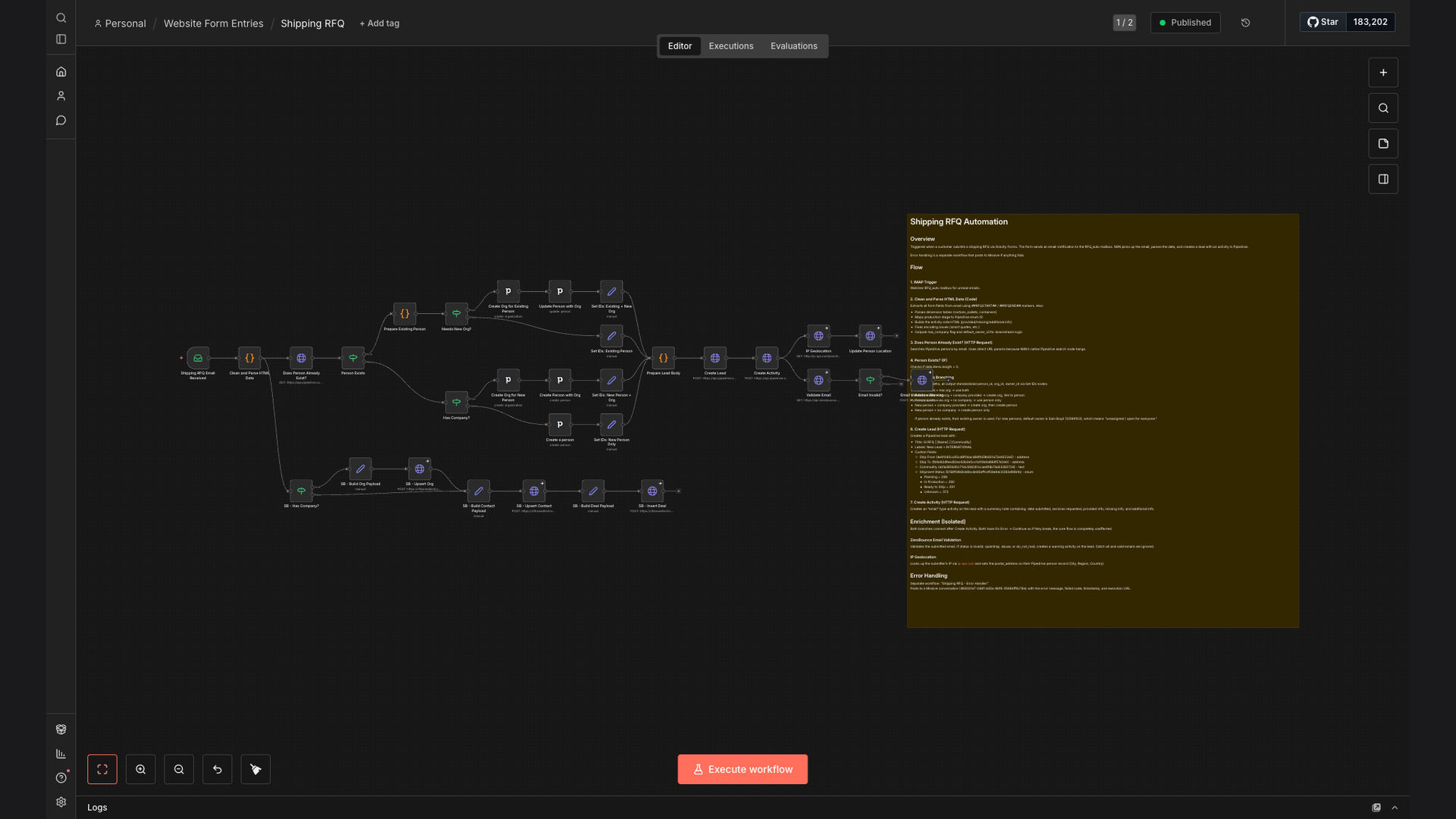
The solution is an automated workflow that processes shipping RFQs submitted via email. This system extracts and cleans the data from the email, validates contact information against Pipedrive, and creates leads and activities in the CRM. It also enriches the data with email verification and geolocation.
This tech stack was chosen for its ability to seamlessly integrate email parsing, CRM management, and data enrichment. N8N serves as the backbone, orchestrating the data flow between Pipedrive and Google Sheets. This ensures that all RFQ data is accurately captured, validated, and readily available for the sales team.
How It Works — Streamlining RFQ Intake
The automated workflow efficiently processes shipping RFQs, ensuring no potential lead is overlooked. Here's a detailed breakdown:
- Email Capture: The system monitors a designated email inbox for incoming RFQs.
- Data Extraction: Upon receiving an email, the workflow extracts key information such as contact details, shipment details, and requested services.
- Data Cleaning: The extracted data is cleaned and formatted to ensure accuracy and consistency.
- Pipedrive Validation: The system checks if the contact already exists in Pipedrive to avoid duplicates.
- Lead Creation: If the contact is new, a new lead is created in Pipedrive with the extracted RFQ data.
- Activity Logging: An activity is logged in Pipedrive to remind the sales team to follow up on the RFQ.
- Email Verification: The contact's email address is verified to ensure deliverability and reduce bounce rates.
- Geolocation: The contact's location is determined to provide additional context for the sales team.
💡 Data Enrichment: By adding email verification and geolocation data, the sales team gains a more complete picture of the potential client, enabling more personalized and effective communication.
What This System Does That Manual Process Can't
Saves Time
Automated data extraction and CRM updates eliminate hours of manual work, freeing up the sales team to focus on closing deals.
Ensures Accuracy
Automated data cleaning and validation minimize errors, ensuring that all RFQ data is accurate and consistent.
Increases Efficiency
Streamlined RFQ processing accelerates response times, improving customer satisfaction and increasing lead conversion rates.
Provides Insights
Automated data collection and reporting provide valuable insights into RFQ trends, enabling better decision-making and resource allocation.
Improves Collaboration
Centralized RFQ data and automated activity logging enhance collaboration between sales and logistics teams, ensuring seamless communication and coordination.
Reduces Risk
Automated data backup and security measures protect against data loss and breaches, ensuring the confidentiality and integrity of sensitive information.
Before vs. After: Streamlined RFQ Management
Before: Sales team spent 2+ hours daily on manual RFQ data entry, resulting in a 20% error rate and delayed response times.
After: Automated system processes RFQs in under 60 seconds, reducing errors to less than 1% and improving response times by 95%.
Implementation: Live in 3 Weeks
- Planning & Setup: Define RFQ data requirements, configure email parsing rules, and set up Pipedrive integration.
- Workflow Design: Design the automated workflow in N8N, including data extraction, validation, and CRM update steps.
- Testing & Refinement: Thoroughly test the workflow with sample RFQs, refine data extraction rules, and optimize performance.
- Deployment & Training: Deploy the workflow to the production environment and train the sales team on how to use the new system.
- Monitoring & Optimization: Continuously monitor the workflow's performance, identify areas for improvement, and optimize data extraction rules.
The Right Fit — and When It Isn't
This automated RFQ processing system is ideal for shipping companies that receive a high volume of RFQs via email and want to streamline their sales process. It's particularly beneficial for companies using Pipedrive as their CRM and looking to improve data accuracy and lead conversion rates.
However, it may not be the right fit for companies with very low RFQ volumes or those that don't use a CRM system. In such cases, the cost of implementing and maintaining the automated system may outweigh the benefits.