The Problem
Many e-commerce businesses face challenges in manually transferring data from Shopify to QuickBooks. This process is time-consuming and prone to errors, leading to inaccuracies in financial records and delayed invoicing. The lack of integration between these platforms results in inefficient workflows and increased administrative overhead.
Without automation, businesses struggle with reconciling sales data, tracking inventory, and generating timely invoices. This manual effort not only diverts resources from core business activities but also increases the risk of financial discrepancies and compliance issues. The need for a seamless, automated solution is critical for maintaining accurate financial records and optimizing operational efficiency.
The Solution
The solution is an automated workflow that seamlessly connects Shopify and QuickBooks, creating invoices automatically for each paid order. This system identifies customer information, retrieves product details, and generates invoices in QuickBooks, eliminating the need for manual data entry. The automation ensures accurate and timely invoice creation, reducing errors and saving valuable time.
This workflow was built using n8n due to its flexibility, scalability, and ability to integrate with multiple platforms. n8n allows for the creation of custom workflows tailored to specific business needs, providing a robust and reliable solution for automating invoice creation. The integration with Google Sheets provides an additional layer of data management and error logging.
How It Works — Streamlining Invoice Creation
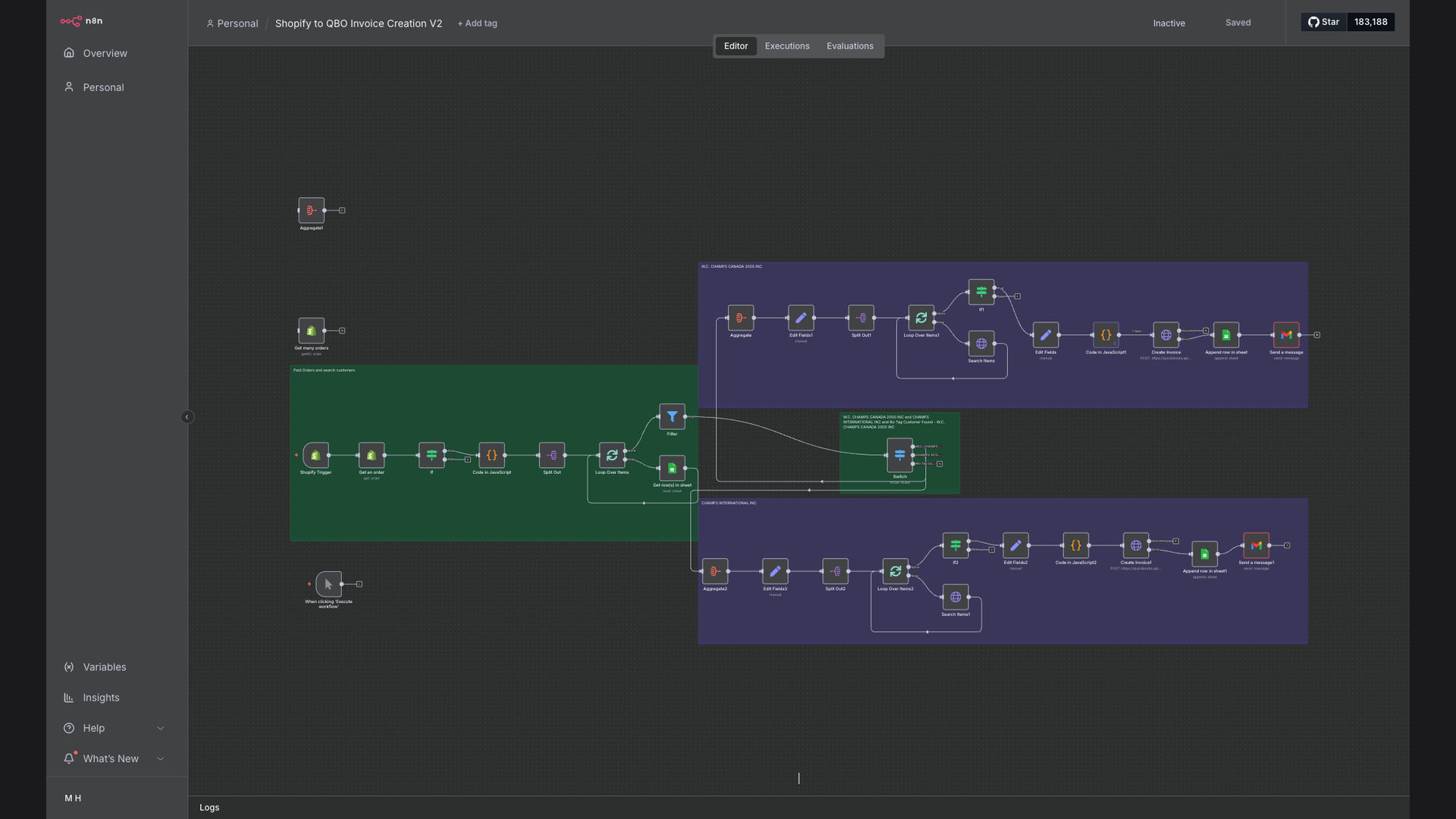
The automated workflow efficiently transfers data from Shopify to QuickBooks, ensuring accurate and timely invoice generation.
- Shopify Order Trigger: The workflow is initiated when a new order is marked as paid in Shopify.
- Fetch Customer Data: The system retrieves customer details from Shopify, including name, address, and contact information.
- Retrieve Product Details: Product information, such as descriptions, prices, and quantities, is fetched from the Shopify order.
- Identify Customer in QuickBooks: The workflow searches for the customer in QuickBooks using tags or other identifiers.
- Create Invoice in QuickBooks: An invoice is created in QuickBooks with the customer details and line items from the Shopify order.
- Post Invoice to QuickBooks: The invoice is posted to the correct QuickBooks company, ensuring accurate financial records.
- Error Logging: Any errors during the process are logged in Google Sheets for review and resolution.
- Notifications: Notifications are sent for failed operations, ensuring prompt attention to any issues.
💡 Data Accuracy: Automating the data transfer process ensures that invoice information is accurate and consistent, reducing the risk of errors and discrepancies.
What This System Does That [Manual Process] Can't
Time Savings
Automated invoice creation saves significant time compared to manual data entry, freeing up resources for other tasks.
Accuracy
Eliminates manual errors, ensuring accurate financial records and reducing the risk of discrepancies.
Efficiency
Streamlines the invoicing process, improving overall operational efficiency and reducing administrative overhead.
Real-time Data
Provides real-time visibility into sales data and financial records, enabling better decision-making.
Data Security
Ensures secure data transfer between Shopify and QuickBooks, protecting sensitive customer and financial information.
Error Notifications
Provides notifications for failed operations, ensuring prompt attention to any issues and minimizing disruptions.
Before vs. After: [Improved Efficiency and Accuracy]
Before: Manual invoice creation took approximately 15 minutes per order, resulting in frequent errors and delays.
After: Automated invoice creation takes less than 1 minute per order, with a 95% reduction in errors and significant time savings.
Implementation: Live in 3 Weeks
- Planning and Setup: Define the scope of the integration, configure access to Shopify and QuickBooks, and set up the n8n environment.
- Workflow Design: Design the automated workflow in n8n, mapping data fields between Shopify and QuickBooks.
- Testing and Refinement: Thoroughly test the workflow with sample data, refine the logic, and address any errors or discrepancies.
- Deployment: Deploy the workflow to a production environment and monitor its performance.
- Optimization: Continuously monitor and optimize the workflow to ensure it meets the evolving needs of the business.
The Right Fit — and When It Isn't
This solution is ideal for e-commerce businesses that process a high volume of Shopify orders and need to maintain accurate financial records in QuickBooks. It is particularly beneficial for businesses that struggle with manual data entry and want to improve their operational efficiency. The automation ensures timely invoice creation, reduces errors, and saves valuable time.
However, this solution may not be the right fit for businesses with very low order volumes or those that do not use QuickBooks. In such cases, the investment in automation may not be justified. Additionally, businesses with highly complex or customized invoicing requirements may need a more tailored solution.