The Problem
Trades businesses often struggle with inefficient lead generation. Sales teams spend countless hours manually searching online directories for potential clients. This process is not only time-consuming but also prone to errors, leading to missed opportunities and wasted resources.
The manual approach also makes it difficult to maintain an organized database of leads. Contact information is scattered across various sources, making it challenging to track progress and personalize outreach efforts. This lack of structure results in lower conversion rates and a less effective sales process.
The Solution
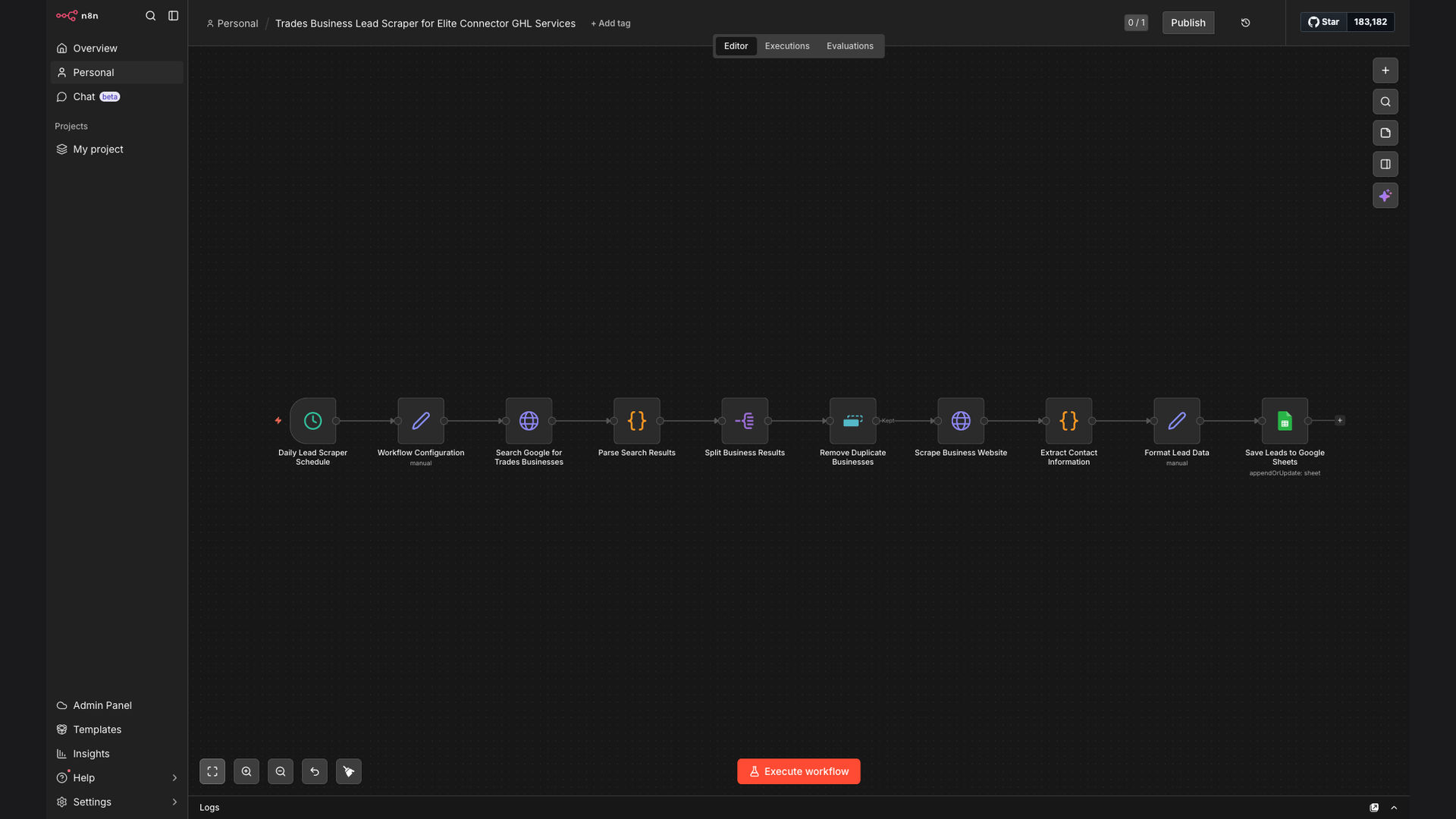
The solution is an automated lead generation workflow built with n8n. This system scrapes business listings from online directories, extracts contact details from their websites, and saves the structured lead data into Google Sheets. This automation eliminates manual searching and ensures a centralized, organized database.
n8n was chosen for its flexibility and ability to integrate seamlessly with Apify for web scraping and Google Sheets for data storage. The workflow is designed to be easily customizable, allowing sales teams and agencies to adapt it to their specific needs and target different directories.
How It Works — Automated Lead Prospecting
This workflow automates the entire lead generation process, from initial scraping to data organization:
- Directory Scraping: The workflow starts by scraping business listings from online directories like Yell.com using Apify.
- Business Name Extraction: The business names are extracted from the scraped data.
- Website URL Extraction: The website URLs associated with each business are extracted.
- Contact Detail Scraping: The workflow then visits each website and scrapes contact details such as email addresses and phone numbers.
- Data Cleaning: The scraped data is cleaned and formatted to remove any inconsistencies or errors.
- Google Sheets Integration: The cleaned data is then automatically saved into a Google Sheets spreadsheet.
- Lead Qualification: The sales team reviews the data in Google Sheets to qualify leads.
- Automated Scheduling: The entire workflow is scheduled to run automatically on a regular basis.
💡 Data Enrichment: The workflow can be extended to enrich lead data with additional information from other sources, such as social media profiles or industry databases.
What This System Does That Manual Process Can't
Speed & Efficiency
Automated scraping is much faster than manual searching, allowing you to generate leads more quickly.
Consistency
The automated workflow ensures that data is collected and formatted consistently, reducing errors.
Targeted Data
You can customize the scraping parameters to target specific industries and locations.
Scalability
The automated system can easily scale to handle a larger volume of leads as your business grows.
Organized Data
The data is automatically saved into a structured format in Google Sheets, making it easy to analyze and track.
Time Savings
Sales teams can focus on qualifying and closing leads instead of spending time on manual data entry.
Before vs. After: Streamlined Lead Generation
Before: Sales teams spent 20+ hours per week manually searching for leads, resulting in only 50 qualified leads per month.
After: The automated workflow generates 250+ qualified leads per month with only 4 hours of manual review and qualification.
Implementation: Live in 2 Weeks
- Requirements Gathering: Define the target directories, data points, and Google Sheets structure.
- Workflow Design: Design the n8n workflow to scrape, extract, and format the data.
- Testing & Optimization: Test the workflow and optimize it for accuracy and efficiency.
- Deployment: Deploy the workflow to a production environment and schedule it to run automatically.
- Monitoring & Maintenance: Monitor the workflow and make adjustments as needed to ensure continued performance.
The Right Fit — and When It Isn't
This automated lead generation workflow is ideal for sales teams and agencies that need to generate a high volume of targeted leads for trades businesses. It's particularly well-suited for organizations that want to streamline their lead prospecting process and improve the efficiency of their sales efforts.
However, this solution may not be the right fit for businesses that require highly specialized or niche lead data that is not readily available in online directories. In such cases, a more manual or customized approach may be necessary.