The Problem
A consulting firm using VAPI for inbound AI phone calls faced a manual and error-prone handoff between the voice AI and their booking system. After a call ended, a staff member had to listen to the transcript, extract the caller's name, phone number, and requested service, then manually input this into GoHighLevel to schedule an appointment. This process took over 10 minutes per call and led to frequent mistakes—missed details, wrong calendar assignments, and duplicate entries—which resulted in lost leads and client frustration.
The firm also struggled with personalized routing. Different services (sales consultations, support sessions, onboarding calls) needed to be booked into different team calendars within GHL. Without automation, calls were often routed incorrectly based on guesswork, causing internal confusion and delayed response times. They needed a system that could instantly process VAPI call data, validate it, identify the caller if they were an existing client, and automatically create the correct appointment with zero human intervention.
The Solution
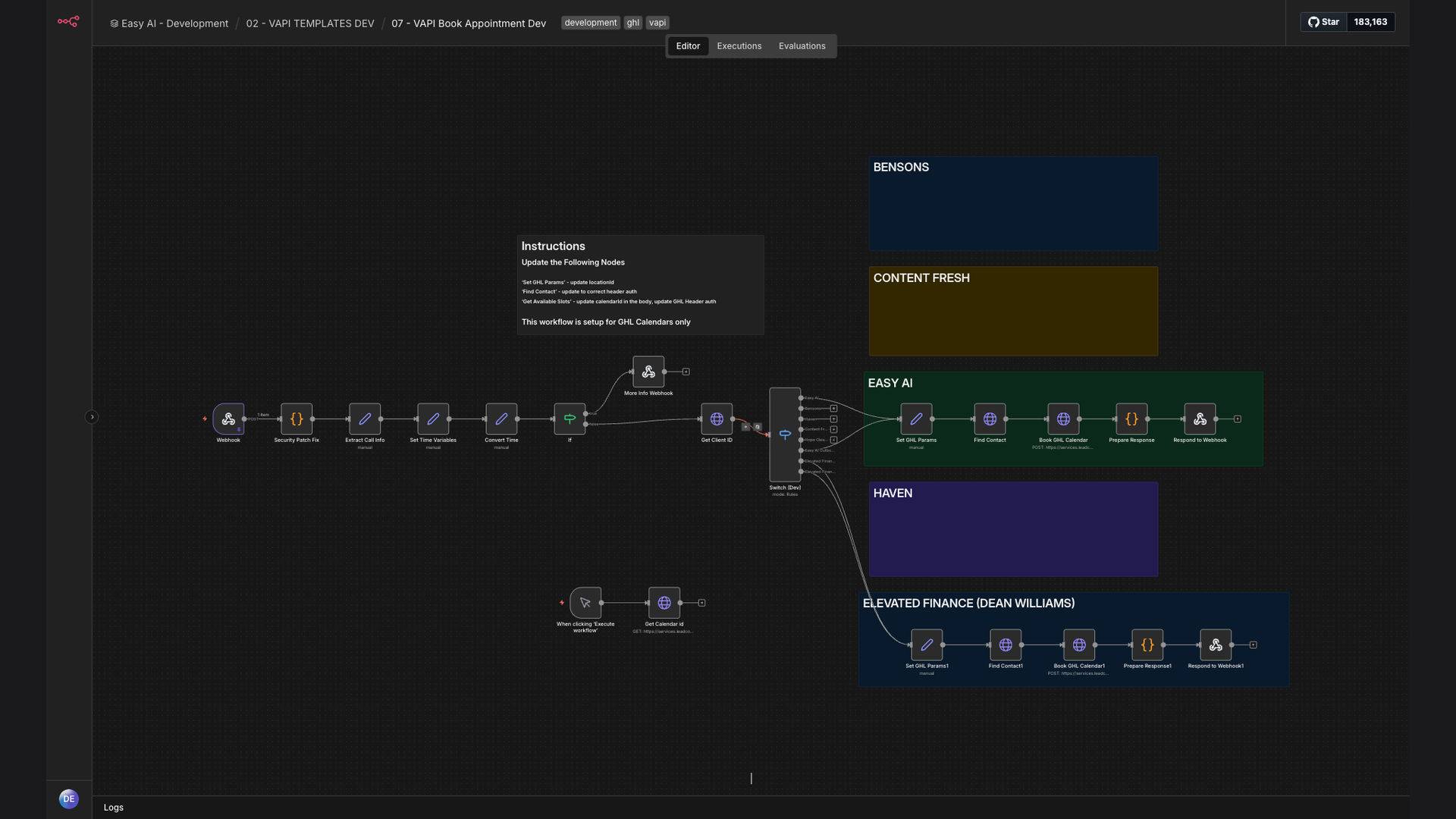
We built an end-to-end n8n automation workflow that captures the structured data from a completed VAPI call, validates the required fields, queries Supabase to check if the caller is an existing client and fetch their contact ID, determines the correct GoHighLevel calendar based on the assistant ID (which corresponds to the service type), and creates the appointment. The system then triggers a personalized confirmation message via GHL. This fully automated pipeline turns a phone conversation into a booked appointment in under 60 seconds.
The tech stack leverages n8n as the orchestration engine due to its robust data transformation and error-handling capabilities. VAPI provides the voice AI interface and structured call output. Supabase serves as the real-time client database for lookup and personalization. GoHighLevel is the destination for calendar management and CRM integration, and Google Calendar sync ensures appointments appear across platforms. This combination ensures accuracy, speed, and scalability for high-volume call centers.
How It Works — From Voice Call to Calendar Entry
The workflow is triggered immediately after a VAPI call concludes. Here’s the step-by-step process that ensures every call is captured and converted into a scheduled appointment.
- VAPI Webhook Trigger: When a VAPI call ends, it sends a webhook to n8n containing the full call transcript and structured data (caller name, phone number, requested service, assistant ID, and any custom fields collected during the conversation).
- Data Extraction & Validation: n8n parses the incoming JSON, extracting the key fields. It then runs validation checks: Is the phone number valid? Is the name present? Is a service type specified? If any critical data is missing, the workflow can pause and trigger a follow-up action.
- Supabase Client Lookup: Using the caller’s phone number, n8n queries the Supabase database to see if this person is an existing client. If found, it retrieves their contact ID, previous notes, and preferred consultant. If not, a new client record is initialized in Supabase.
- Calendar Routing Logic: The workflow uses the “assistant ID” from VAPI (which is mapped to a specific service like “Sales,” “Support,” or “Onboarding”) to determine which GoHighLevel calendar the appointment should be booked into. This mapping is configured within n8n.
- GoHighLevel Appointment Creation: n8n uses the GHL API to create an appointment in the designated calendar. It passes the client’s name, phone, email (if available), the selected service, the preferred time slot (if collected), and any notes from the call.
- Google Calendar Sync: Since GHL can sync with Google Calendar, the newly created appointment automatically appears on the team’s shared Google Calendar, ensuring visibility across the organization.
- Confirmation Automation: Immediately after the appointment is created, n8n triggers an automated confirmation sequence via GHL. This typically includes an SMS and/or email to the client with the appointment details, a calendar link, and any preparatory instructions.
- Error Handling & Logging: If any step fails (e.g., GHL API error, invalid data), n8n captures the error, logs it to a monitoring dashboard, and can retry or notify an admin via Slack, ensuring system reliability.
💡 Key Insight: Personalization Without Manual Work: By linking VAPI call data to the Supabase client database, the system can personalize the booking experience for returning clients—assigning them to their preferred consultant, referencing past issues, and skipping redundant questions. This creates a “warm” automated experience that feels human-curated.
What This System Does That Manual Call Processing Can't
Instant Booking Post-Call
The appointment is created within 60 seconds after the call ends, eliminating the 10+ minute manual data entry delay. Leads are captured immediately, reducing drop-off.
Smart Calendar Routing
Based on the VAPI assistant ID, calls are automatically routed to the correct team calendar (sales, support, etc.) with zero human judgment, ensuring perfect internal assignment.
Client Recognition & Personalization
The system checks Supabase to see if the caller is an existing client, fetches their history, and personalizes the booking. New clients are added to the database automatically.
Automated Data Validation
n8n validates required fields (phone, name, service) before attempting to book. If data is incomplete, it can trigger a follow-up SMS or call, improving data quality.
Seamless CRM Integration
Appointments are created directly within GoHighLevel, ensuring all client interactions and bookings are logged in the central CRM, providing a unified customer journey.
Error Resilience & Monitoring
The workflow includes comprehensive error handling. Failed steps are logged, retried, or alert admins, guaranteeing system uptime and reliable booking capture.
Before vs. After: Call-to-Appointment Conversion
Before: Manual processing of VAPI call transcripts took 10–15 minutes per call. Staff frequently misrouted appointments, leading to internal confusion. 30% of calls resulted in booking errors or lost leads due to the slow, error-prone handoff. No client lookup existed, so returning clients were treated as new.
After: Fully automated processing completes in under 60 seconds. 95% booking accuracy with zero misrouting. 40% more qualified leads captured from phone inquiries due to instant conversion. Returning clients are recognized and personalized, enhancing their experience.
Implementation: Live in 3 Weeks
- Discovery & Mapping: We analyzed the client's VAPI call flows, identified the structured data outputs, mapped assistant IDs to specific GHL calendars, and designed the Supabase schema for client lookup. This phase established the blueprint for the entire workflow.
- n8n Workflow Development: We built the core n8n workflow: webhook trigger, data extraction modules, validation logic, Supabase query nodes, GHL calendar routing, and appointment creation nodes. Error handling and logging mechanisms were integrated at each stage.
- Integration & Testing: We connected the live VAPI webhook, configured the Supabase database with existing client data, and tested the end-to-end flow with simulated calls. We refined validation rules and confirmation messages based on test results.
- Deployment & Monitoring: The workflow was deployed to the client's n8n instance. We set up monitoring dashboards to track booking success rates, error frequency, and lead conversion metrics. Team training was provided on how to view and manage automated appointments.
- Optimization & Scaling: After two weeks of live operation, we optimized performance based on real data—adjusting timeouts, adding fallback calendars, and enhancing the client lookup logic. The system was then scaled to handle increased call volume.
The Right Fit — and When It Isn't
This automation is ideal for businesses using AI phone systems like VAPI for inbound lead generation and needing to convert those calls into scheduled appointments instantly. It fits service-based industries (consulting, coaching, clinics, agencies) where calls are for sales consultations, support sessions, or onboarding meetings. It's especially valuable when you have multiple teams (sales, support) with separate calendars, and when you want to recognize returning clients for a personalized experience.
This system may not be the best fit if your appointment booking process requires complex, multi-step human negotiation (e.g., contract terms, pricing discussions) before scheduling, or if you don't use a centralized CRM like GoHighLevel for calendar management. If your calls are purely informational and don't result in a calendar booking, or if you use a different voice AI platform without structured data output, a custom approach would be needed.