The Problem
Many businesses struggle with inefficient and time-consuming financial analysis. Manually extracting data from bank statements, identifying recurring expenses, and forecasting cash flow can take hours each month. This not only delays critical decision-making but also increases the risk of errors and missed opportunities for cost optimization.
Without an automated system, businesses often face difficulty in accurately tracking expenses and predicting future cash flow. This can lead to poor financial planning, missed payment deadlines, and ultimately, a negative impact on the bottom line. The lack of real-time insights into financial performance hinders the ability to make informed decisions and proactively address potential issues.
The Solution
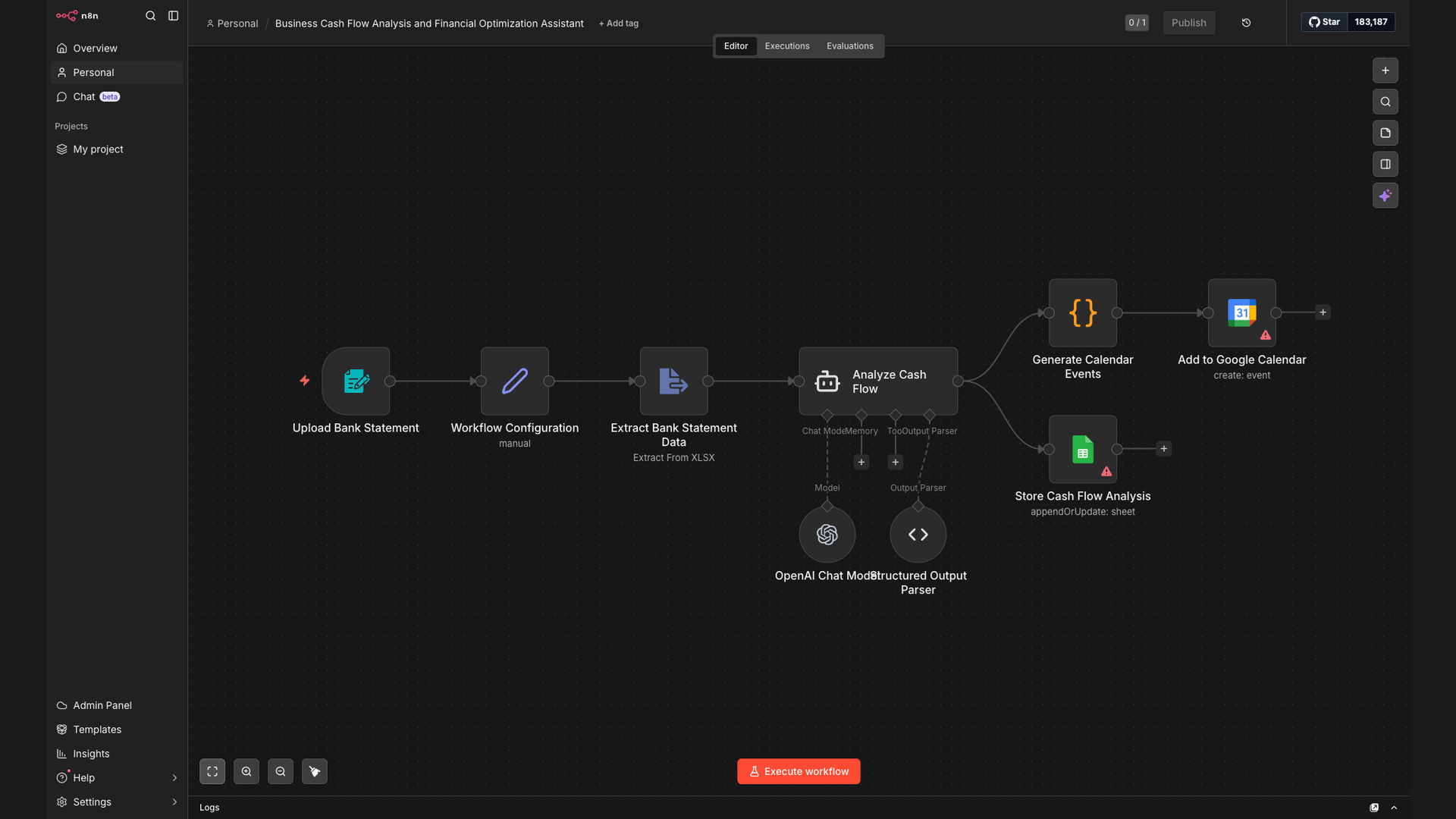
The solution is an automated business cash flow analysis and expense tracking system built using N8N. This system automatically extracts data from bank statements, identifies recurring expenses using AI, and generates cash flow insights. It also creates automated expense calendars in Google Calendar and populates financial reports in Google Sheets.
N8N was chosen for its flexibility in integrating with various APIs and services, allowing seamless data extraction and processing. Google Sheets and Google Calendar were selected for their ease of use and accessibility, providing a user-friendly interface for financial reporting and expense tracking. OpenAI was integrated to intelligently categorize and analyze expenses, providing deeper insights into spending patterns.
How It Works — Streamlining Financial Analysis
The automated system streamlines financial analysis by automating data extraction, expense categorization, and report generation, providing real-time insights into cash flow and spending patterns.
- Data Extraction: The system automatically extracts financial data from bank statements using API integrations or data parsing techniques.
- Expense Categorization: OpenAI analyzes transaction descriptions to categorize expenses into predefined categories (e.g., marketing, operations, salaries).
- Recurring Expense Identification: The system identifies recurring expenses based on transaction patterns and frequency.
- Cash Flow Analysis: The system generates cash flow reports, providing insights into income, expenses, and overall financial performance.
- Automated Calendar Creation: The system creates an automated expense calendar in Google Calendar, scheduling reminders for upcoming payments.
- Financial Report Population: The system populates financial reports in Google Sheets with real-time data, providing a comprehensive view of financial performance.
- Alerting and Notifications: The system sends alerts and notifications for critical financial events, such as low cash balances or upcoming payment deadlines.
💡 AI-Powered Insights: OpenAI's integration enables intelligent expense categorization and analysis, providing deeper insights into spending patterns and cost optimization opportunities.
What This System Does That Manual Process Can't
Time Savings
Automates data extraction and report generation, saving hours of manual work each month.
Accuracy
Reduces the risk of errors associated with manual data entry and calculations.
Real-Time Insights
Provides real-time visibility into cash flow and spending patterns, enabling informed decision-making.
Automated Alerts
Sends alerts and notifications for critical financial events, ensuring timely action.
Expense Calendar
Creates an automated expense calendar in Google Calendar, scheduling reminders for upcoming payments.
Scalability
Easily scales to accommodate growing business needs and increasing transaction volumes.
Before vs. After: Streamlined Financial Management
Before: Manual financial analysis took 20 hours per month, with a 10% error rate in expense tracking.
After: Automated system reduces analysis time to 2 hours per month, with near-zero error rate and real-time insights.
Implementation: Live in 4 Weeks
- Planning and Design: Define project scope, identify data sources, and design the system architecture.
- N8N Workflow Development: Develop N8N workflows for data extraction, expense categorization, and report generation.
- API Integration: Integrate N8N with bank APIs, Google Sheets, and Google Calendar.
- Testing and Validation: Test the system with sample data to ensure accuracy and reliability.
- Deployment and Training: Deploy the system and train users on how to use it effectively.
The Right Fit — and When It Isn't
This system is ideal for small to medium-sized businesses looking to automate their financial analysis and expense tracking processes. It's particularly beneficial for businesses that rely on manual data entry and struggle with inefficient financial reporting.
However, this system may not be suitable for businesses with highly complex financial structures or those requiring advanced financial modeling capabilities. In such cases, a more comprehensive financial management solution may be necessary.