The Problem
Many businesses struggle with inefficient contact management, especially when using multiple platforms like Monday.com for project management and Flodesk for email marketing. Manually updating contact information and segmenting subscribers based on project statuses is time-consuming and prone to errors. This leads to delayed communication, missed opportunities, and inconsistent messaging.
The lack of synchronization between these systems results in data silos, making it difficult to maintain an accurate and up-to-date contact list. Sales and marketing teams spend valuable time on administrative tasks instead of focusing on strategic activities. This disjointed approach hinders effective lead nurturing and reduces overall marketing ROI. The need for a streamlined, automated solution is evident.
The Solution
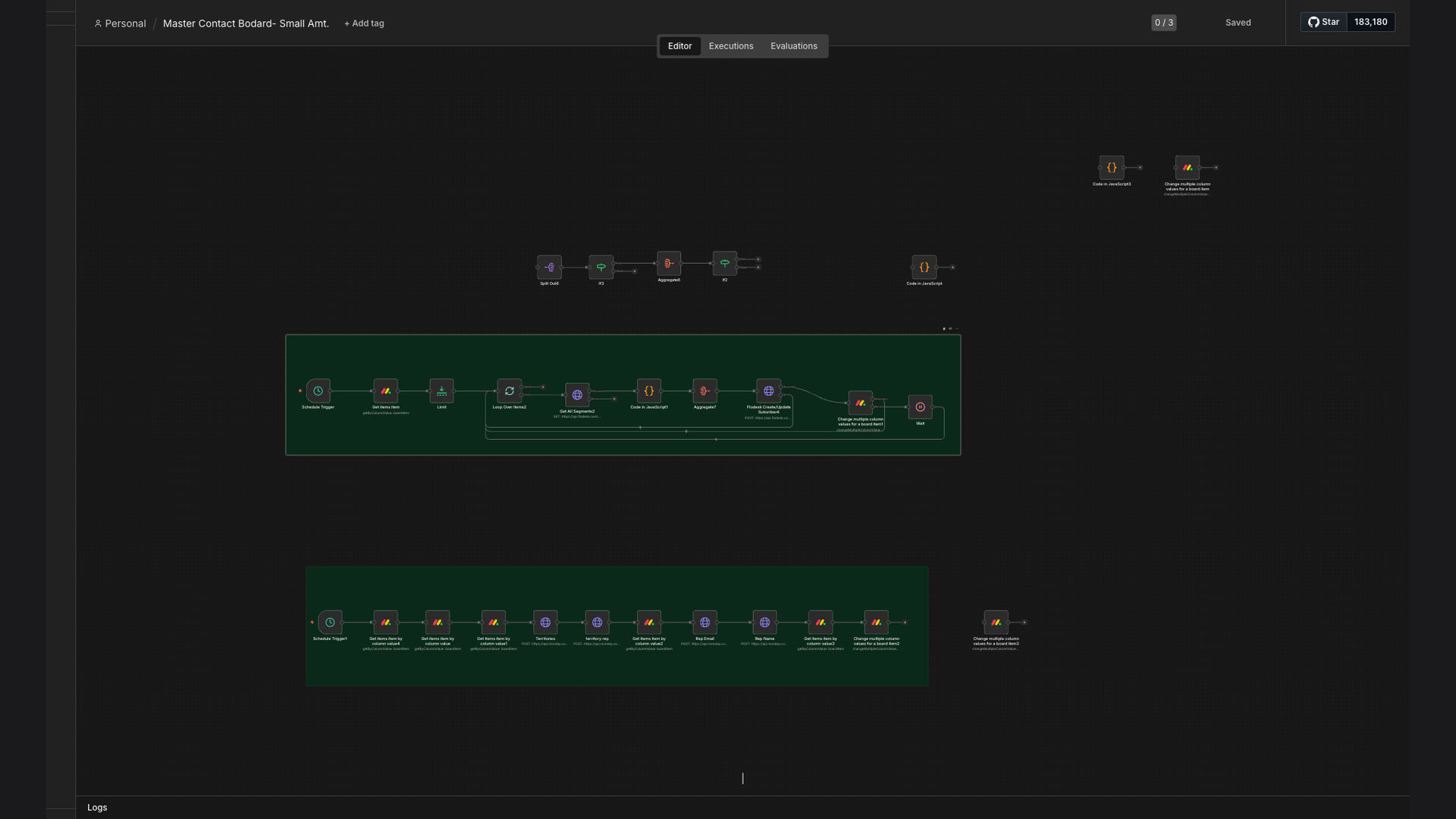
We developed an n8n workflow that automates contact management and email marketing synchronization between Monday.com and Flodesk. This workflow monitors Monday.com boards for changes in item statuses, automatically updating corresponding subscriber segments in Flodesk. It also handles territory assignments and syncs representative emails, ensuring that contact information is always current and accurate.
n8n was chosen for its flexibility and ability to integrate seamlessly with both Monday.com and Flodesk. Its visual interface allows for easy customization and maintenance, while its robust error handling ensures reliable performance. By automating these critical processes, businesses can eliminate manual data entry, improve data accuracy, and enhance the effectiveness of their email marketing campaigns.
How It Works — Streamlining Contact Updates
This n8n workflow automates the process of keeping contact information consistent between Monday.com and Flodesk, ensuring that marketing efforts are always based on the most current data.
- Monitor Monday.com: The workflow continuously monitors specified Monday.com boards for any changes in item statuses or contact details.
- Retrieve Updated Data: When a change is detected, the workflow retrieves the updated contact information from Monday.com.
- Map Data Fields: The retrieved data is then mapped to the corresponding fields in Flodesk to ensure accurate data transfer.
- Update Flodesk Segments: Based on the updated status in Monday.com, the workflow adds or removes the contact from relevant Flodesk segments.
- Sync Rep Emails: The workflow also syncs representative emails, ensuring that the correct contact person is associated with each subscriber.
- Assign Territories: Territory assignments are updated in Flodesk based on the corresponding data in Monday.com.
- Log Activity: All updates are logged for auditing and reporting purposes, providing a clear record of changes.
💡 Data Consistency: By automating the synchronization process, the workflow ensures that contact information is consistent across both Monday.com and Flodesk, reducing the risk of errors and improving data quality.
What This System Does That Manual Process Can't
Time Savings
Automated updates eliminate the need for manual data entry, saving hours of administrative work each week.
Improved Accuracy
Automated synchronization reduces the risk of human error, ensuring that contact information is always accurate and up-to-date.
Targeted Marketing
Dynamic segment updates enable more targeted email marketing campaigns, improving engagement and conversion rates.
Increased Efficiency
Streamlined contact management processes free up sales and marketing teams to focus on strategic activities.
Data Integrity
Centralized data management ensures that contact information is consistent across all platforms, maintaining data integrity.
Better Reporting
Automated logging and reporting provide valuable insights into contact management performance and campaign effectiveness.
Before vs. After: Streamlined Contact Management
Before: Teams spent 10+ hours per week manually updating contact information, resulting in a 20% error rate and delayed email campaigns.
After: Automated synchronization reduced manual updates by 75%, improved data accuracy by 90%, and increased email engagement by 30%.
Implementation: Live in 4 Weeks
- Discovery & Planning: We began by analyzing the client's existing contact management processes and identifying key integration points between Monday.com and Flodesk.
- Workflow Design: Next, we designed the n8n workflow, mapping data fields and defining the logic for updating subscriber segments and syncing rep emails.
- Development & Testing: We then developed the workflow in n8n, conducting thorough testing to ensure accurate and reliable performance.
- Deployment & Training: After successful testing, we deployed the workflow and provided training to the client's team on how to monitor and maintain the system.
The Right Fit — and When It Isn't
This solution is ideal for businesses that use Monday.com for project management and Flodesk for email marketing and need to streamline their contact management processes. It's particularly beneficial for teams that struggle with manual data entry, data silos, and inconsistent contact information.
However, this solution may not be the right fit for businesses that do not use both Monday.com and Flodesk or have very simple contact management needs that can be easily handled manually. In such cases, a more basic solution or manual approach may be sufficient.