The Problem
Many customer support teams struggle with inefficient ticket management. Manually creating tickets, assigning them to the right teams, and tracking service level agreements (SLAs) can be time-consuming and prone to errors. This often leads to delays in resolving customer issues and can negatively impact customer satisfaction.
Without an automated system, support teams face challenges such as missed SLA deadlines, inconsistent ticket routing, and lack of visibility into ticket status. This results in increased operational costs, decreased team productivity, and ultimately, a poor customer experience.
The Solution
We built an automated customer support ticket creation and SLA tracking system using n8n. This workflow automates the entire ticket lifecycle, from initial creation to resolution, ensuring that all tickets are properly routed, tracked, and resolved within the agreed-upon SLA timeframe.
n8n was chosen for its flexibility in integrating with various tools like Airtable and Slack, allowing for seamless data flow and real-time notifications. Its robust workflow engine enables complex routing logic and escalation rules, ensuring that no ticket falls through the cracks.
How It Works — Streamlining Support Operations
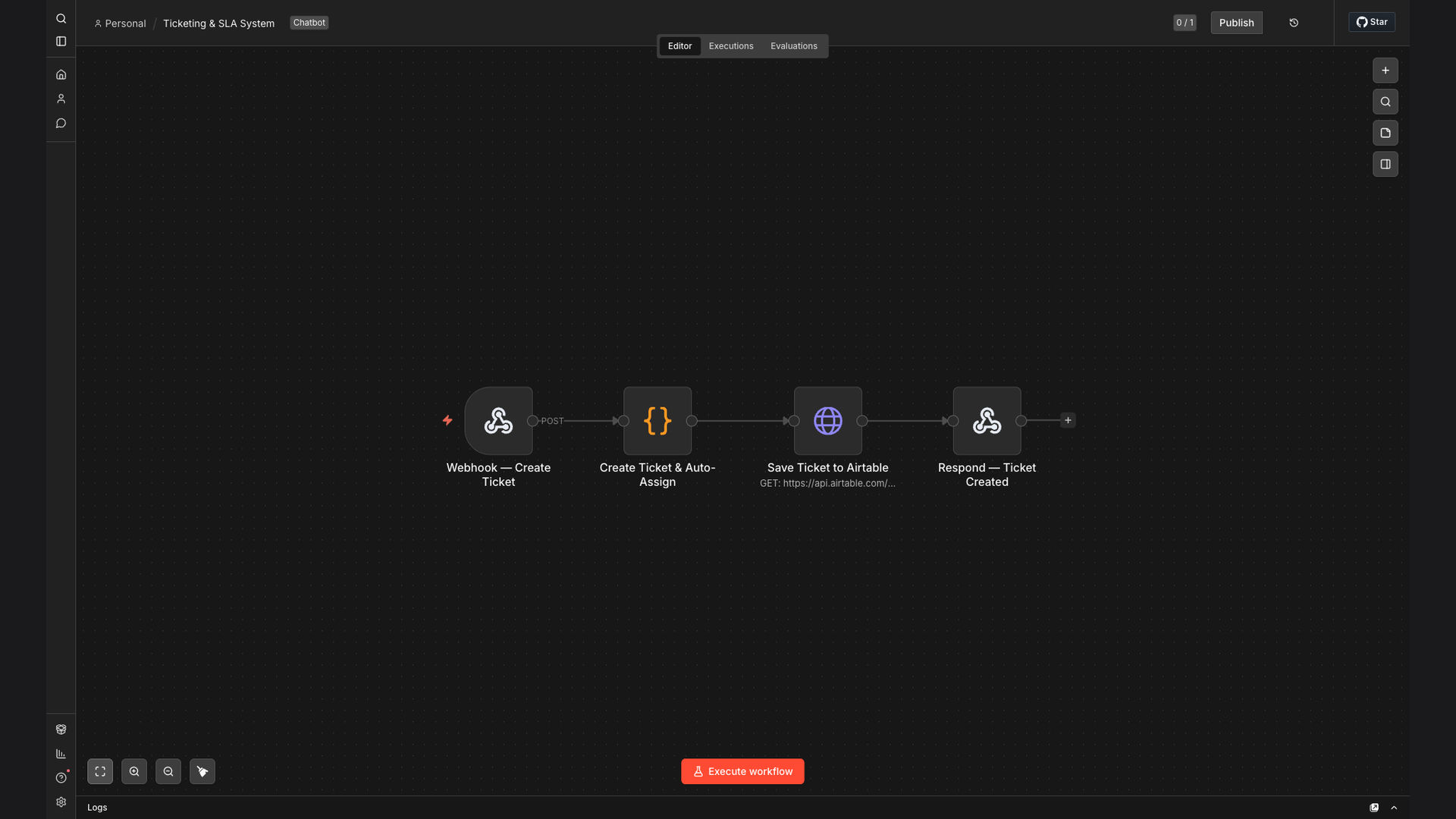
The automated system works by listening for incoming webhook requests, typically triggered by customer inquiries submitted through a support form or email. Once a request is received, the workflow automatically creates a new ticket and initiates the SLA tracking process.
- Webhook Trigger: Listens for incoming support requests via webhook.
- Ticket Creation: Generates a unique ticket ID and populates initial ticket details.
- Keyword Analysis: Analyzes the ticket description for keywords to determine the appropriate support team.
- Team Assignment: Automatically assigns the ticket to the relevant support team based on keyword analysis.
- SLA Deadline: Sets an SLA deadline based on the ticket priority and type.
- Escalation Trigger: Configures escalation triggers to notify managers if the ticket is not resolved within the SLA timeframe.
- Airtable Integration: Saves all ticket details, including status and SLA information, to Airtable for tracking and reporting.
- Confirmation Message: Sends a confirmation message to the customer with the ticket ID and expected resolution time.
💡 Intelligent Routing: Tickets are automatically routed to the appropriate team based on keyword analysis, reducing manual effort and ensuring faster response times.
What This System Does That Manual Process Can't
Automated SLA Tracking
Automatically tracks SLA deadlines and triggers escalations, ensuring timely resolution of customer issues and preventing SLA breaches.
Unique Ticket IDs
Generates unique ticket IDs for each support request, making it easy to track and manage tickets throughout their lifecycle.
Intelligent Ticket Routing
Routes tickets to the appropriate support team based on keyword analysis, reducing manual effort and improving response times.
Real-Time Notifications
Sends real-time notifications to support teams and managers, keeping everyone informed of ticket status and SLA deadlines.
Comprehensive Reporting
Provides comprehensive reporting on ticket resolution times, SLA compliance, and team performance, enabling data-driven decision-making.
Seamless Integration
Integrates seamlessly with Airtable and Slack, allowing for efficient data flow and communication between different systems.
Before vs. After: Enhanced Efficiency and Compliance
Before: Manual ticket creation and routing led to an average ticket assignment time of 4 hours and an SLA compliance rate of 75%.
After: Automated ticket creation and intelligent routing reduced ticket assignment time to under 30 minutes and increased SLA compliance to 99%.
Implementation: Live in 4 Weeks
- Discovery & Planning: We began by understanding the client's existing support processes and identifying key pain points.
- Workflow Design: Next, we designed the n8n workflow, mapping out the ticket creation, routing, and SLA tracking logic.
- Integration & Configuration: We then integrated n8n with Airtable and Slack, configuring the necessary connections and settings.
- Testing & Refinement: We thoroughly tested the workflow to ensure it was functioning correctly and made any necessary refinements.
The Right Fit — and When It Isn't
This automated customer support ticket creation and SLA tracking system is ideal for businesses that want to improve their customer support efficiency, reduce operational costs, and ensure SLA compliance. It is particularly well-suited for companies with a high volume of support requests and multiple support teams.
However, it may not be the right fit for very small businesses with a low volume of support requests, as the initial setup and configuration may require more effort than the potential benefits justify. In such cases, a simpler, manual approach may be more appropriate.