The Problem
Logistics teams often struggle with maintaining accurate data synchronization between their project management systems like Monday.com and spreadsheet software such as Google Sheets. This disconnect leads to data discrepancies, which can result in delayed shipments, incorrect billing, and overall operational inefficiencies. The manual effort required to reconcile these systems is time-consuming and prone to errors.
Without an automated solution, teams spend countless hours manually comparing data, identifying mismatches, and correcting errors. This not only diverts valuable resources from more strategic tasks but also increases the risk of making critical decisions based on inaccurate information. The lack of real-time visibility into data inconsistencies further compounds the problem, making it difficult to proactively address issues and maintain data integrity.
The Solution
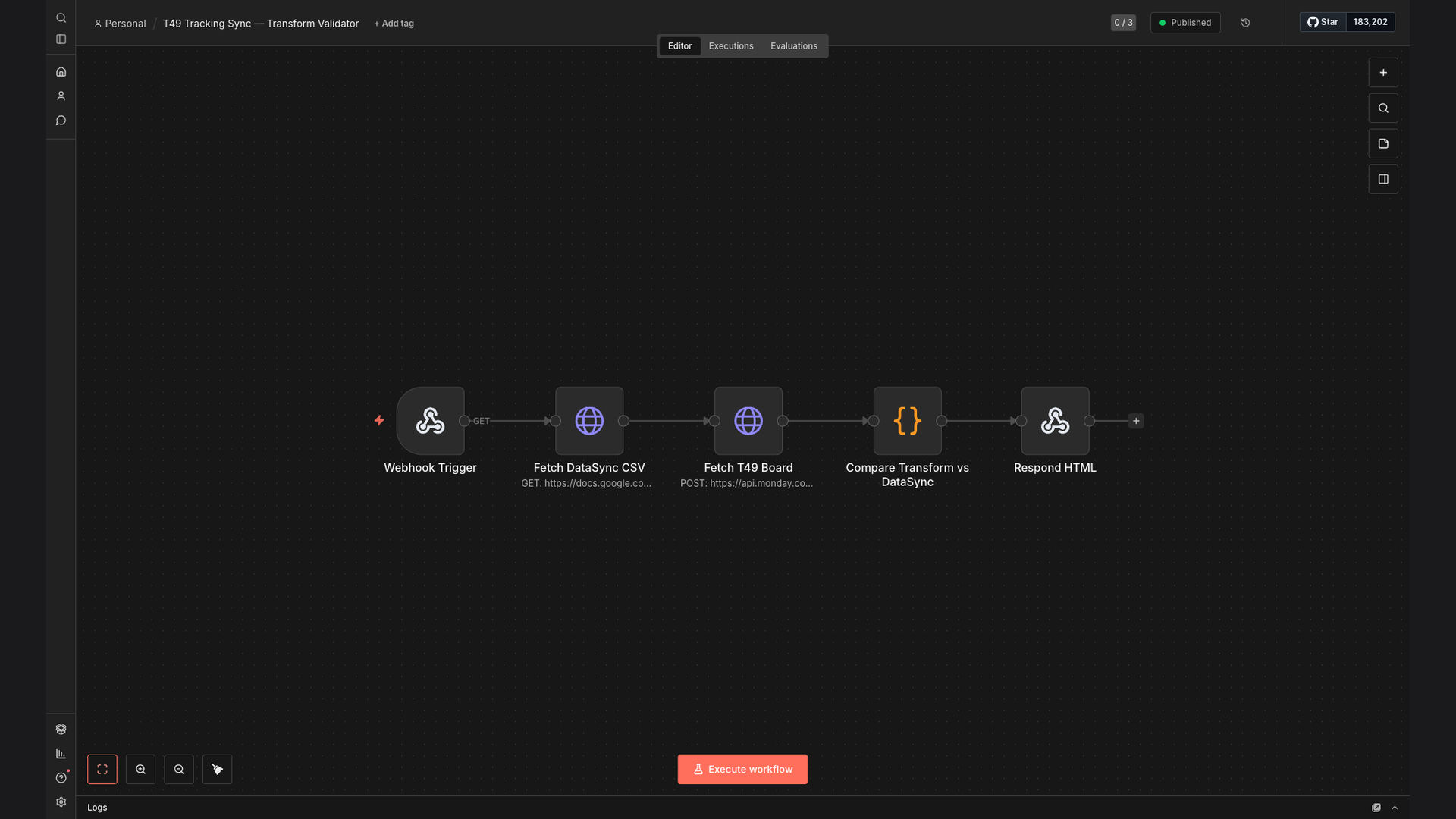
The solution is an automated workflow built with N8N that validates data synchronization between Monday.com boards and Google Sheets. This system compares tracking information, identifies any mismatches, and automatically generates HTML validation reports, providing a clear and concise overview of data discrepancies.
N8N was chosen for its flexibility and ability to seamlessly integrate with both Monday.com and Google Sheets through their respective APIs. The workflow leverages N8N's data transformation capabilities to standardize data formats and perform accurate comparisons. By automating this process, the system ensures data accuracy, saves time, and improves overall operational efficiency.
How It Works — Streamlining Data Reconciliation
This automated workflow simplifies the process of validating data synchronization between Monday.com and Google Sheets, ensuring accuracy and saving valuable time.
- Data Extraction from Monday.com: The workflow starts by extracting relevant tracking information from specified boards in Monday.com using the Monday.com API.
- Data Retrieval from Google Sheets: Simultaneously, the workflow retrieves corresponding data from designated Google Sheets using the Google Sheets API.
- Data Transformation: The extracted data from both sources is transformed into a standardized format to ensure accurate comparison.
- Data Comparison: The workflow compares the transformed data sets, identifying any mismatches or discrepancies between the two sources.
- Mismatch Identification: Any identified mismatches are flagged and recorded for further review and correction.
- HTML Report Generation: The workflow automatically generates an HTML report summarizing the data validation results, including details of any identified mismatches.
- Report Delivery: The generated HTML report is delivered to designated stakeholders via email or stored in a shared drive for easy access.
- Automated Scheduling: The entire workflow is scheduled to run automatically at predefined intervals, ensuring continuous data validation and synchronization.
💡 Real-Time Validation: Automating data validation ensures that data discrepancies are identified and addressed in real-time, minimizing the impact on operations and decision-making.
What This System Does That Manual Process Can't
Saves Time
Automates the data validation process, reducing the time spent on manual reconciliation.
Ensures Accuracy
Minimizes the risk of human error by automating data comparison and validation.
Provides Visibility
Generates HTML reports that provide a clear overview of data discrepancies.
Continuous Validation
Schedules the workflow to run automatically, ensuring continuous data validation and synchronization.
Seamless Integration
Integrates seamlessly with Monday.com and Google Sheets through their respective APIs.
Improves Efficiency
Streamlines data reconciliation, improving overall operational efficiency and decision-making.
Before vs. After: Accelerating Data Reconciliation
Before: Logistics teams spent approximately 20 hours per week manually reconciling data between Monday.com and Google Sheets, resulting in frequent data discrepancies and operational delays.
After: With the automated workflow, data reconciliation time has been reduced by 80%, and data accuracy has increased to 99%, minimizing errors and improving overall efficiency.
Implementation: Live in 3 Weeks
- Requirements Gathering: The first phase involves gathering detailed requirements and understanding the specific data synchronization needs of the logistics team.
- Workflow Design: Based on the requirements, the workflow is designed to extract, transform, and compare data between Monday.com and Google Sheets.
- Workflow Development: The workflow is developed using N8N, integrating with the Monday.com and Google Sheets APIs.
- Testing and Validation: The workflow is thoroughly tested and validated to ensure data accuracy and reliability.
- Deployment and Training: The workflow is deployed, and the logistics team receives training on how to use the system and interpret the generated HTML reports.
The Right Fit — and When It Isn't
This automated data synchronization solution is ideal for logistics teams that rely on both Monday.com and Google Sheets for project management and data tracking. It is particularly beneficial for organizations that require accurate and real-time data synchronization to ensure operational efficiency and informed decision-making.
However, this solution may not be the right fit for organizations that do not use both Monday.com and Google Sheets or those that have very simple data tracking needs that can be easily managed manually. In such cases, a simpler data management solution may be more appropriate.