The Problem
Many cleaning and service businesses struggle with manual job scheduling and assignment. This often involves sifting through numerous emails, spreadsheets, and databases to match available cleaners with new job requests. The process is time-consuming, prone to errors, and can lead to delays in service delivery.
Without an automated system, businesses face challenges such as inefficient resource allocation, increased administrative overhead, and potential loss of revenue due to missed or delayed job assignments. This manual approach hinders scalability and impacts customer satisfaction.
The Solution
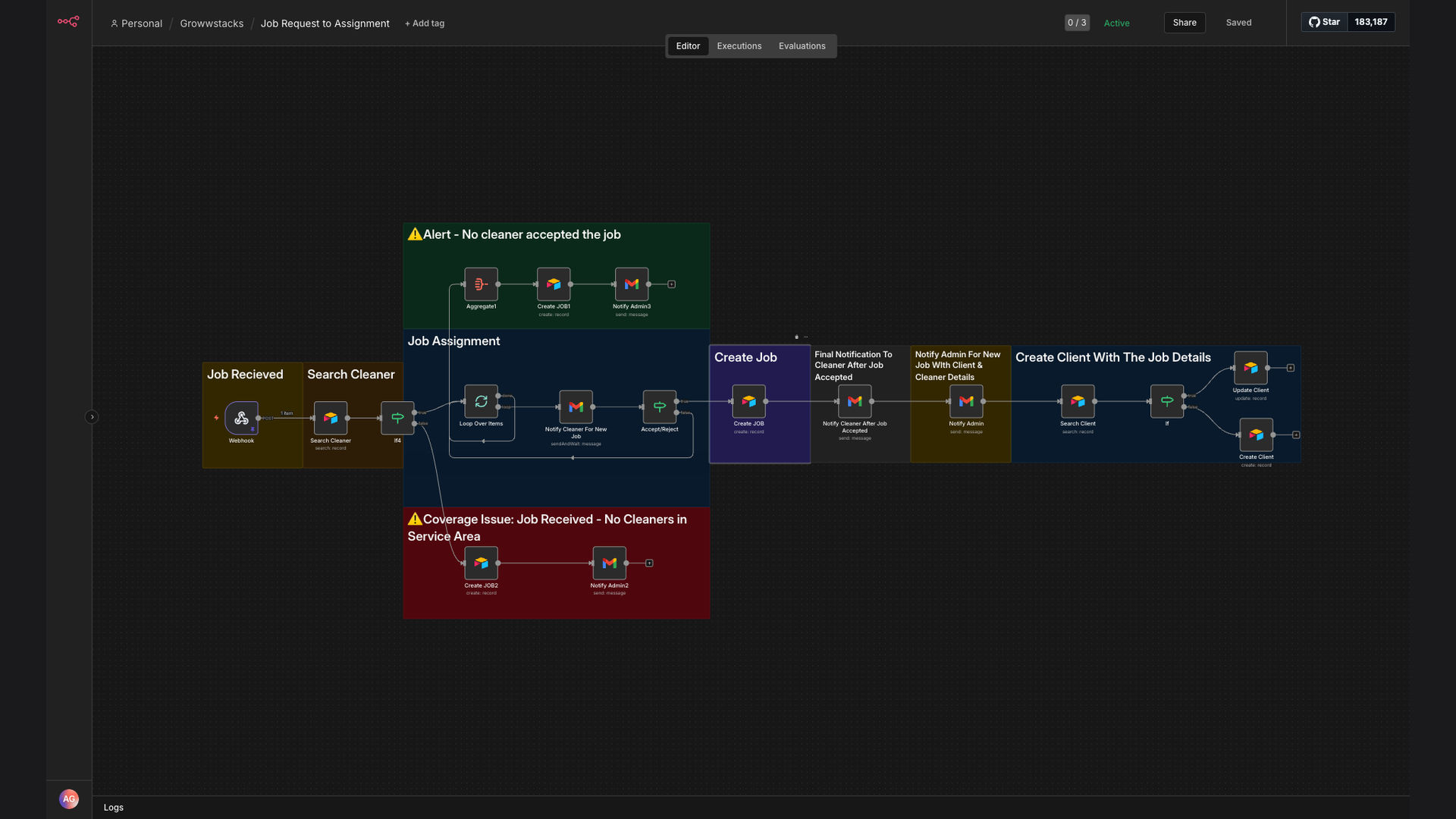
The solution is an automated job assignment workflow built with n8n that integrates Typeform, Airtable, and Gmail. When a new job request is submitted via Typeform, the workflow automatically searches for available cleaners in Airtable based on the client's ZIP code. It then creates a job record, sends an assignment request to the cleaner, and notifies the admin upon approval.
This tech stack was chosen for its flexibility and ease of integration. n8n acts as the central automation platform, connecting Typeform for data capture, Airtable for data storage and cleaner management, and Gmail for notifications and approvals. This combination streamlines the entire job assignment process, reducing manual effort and improving efficiency.
How It Works — Streamlining Job Assignments
This n8n workflow automates the entire job assignment process, from initial request to final assignment, ensuring efficiency and accuracy.
- Form Submission: A client submits a job request via a Typeform form, providing details such as location, service type, and preferred date.
- Data Capture: n8n captures the form data and extracts relevant information, such as the client's ZIP code and service requirements.
- Cleaner Search: The workflow searches for available cleaners in Airtable based on the client's ZIP code, identifying those who are qualified and available.
- Job Record Creation: A new job record is created in Airtable, including the client's details, service requirements, and potential cleaner assignments.
- Assignment Request: An email is sent to the selected cleaner with the job details and a request to accept or decline the assignment.
- Approval Notification: If the cleaner accepts the assignment, the workflow updates the job record in Airtable and notifies the admin.
- Client Record Update: The client's record in Airtable is updated with the job details and assigned cleaner, ensuring accurate tracking.
- Admin Notification: The admin receives a notification confirming the job assignment, allowing them to monitor and manage the workflow.
💡 Real-Time Updates: The system provides real-time updates on job assignments, ensuring that all stakeholders are informed and aware of the current status.
What This System Does That Manual Process Can't
Time Savings
Automates the entire job assignment process, reducing the time spent on manual tasks and freeing up resources for other priorities.
Accuracy
Eliminates manual errors and ensures accurate job assignments, reducing the risk of missed or delayed services.
Scalability
Scales easily to accommodate growing business needs, allowing you to handle more job requests without increasing administrative overhead.
Data-Driven Insights
Provides valuable data and insights into job assignments, allowing you to optimize resource allocation and improve service delivery.
Automated Notifications
Sends automated notifications to cleaners and admins, ensuring that everyone is informed and aware of the current job status.
Cost Reduction
Reduces administrative costs and improves resource utilization, leading to significant cost savings over time.
Before vs. After: Streamlined Efficiency
Before: Manual job assignment took an average of 30 minutes per job, with frequent errors and delays.
After: Automated job assignment takes less than 1 minute, with improved accuracy and faster service delivery.
Implementation: Live in 3 Weeks
- Planning: Define the scope of the automation project, identify key stakeholders, and establish clear goals and objectives.
- Setup: Configure Typeform to capture job requests, set up Airtable to manage cleaner and client data, and integrate Gmail for notifications.
- Workflow Design: Design the n8n workflow to automate the job assignment process, including data capture, cleaner search, and notification triggers.
- Testing: Test the workflow thoroughly to ensure accuracy and reliability, making adjustments as needed.
- Deployment: Deploy the automated job assignment system and train staff on how to use it effectively.
The Right Fit — and When It Isn't
This automated job assignment system is ideal for cleaning and service businesses that want to streamline their operations, improve resource allocation, and reduce administrative costs. It is particularly well-suited for businesses that handle a high volume of job requests and need to ensure accurate and timely assignments.
However, this system may not be the right fit for businesses with very low job volumes or those that require highly customized and complex assignment processes. In such cases, a manual approach or a more tailored automation solution may be more appropriate.