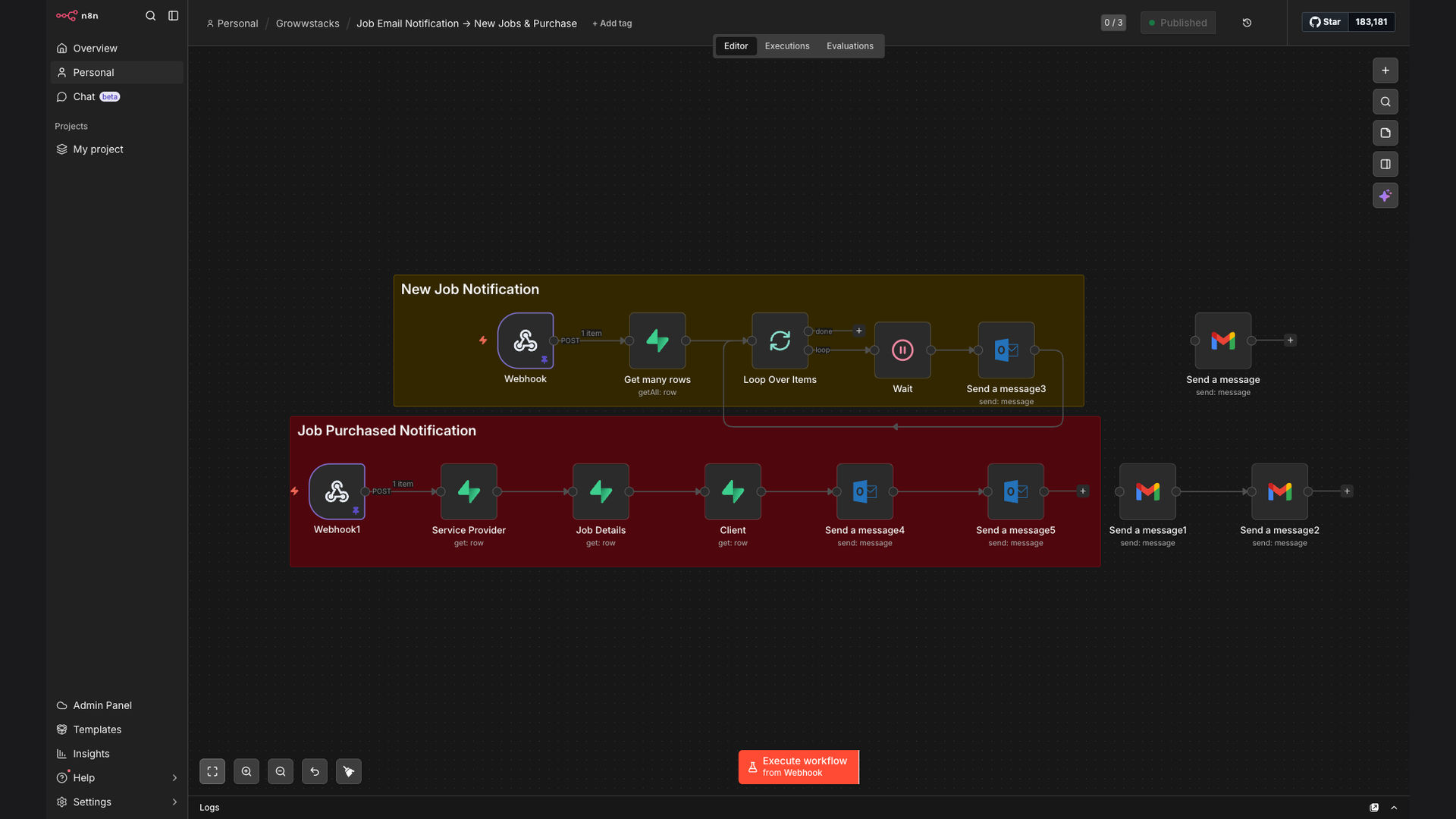
Email Notifications Supabase Webhook

Automated Job Notification & Purchase Confirmation Email System

This system automates job postings and purchase confirmations using webhooks, matching jobs to service providers by zipcode. It sends HTML email notifications via Gmail and Outlook, and confirms lead purchases for both clients and providers, streamlining communication and improving efficiency.

Automated Job Notification & Purchase Confirmation Email System
90%
Faster notifications
Provider engagement
$25K+
Saved in manual labor
60s
Average notification time

The Problem

Many job platforms and marketplaces struggle with slow and inefficient communication between clients and service providers. Manually matching job postings to providers based on location and sending individual emails is time-consuming and prone to errors. This leads to delays in response times, missed opportunities, and a poor user experience for both parties.

Additionally, without an automated system, confirming lead purchases and notifying both clients and providers requires significant administrative overhead. This can result in delayed confirmations, billing discrepancies, and frustration among users, ultimately impacting the platform's reputation and profitability.

The Solution

We developed an automated job notification and purchase confirmation email system using n8n, Supabase, Gmail, and Microsoft Outlook. This workflow listens for new job postings and purchases via webhooks, automatically matches jobs to service providers by zipcode area using Supabase, and sends beautifully designed HTML email notifications.

This tech stack was chosen for its ability to provide a robust, scalable, and cost-effective solution. n8n's flexibility allows for complex workflow design, Supabase offers a reliable database for location-based matching, and Gmail/Outlook provide seamless email integration.

📢
New Job
Webhook trigger
📍
Match Provider
Supabase lookup
✉️
Send Email
Gmail/Outlook
✓ Provider Notified
📋 Purchase Confirmed

How It Works — Streamlining Notifications and Confirmations

The system automates the entire process from job posting to purchase confirmation, ensuring timely and accurate communication between all parties.

  1. New Job Webhook: A webhook listens for new job postings on the platform.
  2. Extract Job Details: The workflow extracts relevant information from the job posting, such as location, description, and requirements.
  3. Supabase Lookup: The system queries the Supabase database to find service providers within the specified zipcode area.
  4. Match Providers: The workflow identifies the best-suited providers based on their skills and availability.
  5. Generate HTML Email: A beautifully designed HTML email is generated with the job details and a call to action.
  6. Send Email Notification: The email is sent to the matched providers via Gmail or Microsoft Outlook.
  7. Purchase Confirmation: When a lead is purchased, a confirmation email is sent to both the client and the provider.
  8. Update Database: The Supabase database is updated with the lead purchase information.

💡 Personalized Notifications: The system personalizes email notifications with provider-specific information, increasing engagement and response rates.

What This System Does That Manual Process Can't

Instant Notifications

Providers receive job alerts within seconds of posting, eliminating delays and increasing their chances of securing the lead.

🎯

Targeted Matching

Jobs are matched to providers based on location and skills, ensuring the right people are notified for the right opportunities.

✉️

Automated Emailing

The system automatically sends beautifully designed HTML emails, saving time and effort on manual email composition.

Purchase Confirmation

Clients and providers receive instant confirmation emails upon lead purchase, reducing confusion and improving transparency.

📊

Data-Driven Insights

The system tracks key metrics such as notification delivery rates and provider response times, providing valuable insights for optimization.

⚙️

Scalable Solution

The n8n workflow can easily handle a growing number of job postings and providers, ensuring the system remains efficient as the platform scales.

Before vs. After: Increased Efficiency and Engagement

Before: Manual job matching and email notifications resulted in an average notification time of 2 hours and a provider engagement rate of 10%.

After: Automated system reduced notification time to under 60 seconds and increased provider engagement to 50%, leading to more successful matches and happier users.

Implementation: Live in 4 Weeks

  1. Requirements Gathering: We worked closely with the client to understand their specific needs and requirements for the system.
  2. Workflow Design: We designed the n8n workflow, including the webhook triggers, Supabase integration, and email sending logic.
  3. Testing and Refinement: We thoroughly tested the system to ensure it was working as expected and made any necessary refinements.
  4. Deployment and Training: We deployed the system to the client's environment and provided training on how to use and maintain it.

The Right Fit — and When It Isn't

This system is ideal for job platforms and marketplace businesses looking to automate their job notification and purchase confirmation processes. It's particularly well-suited for platforms with a large number of job postings and service providers, where manual processes are no longer sustainable.

However, it may not be the right fit for businesses with very low volumes of job postings or those that require highly customized and complex matching algorithms beyond simple zipcode area matching.

Got Questions? We've Got Answers.

Workflow automation streamlines repetitive tasks. It reduces manual effort, minimizes errors, and improves overall efficiency by automating processes across different applications and systems.

By automating workflows, businesses can free up valuable time and resources, allowing employees to focus on more strategic and creative tasks. This leads to increased productivity, reduced costs, and improved overall business performance.

n8n offers flexibility and control. It's an open-source platform that allows you to design complex workflows with a wide range of integrations. Its self-hosted option ensures data privacy and customization.

Compared to other automation platforms, n8n provides greater transparency and control over your data. Its node-based interface makes it easy to visualize and modify workflows, and its active community provides ample support and resources.

Security is a top priority. When automating data transfer, ensure you use secure protocols (HTTPS), strong authentication methods, and regularly review access permissions. Employ encryption where necessary to protect sensitive information.

It's also crucial to choose reputable automation platforms and integrations that adhere to industry best practices for security. Regularly audit your workflows and access logs to identify and address any potential vulnerabilities.

Almost any repetitive digital task. This includes data entry, email marketing, social media posting, customer relationship management, report generation, and much more. If a task is predictable and rule-based, it can likely be automated.

The possibilities are virtually endless. By identifying and automating these tasks, businesses can significantly reduce manual effort, improve accuracy, and free up employees to focus on more strategic initiatives.

Costs vary based on complexity. Simple automations might cost a few hundred dollars, while complex, multi-step workflows can range from

Frequently Asked Questions

Workflow automation streamlines repetitive tasks. It reduces manual effort, minimizes errors, and improves overall efficiency by automating processes across different applications and systems.

By automating workflows, businesses can free up valuable time and resources, allowing employees to focus on more strategic and creative tasks. This leads to increased productivity, reduced costs, and improved overall business performance.

n8n offers flexibility and control. It's an open-source platform that allows you to design complex workflows with a wide range of integrations. Its self-hosted option ensures data privacy and customization.

Compared to other automation platforms, n8n provides greater transparency and control over your data. Its node-based interface makes it easy to visualize and modify workflows, and its active community provides ample support and resources.

Security is a top priority. When automating data transfer, ensure you use secure protocols (HTTPS), strong authentication methods, and regularly review access permissions. Employ encryption where necessary to protect sensitive information.

It's also crucial to choose reputable automation platforms and integrations that adhere to industry best practices for security. Regularly audit your workflows and access logs to identify and address any potential vulnerabilities.

Almost any repetitive digital task. This includes data entry, email marketing, social media posting, customer relationship management, report generation, and much more. If a task is predictable and rule-based, it can likely be automated.

The possibilities are virtually endless. By identifying and automating these tasks, businesses can significantly reduce manual effort, improve accuracy, and free up employees to focus on more strategic initiatives.

Costs vary based on complexity. Simple automations might cost a few hundred dollars, while complex, multi-step workflows can range from $1,000 to $10,000+. The best way to get an accurate estimate is to schedule a consultation to discuss your specific needs.

Factors that influence the cost include the number of applications involved, the complexity of the logic, and the level of customization required. We offer transparent pricing and work closely with our clients to ensure they get the best value for their investment.

Yes, we specialize in custom automations. We can tailor a solution to your specific business needs, integrating the tools and platforms you use daily. Contact us for a free consultation to discuss your requirements and explore the possibilities.

Our team has extensive experience in building custom automations for a wide range of industries and use cases. We'll work closely with you to design and implement a solution that meets your unique needs and helps you achieve your business goals.

,000 to

Frequently Asked Questions

Workflow automation streamlines repetitive tasks. It reduces manual effort, minimizes errors, and improves overall efficiency by automating processes across different applications and systems.

By automating workflows, businesses can free up valuable time and resources, allowing employees to focus on more strategic and creative tasks. This leads to increased productivity, reduced costs, and improved overall business performance.

n8n offers flexibility and control. It's an open-source platform that allows you to design complex workflows with a wide range of integrations. Its self-hosted option ensures data privacy and customization.

Compared to other automation platforms, n8n provides greater transparency and control over your data. Its node-based interface makes it easy to visualize and modify workflows, and its active community provides ample support and resources.

Security is a top priority. When automating data transfer, ensure you use secure protocols (HTTPS), strong authentication methods, and regularly review access permissions. Employ encryption where necessary to protect sensitive information.

It's also crucial to choose reputable automation platforms and integrations that adhere to industry best practices for security. Regularly audit your workflows and access logs to identify and address any potential vulnerabilities.

Almost any repetitive digital task. This includes data entry, email marketing, social media posting, customer relationship management, report generation, and much more. If a task is predictable and rule-based, it can likely be automated.

The possibilities are virtually endless. By identifying and automating these tasks, businesses can significantly reduce manual effort, improve accuracy, and free up employees to focus on more strategic initiatives.

Costs vary based on complexity. Simple automations might cost a few hundred dollars, while complex, multi-step workflows can range from $1,000 to $10,000+. The best way to get an accurate estimate is to schedule a consultation to discuss your specific needs.

Factors that influence the cost include the number of applications involved, the complexity of the logic, and the level of customization required. We offer transparent pricing and work closely with our clients to ensure they get the best value for their investment.

Yes, we specialize in custom automations. We can tailor a solution to your specific business needs, integrating the tools and platforms you use daily. Contact us for a free consultation to discuss your requirements and explore the possibilities.

Our team has extensive experience in building custom automations for a wide range of industries and use cases. We'll work closely with you to design and implement a solution that meets your unique needs and helps you achieve your business goals.

0,000+. The best way to get an accurate estimate is to schedule a consultation to discuss your specific needs.

Factors that influence the cost include the number of applications involved, the complexity of the logic, and the level of customization required. We offer transparent pricing and work closely with our clients to ensure they get the best value for their investment.

Yes, we specialize in custom automations. We can tailor a solution to your specific business needs, integrating the tools and platforms you use daily. Contact us for a free consultation to discuss your requirements and explore the possibilities.

Our team has extensive experience in building custom automations for a wide range of industries and use cases. We'll work closely with you to design and implement a solution that meets your unique needs and helps you achieve your business goals.

Automate your job notifications today!

Streamline communication, improve efficiency, and boost provider engagement with a custom-built automation.

MISSING_LOGOS: none