The Problem
Many professionals and sales teams spend a significant amount of time manually scheduling meetings. This involves reading emails, checking calendar availability, proposing times, and following up, which is a time-consuming and inefficient process. The back-and-forth communication often leads to delays and missed opportunities.
The traditional method of scheduling is prone to errors and scheduling conflicts. It also requires constant monitoring of email inboxes and calendars, diverting attention from more critical tasks. The lack of automation results in slower response times and a higher risk of losing potential clients or valuable meeting slots.
The Solution
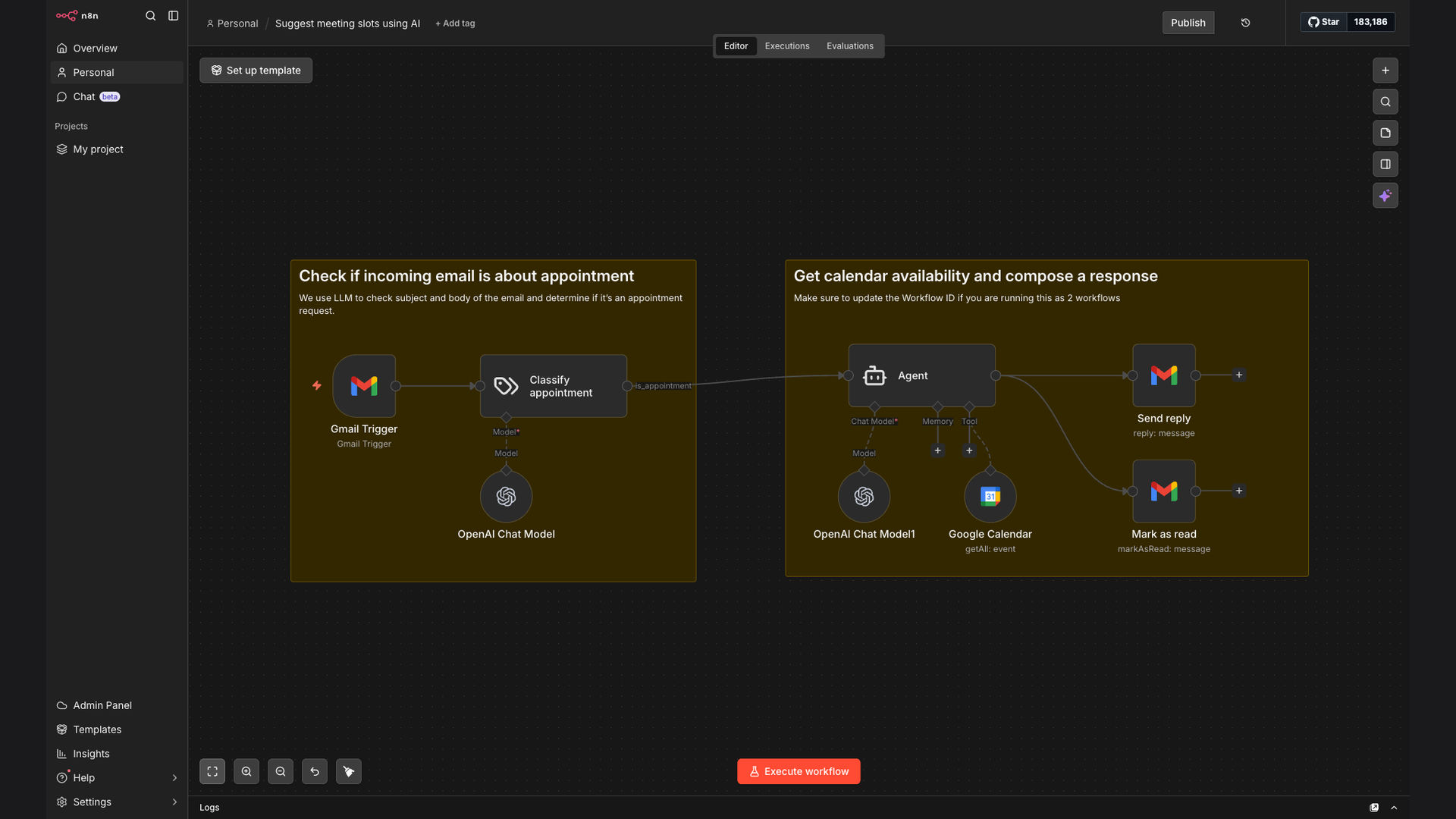
The solution is an automated workflow built with N8N that integrates Gmail, Google Calendar, and OpenAI to streamline the meeting scheduling process. This system automatically detects appointment requests in incoming emails, checks the user's Google Calendar for available slots, and uses OpenAI to generate personalized responses with proposed meeting times.
This tech stack was chosen for its flexibility, scalability, and ease of integration. N8N provides a robust platform for building custom workflows, while Gmail and Google Calendar offer seamless connectivity for email and calendar management. OpenAI enhances the system by providing AI-powered natural language generation for crafting professional and engaging responses.
How It Works — Automated Scheduling Sequence
The automated meeting scheduling system works by monitoring incoming Gmail emails, extracting relevant information, checking calendar availability, and generating AI-powered responses to propose meeting times. Here's a detailed breakdown of the process:
- Email Monitoring: The N8N workflow continuously monitors the designated Gmail inbox for new emails.
- Request Detection: The system analyzes the email content to identify potential appointment requests using keyword recognition and natural language processing.
- Calendar Availability Check: Upon detecting a request, the workflow checks the user's Google Calendar to determine available time slots.
- AI Response Generation: Using OpenAI, the system generates a personalized response proposing several meeting times based on the calendar availability.
- Response Sending: The generated response is automatically sent to the email sender, providing them with convenient meeting options.
- Confirmation Handling: The workflow monitors for a confirmation response from the email sender and updates the Google Calendar accordingly.
- Manual Review Option: In cases where the AI is uncertain or requires human intervention, the workflow flags the email for manual review.
💡 AI-Powered Efficiency: The integration of OpenAI allows for the generation of personalized and professional responses, significantly reducing the time spent on crafting emails manually.
What This System Does That Manual Process Can't
Instant Response
Provides immediate responses to scheduling requests, reducing delays and improving customer satisfaction.
AI-Powered Personalization
Generates personalized meeting proposals using AI, making the scheduling process more engaging and efficient.
Real-Time Availability
Checks Google Calendar in real-time to ensure proposed meeting times are accurate and conflict-free.
Automated Follow-Up
Automatically sends follow-up emails to confirm meeting times and ensure timely responses.
Time Savings
Reduces the time spent on manual scheduling tasks, freeing up valuable time for more critical activities.
Error Reduction
Minimizes the risk of scheduling errors and conflicts, ensuring a smooth and efficient process.
Before vs. After: Automated Efficiency
Before: Manually scheduling meetings took an average of 15 minutes per request, resulting in several hours per week spent on administrative tasks.
After: The automated system reduces scheduling time to under 3 minutes per request, saving significant time and improving overall efficiency by 5x.
Implementation: Live in 3 Weeks
- Planning & Setup: Define the scope of the automation, configure Gmail and Google Calendar integrations, and set up the N8N environment.
- Workflow Design: Design the N8N workflow to monitor emails, check calendar availability, and generate AI-powered responses.
- AI Integration: Integrate OpenAI to generate personalized meeting proposals and configure the system for natural language processing.
- Testing & Refinement: Thoroughly test the workflow to ensure accuracy and efficiency, making adjustments as needed.
- Deployment & Monitoring: Deploy the automated system and continuously monitor its performance, making ongoing improvements to optimize results.
The Right Fit — and When It Isn't
This automated meeting scheduling system is ideal for busy professionals, sales teams, and customer service representatives who spend a significant amount of time scheduling meetings. It's particularly beneficial for those who receive a high volume of appointment requests via email and need a more efficient way to manage their schedules.
However, this system may not be the right fit for individuals or teams with very infrequent meeting requests or those who prefer a highly personalized, manual approach to scheduling. Additionally, organizations with strict data privacy requirements may need to carefully evaluate the security and compliance aspects of integrating AI-powered solutions.