The Problem
Many businesses struggle with manual data entry when capturing leads from web forms. This process is not only time-consuming but also prone to errors, leading to inaccurate data and missed opportunities. The manual transfer of lead information from web forms to spreadsheets or CRM systems can be a significant bottleneck, hindering sales and marketing efforts.
Furthermore, delayed lead response times due to manual processing can negatively impact conversion rates. In today's fast-paced business environment, responding to leads quickly is crucial for engaging potential customers and building relationships. Without an automated system, businesses risk losing leads to competitors who can respond more promptly.
The Solution
The solution is an automated n8n workflow that captures leads submitted through a web form via webhook and automatically appends the data to a designated Google Sheets spreadsheet. This eliminates the need for manual data entry, ensuring accuracy and saving valuable time. The workflow is designed to be flexible and customizable, allowing businesses to tailor it to their specific needs and data requirements.
n8n was chosen for its robust webhook capabilities and seamless integration with Google Sheets. Its visual interface makes it easy to design and maintain the workflow, even for users with limited technical expertise. By leveraging n8n, businesses can automate their lead capture process, improve data accuracy, and respond to leads more quickly, ultimately driving sales and revenue growth.
How It Works — Automated Data Transfer to Google Sheets
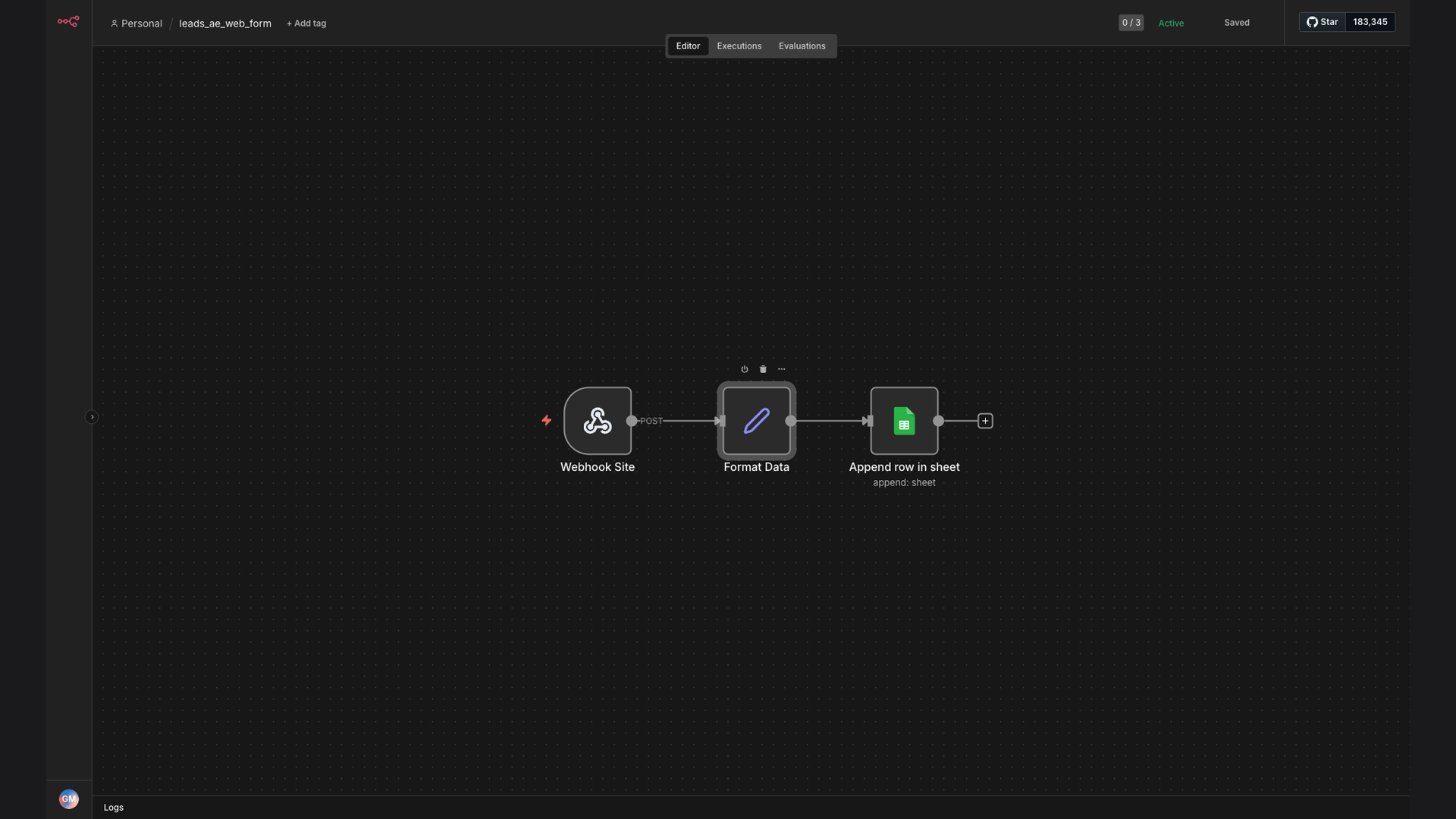
This n8n workflow listens for new submissions on a web form and automatically adds the data to a Google Sheet. Here's how it works:
- Web Form Submission: A user fills out and submits a form on your website.
- Webhook Trigger: The form submission triggers a webhook, sending the data to your n8n workflow.
- Receive Webhook Data: The n8n workflow receives the data from the webhook.
- Parse the Data: The workflow parses the incoming data to extract the relevant information.
- Format the Data: The data is formatted to match the structure of your Google Sheet.
- Append to Google Sheet: The formatted data is appended as a new row in your Google Sheet.
- Error Handling: If any errors occur during the process, the workflow logs the error and sends a notification.
- Confirmation: A confirmation message is sent to indicate that the data has been successfully added to the Google Sheet.
💡 Data Transformation: n8n allows you to transform the data before it's added to Google Sheets. This includes cleaning the data, converting data types, and mapping fields to match your Google Sheet columns.
What This System Does That Manual Process Can't
Saves Time
Automates data entry, freeing up valuable time for other tasks.
Improves Accuracy
Eliminates manual errors, ensuring data is accurate and reliable.
Increases Efficiency
Streamlines the lead capture process, making it more efficient.
Provides Real-Time Data
Offers instant access to lead data in Google Sheets.
Enables Faster Follow-Up
Allows for quicker lead response times, improving conversion rates.
Customizable
Adaptable to specific business needs and data requirements.
Before vs. After: Streamlined Lead Management
Before: Manual data entry took 2 hours per day, resulting in frequent errors and delayed lead response times.
After: Automated data capture saves 10+ hours per week, with 95% data accuracy and faster lead follow-up.
Implementation: Live in 2 Weeks
- Planning: Define the data fields to capture and the structure of the Google Sheet.
- Workflow Design: Create the n8n workflow, configuring the webhook trigger and Google Sheets integration.
- Testing: Thoroughly test the workflow to ensure data is captured and transferred correctly.
- Deployment: Deploy the workflow to a production environment.
- Monitoring: Monitor the workflow to ensure it's running smoothly and address any issues that arise.
The Right Fit — and When It Isn't
This solution is ideal for businesses that rely on web forms to capture leads and want to automate the process of adding that data to Google Sheets. It's particularly well-suited for small to medium-sized businesses that don't have the resources to invest in a complex CRM system. The workflow is easy to set up and maintain, making it a cost-effective solution for streamlining lead management.
However, this solution may not be the right fit for businesses that require advanced CRM features, such as lead scoring, automated email marketing, or detailed reporting. In those cases, a more comprehensive CRM system may be necessary. Additionally, businesses with highly complex data requirements may need a more customized solution.