The Problem
Many organizations struggle with data silos and inefficient information retrieval. Accessing relevant information from a vast collection of documents can be time-consuming and challenging, especially when dealing with diverse file formats and unstructured data. This often leads to delayed decision-making, reduced productivity, and missed opportunities.
Traditional search methods often fail to capture the semantic meaning of the content, resulting in irrelevant or incomplete search results. This is particularly problematic when users need to find specific answers or insights within large documents. The lack of a streamlined and intelligent document retrieval system can hinder innovation and limit the effectiveness of AI-powered applications.
The Solution
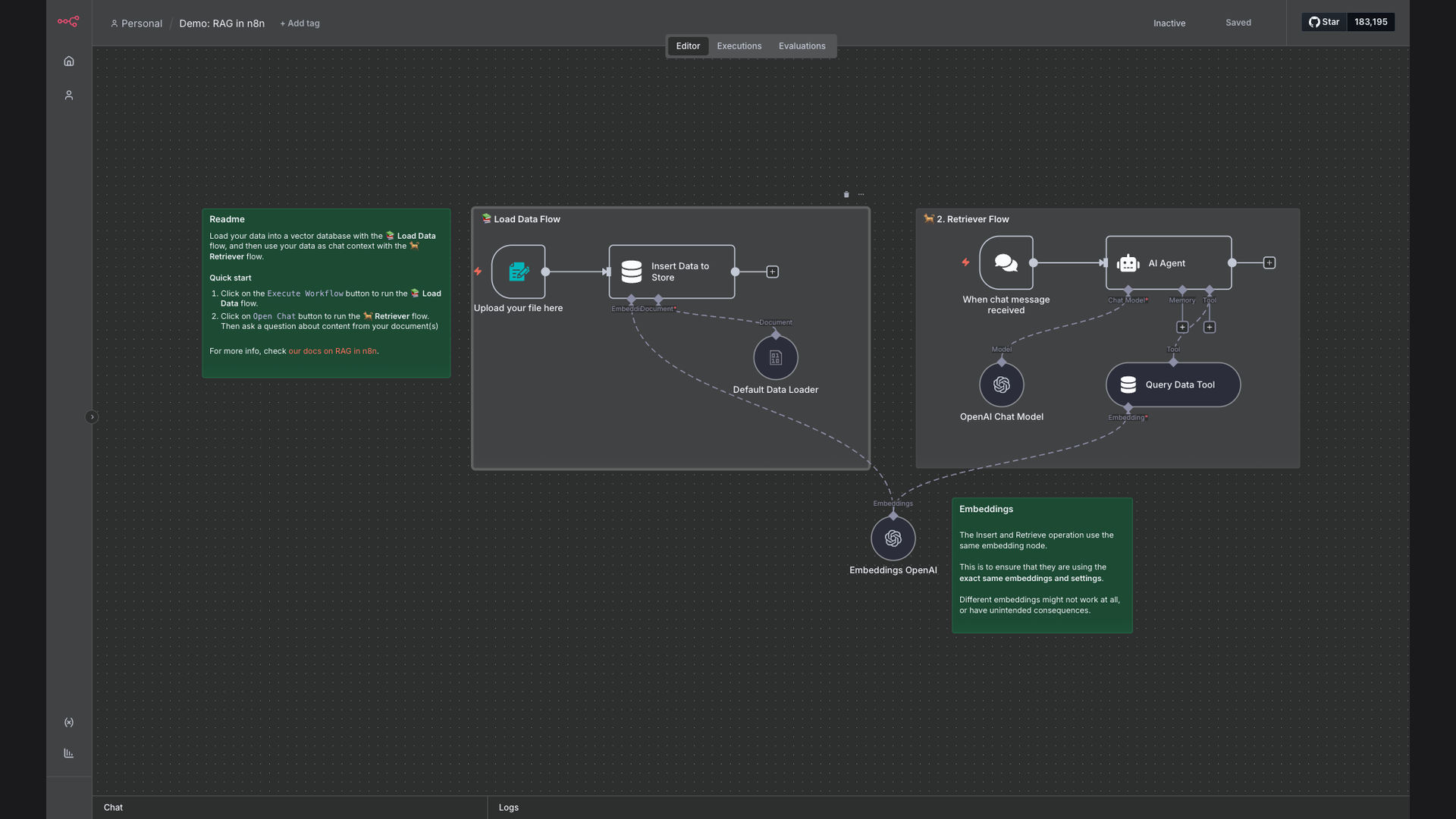
We implemented a Retrieval-Augmented Generation (RAG) system using n8n, OpenAI, and a vector database. This system automates the process of loading, indexing, and querying documents, enabling users to quickly find relevant information and generate contextually appropriate responses. The workflow supports various file formats, including PDF and CSV, and can be easily integrated with existing data sources.
n8n was chosen as the primary platform due to its flexibility, scalability, and ease of use. Its visual interface and pre-built integrations with OpenAI and vector databases made it an ideal choice for building a custom RAG solution. The use of a vector database allows for efficient semantic search, while OpenAI's language models provide the ability to generate human-like responses based on the retrieved information.
How It Works — Streamlining Document Q&A
The n8n workflow automates the entire document retrieval and question-answering process, from data ingestion to response generation.
- Load Documents: The workflow starts by loading documents from various sources, such as local files or cloud storage.
- Extract Text: The text is extracted from the documents, regardless of their format (PDF, CSV, etc.).
- Create Embeddings: The extracted text is then converted into vector embeddings using OpenAI's embedding models.
- Store in Vector DB: The vector embeddings are stored in a vector database for efficient semantic search.
- Receive Query: The system receives a user query or question.
- Create Query Embedding: The query is also converted into a vector embedding using the same OpenAI model.
- Search Vector DB: The vector database is searched for documents that are semantically similar to the query.
- Generate Response: The retrieved documents are combined with the original query and fed into OpenAI's language models to generate a contextually appropriate response.
💡 Contextual Understanding: By using vector embeddings and semantic search, the system can understand the context of the query and retrieve the most relevant documents, even if they don't contain the exact keywords.
What This System Does That [Manual Process] Can't
Faster Retrieval
Quickly access relevant information from large document collections, reducing search time from hours to seconds.
Semantic Search
Find documents based on meaning and context, not just keywords, improving the accuracy of search results.
Automated Q&A
Generate contextually appropriate answers to questions, eliminating the need for manual review and analysis.
Scalable Solution
Easily handle large volumes of documents and complex queries, scaling to meet the needs of growing organizations.
Seamless Integration
Integrate with existing data sources and applications, creating a unified information ecosystem.
Enhanced Security
Implement robust access control mechanisms to protect sensitive data and ensure compliance with data privacy regulations.
Before vs. After: Streamlined Information Access
Before: Employees spent an average of 4 hours per week searching for information, resulting in a loss of productivity and delayed decision-making.
After: Employees can now access relevant information in seconds, saving valuable time and improving the accuracy of their decisions. Query times reduced by 80%.
Implementation: Live in 3 Weeks
- Planning & Setup: Define project scope, identify data sources, and set up the n8n environment.
- Data Integration: Connect to data sources, extract text from documents, and create vector embeddings.
- Workflow Design: Design the n8n workflow to automate the document retrieval and question-answering process.
- Testing & Optimization: Test the workflow with sample data and optimize its performance and accuracy.
- Deployment & Training: Deploy the workflow to a production environment and train users on how to use the system.
The Right Fit — and When It Isn't
This solution is ideal for organizations that need to quickly access and analyze information from large document collections. It is particularly well-suited for industries such as finance, healthcare, and legal, where access to accurate and timely information is critical. Teams needing to build contextual AI assistants with their own data will also benefit.
However, this solution may not be the right fit for organizations that have very small document collections or that do not require semantic search capabilities. In such cases, a simpler search solution may be more appropriate. Additionally, organizations that are not comfortable with using cloud-based services may prefer an on-premise solution.