The Problem
Many project managers face the challenge of manually checking ClickUp for task updates. This process is time-consuming and prone to errors, leading to delays in identifying bottlenecks and inefficiencies in project workflows. The lack of real-time visibility into task statuses makes it difficult to proactively manage projects and ensure timely completion.
Without an automated system, project teams spend countless hours compiling task lists and updating spreadsheets. This not only reduces productivity but also increases the risk of outdated information, leading to miscommunication and poor decision-making. The need for a streamlined, automated solution is critical to improving project management efficiency and accuracy.
The Solution
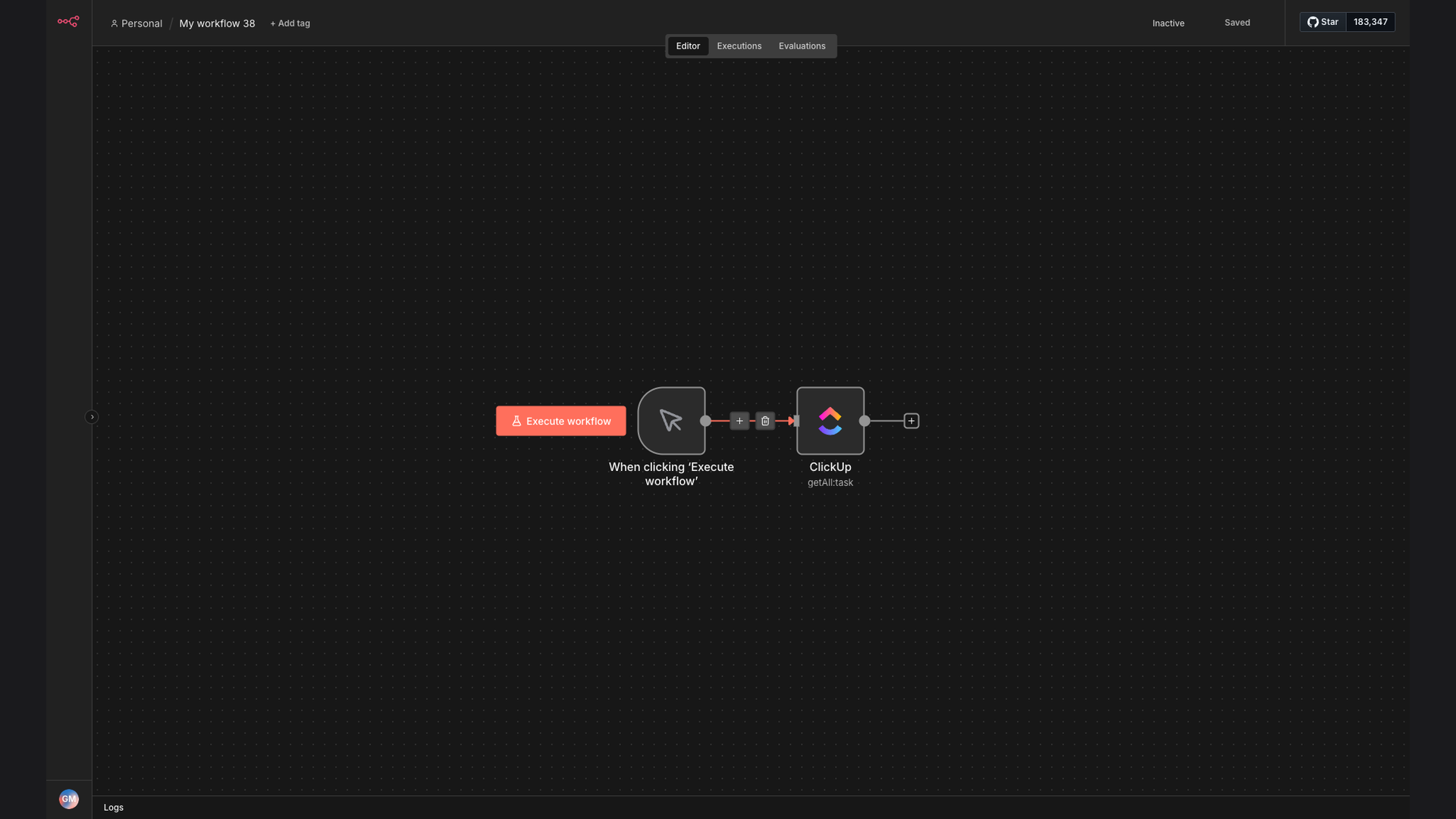
The solution is an automated workflow built with n8n that retrieves all tasks from ClickUp based on specified team, space, folderless setting, and list IDs whenever the workflow is triggered. This ensures that project managers have a real-time status update and instant visibility of project tasks, eliminating the need for manual checks.
n8n was chosen for its flexibility and ability to seamlessly integrate with ClickUp and Google Sheets. This tech stack allows for easy customization and scalability, ensuring that the automation can adapt to changing project needs. The no-code platform makes it accessible to users without extensive technical expertise, empowering project teams to manage their workflows more effectively.
How It Works — Streamlining Task Management
This automation streamlines the process of retrieving and managing ClickUp tasks, ensuring project managers have up-to-date information at their fingertips.
- Workflow Trigger: The workflow is initiated based on a predefined trigger, such as a scheduled interval or a specific event.
- ClickUp Connection: n8n connects to the ClickUp API using authentication credentials to access task data.
- Task Retrieval: The workflow retrieves all tasks from ClickUp based on specified team, space, folderless setting, and list IDs.
- Data Transformation: The retrieved task data is transformed into a structured format for easy analysis and reporting.
- Google Sheets Integration: The transformed task data is then sent to a Google Sheets spreadsheet for centralized tracking and collaboration.
- Real-Time Updates: The Google Sheets spreadsheet is updated in real-time, providing project managers with an up-to-date view of task progress.
- Notification System: Notifications are sent to relevant stakeholders when task statuses change, ensuring timely awareness of project developments.
💡 Enhanced Visibility: By automating the retrieval of ClickUp tasks, project managers gain enhanced visibility into project progress, enabling them to proactively address issues and ensure timely completion.
What This System Does That Manual Process Can't
Real-Time Updates
Provides instant task status updates, eliminating delays associated with manual checks and updates.
Centralized Tracking
Consolidates task data in a Google Sheets spreadsheet for centralized tracking and collaboration.
Improved Accuracy
Reduces the risk of errors associated with manual data entry and ensures data accuracy.
Automated Notifications
Sends notifications when task statuses change, ensuring timely awareness of project developments.
Increased Efficiency
Automates the task retrieval process, freeing up project managers to focus on more strategic activities.
Customizable Workflows
Allows for easy customization and scalability, adapting to changing project needs and requirements.
Before vs. After: Streamlined Task Management
Before: Project managers spent an average of 5 hours per week manually checking ClickUp for task updates, leading to delays and inefficiencies.
After: Task status updates are now automated, saving 5 hours per week and providing real-time visibility into project progress.
Implementation: Live in 3 Weeks
- Planning Phase: Define project scope, identify key stakeholders, and establish project goals.
- Workflow Design: Design the automated workflow in n8n, including ClickUp integration and data transformation logic.
- Testing and Validation: Conduct thorough testing to ensure the workflow functions as expected and data is accurately retrieved and transformed.
- Deployment: Deploy the automated workflow to a production environment and configure triggers for task retrieval.
- Monitoring and Optimization: Continuously monitor the workflow for performance and accuracy, making adjustments as needed to optimize efficiency.
The Right Fit — and When It Isn't
This automation is ideal for project managers and teams who need real-time visibility into ClickUp task statuses and want to streamline their task management processes. It's particularly beneficial for organizations that rely heavily on ClickUp for project tracking and collaboration.
However, this automation may not be the right fit for organizations that do not use ClickUp or have very simple task management needs that do not require automated retrieval and tracking. In such cases, simpler manual processes may suffice.