The Problem
Many marketers and agencies using GoHighLevel (GHL) struggle with programmatically accessing custom field data. The standard GHL interface requires manual navigation and extraction, which is time-consuming and prone to errors. This becomes a significant bottleneck when integrating GHL data with other systems or automating complex marketing processes.
Without an efficient way to retrieve custom field IDs and associated information, developers and automation specialists face challenges in building robust integrations. The lack of structured access to custom field metadata hinders the creation of dynamic workflows and limits the ability to leverage GHL data effectively. This results in increased development time, higher operational costs, and missed opportunities for automation.
The Solution
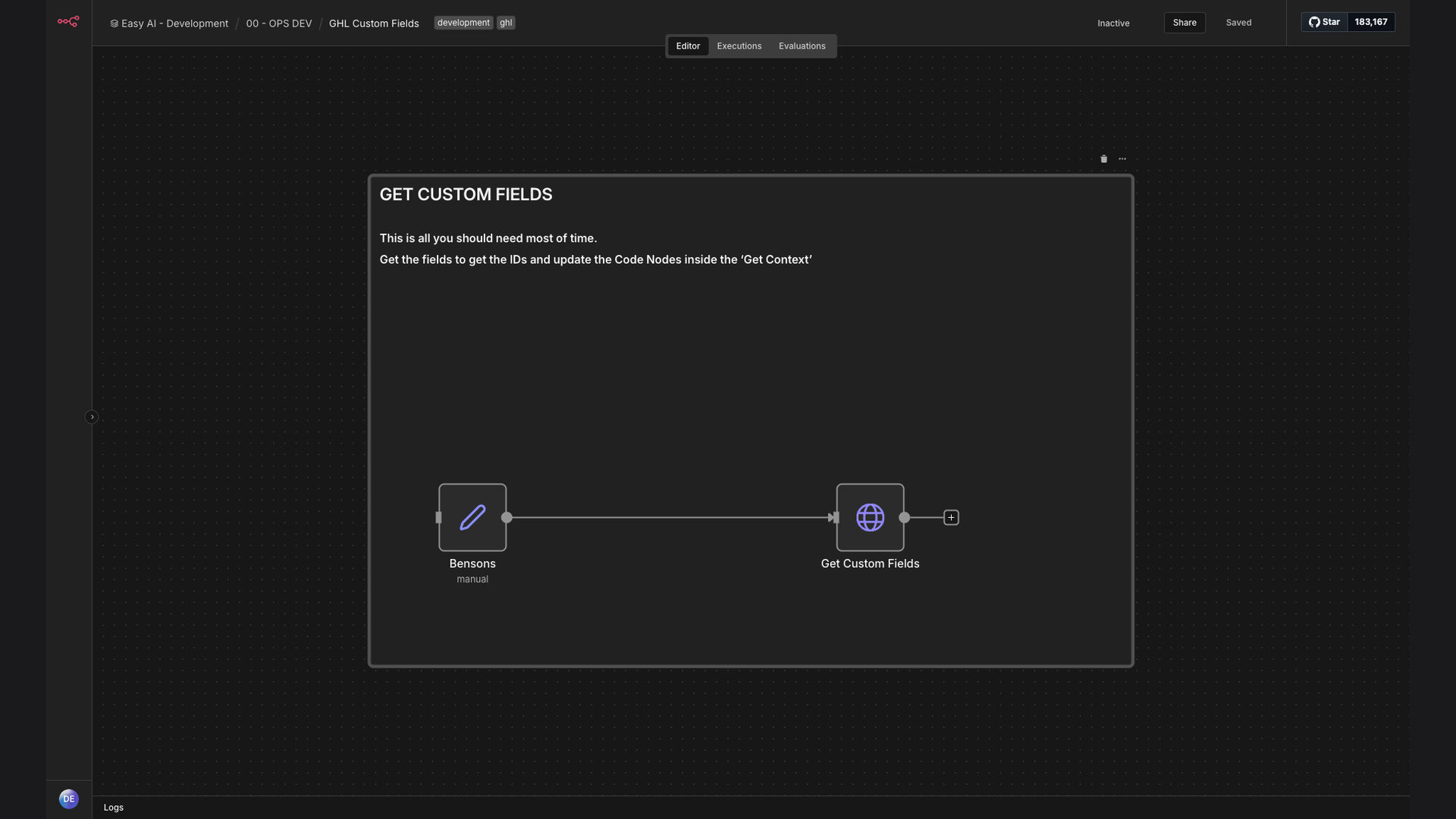
The solution is an n8n workflow that automates the retrieval of custom field data from GoHighLevel using an authenticated API call. This workflow fetches custom field information for a specific location, providing structured access to field IDs, data types, and other relevant metadata. This enables seamless integration with other systems and streamlines the automation of marketing processes.
n8n was chosen for its flexibility, extensibility, and ability to handle complex API interactions. Its visual interface simplifies the creation and management of the workflow, while its robust HTTP Request node allows for seamless communication with the GoHighLevel API. The workflow provides a reliable and efficient way to access custom field data, eliminating manual effort and reducing the risk of errors.
How It Works — Streamlining Data Retrieval
This workflow automates the process of retrieving custom field data from GoHighLevel, providing a structured and efficient way to access critical information.
- Authentication: The workflow begins by authenticating with the GoHighLevel API using an API key or access token. This ensures secure access to the GHL account.
- HTTP Request: An HTTP Request node is used to send a GET request to the GoHighLevel API endpoint for retrieving custom fields. The request includes the location ID for which the custom fields are needed.
- Parse Response: The API response, typically in JSON format, is parsed to extract the relevant custom field data. This includes field IDs, names, data types, and other metadata.
- Data Transformation: The extracted data is transformed into a structured format that can be easily used in other systems or workflows. This may involve mapping field names, converting data types, or filtering specific fields.
- Data Storage: The transformed data is stored in a database or data table for future use. This allows for efficient access to custom field data without repeatedly querying the GHL API.
- Integration: The custom field data is integrated with other systems, such as CRM, marketing automation platforms, or reporting tools. This enables dynamic workflows and personalized marketing campaigns.
- Error Handling: The workflow includes error handling mechanisms to gracefully handle API errors, authentication failures, or data parsing issues. This ensures the reliability and stability of the automation.
💡 Efficiency Boost: Automating custom field retrieval saves significant time and reduces manual errors, allowing marketers and agencies to focus on more strategic tasks.
What This System Does That Manual Process Can't
Time Savings
Automated retrieval eliminates manual data extraction, saving hours of work each week.
Accuracy
Reduces the risk of human error associated with manual data entry and extraction.
Scalability
Easily scales to handle increasing data volumes and complex integration requirements.
Integration
Provides seamless integration with other systems, enabling dynamic workflows and personalized marketing campaigns.
Structured Data
Delivers custom field data in a structured format, making it easy to use in other applications.
Security
Ensures secure access to GHL data through authenticated API calls and data encryption.
Before vs. After: Streamlined Data Access
Before: Manually extracting custom field data from GoHighLevel took approximately 2-3 hours per week, with a high risk of errors.
After: The automated workflow retrieves custom field data in seconds, eliminating manual effort and ensuring data accuracy.
Implementation: Live in 2 Weeks
- Planning: Define the scope of the automation, identify the required custom fields, and determine the integration points with other systems.
- Development: Build the n8n workflow, configure the HTTP Request node, and implement data parsing and transformation logic.
- Testing: Thoroughly test the workflow to ensure accurate data retrieval and seamless integration with other systems.
- Deployment: Deploy the workflow to a production environment and configure scheduling for automated data retrieval.
The Right Fit — and When It Isn't
This solution is ideal for marketers and agencies who need to integrate GoHighLevel custom field data with other systems or automate complex marketing processes. It is particularly beneficial for those who require structured access to custom field IDs and metadata.
This solution may not be suitable for businesses that do not use GoHighLevel or do not require programmatic access to custom field data. Additionally, it requires some technical expertise to set up and maintain the n8n workflow.