The Problem
Many businesses rely on manual methods to gather leads from Google Maps, which is time-consuming and inefficient. Sales teams and recruiters often spend hours searching for business emails, copying and pasting them into spreadsheets. This process is not only tedious but also prone to errors and missed opportunities.
Furthermore, using third-party APIs for web scraping can be expensive and complex, requiring technical expertise and ongoing maintenance. Businesses need a cost-effective and straightforward solution to automate lead generation from Google Maps without relying on external APIs.
The Solution
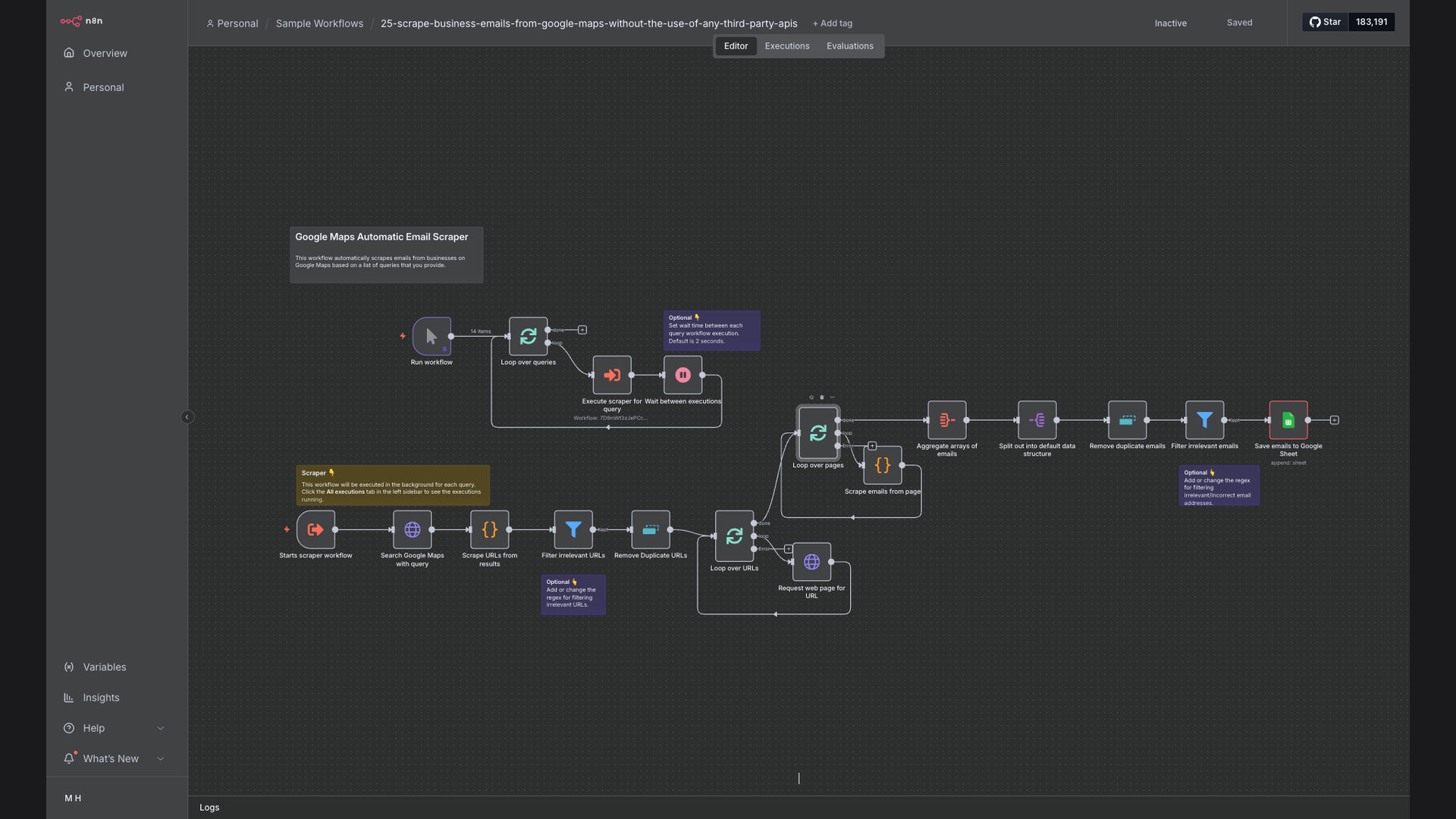
The solution is an n8n workflow that automates the process of scraping business email addresses from Google Maps search results. This workflow crawls business URLs, extracts email addresses, filters out duplicates, and saves the results to Google Sheets. It eliminates the need for manual data entry and expensive third-party APIs.
n8n was chosen for its no-code interface, flexibility, and ability to integrate seamlessly with Google Maps and Google Sheets. It allows users to create custom workflows without requiring extensive coding knowledge, making it an ideal platform for automating lead generation tasks.
How It Works — Automated Email Extraction from Google Maps
This n8n workflow automates the extraction of business emails from Google Maps search results, streamlining lead generation and contact list building.
- Google Maps Search: The workflow starts by performing a search on Google Maps based on predefined keywords and location.
- Extract Business URLs: The workflow extracts the URLs of the businesses listed in the Google Maps search results.
- Crawl Business Websites: The workflow then crawls each business website to find publicly available email addresses.
- Extract Email Addresses: The workflow uses regular expressions to identify and extract email addresses from the website content.
- Filter Duplicates: The workflow filters out duplicate email addresses to ensure a clean and unique list of leads.
- Validate Email Format: The workflow validates the format of the extracted email addresses to ensure they are valid and deliverable.
- Save to Google Sheets: Finally, the workflow saves the extracted and validated email addresses to a Google Sheets spreadsheet for easy access and management.
💡 No API Keys Needed: This workflow scrapes data directly from Google Maps without relying on any third-party APIs, saving you money and simplifying the setup process.
What This System Does That [Manual Process] Can't
Automated Lead Generation
Automatically extracts business emails from Google Maps, eliminating the need for manual searching and data entry.
Time Savings
Reduces the time spent on lead generation by up to 95%, allowing sales teams to focus on closing deals.
Cost-Effective
Eliminates the need for expensive third-party APIs, saving businesses thousands of dollars in subscription fees.
Improved Accuracy
Reduces the risk of human error by automating the data extraction and validation process.
Scalability
Easily scales to handle large volumes of data, allowing businesses to generate leads from multiple locations and industries.
Centralized Data
Saves all extracted email addresses to a Google Sheets spreadsheet, providing a centralized and easily accessible database of leads.
Before vs. After: [Lead Generation Efficiency]
Before: Sales teams spent 20 hours per week manually searching for business emails on Google Maps, resulting in only 50 leads per week.
After: The n8n workflow automates the process, generating 300 leads per week with only 1 hour of manual oversight.
Implementation: Live in 2 Weeks
- Planning & Setup: Define the target keywords, locations, and data fields to extract from Google Maps.
- Workflow Configuration: Configure the n8n workflow to crawl business URLs, extract email addresses, and filter duplicates.
- Testing & Validation: Test the workflow to ensure accurate data extraction and validation, making adjustments as needed.
- Deployment: Deploy the workflow to a production environment and schedule it to run automatically on a regular basis.
The Right Fit — and When It Isn't
This solution is ideal for businesses that need to generate leads from Google Maps without relying on expensive third-party APIs. It's particularly well-suited for sales teams, recruiters, and marketers who need to build contact lists quickly and efficiently.
However, this solution may not be suitable for businesses that require real-time data or have complex data extraction requirements. In such cases, a custom API integration may be necessary.