The Problem
Auto-écoles faced a significant challenge in efficiently communicating with students. Manually crafting and sending personalized emails for various purposes, such as appointment reminders, progress updates, and promotional offers, was time-consuming and prone to errors. This manual process not only strained resources but also hindered their ability to engage effectively with students, impacting overall satisfaction and retention.
The existing methods were labor-intensive, requiring staff to spend hours each week on email-related tasks. This left less time for critical activities like teaching and student support. The lack of automation also meant that emails were often inconsistent in branding and messaging, diluting the impact of their communications and potentially affecting their professional image.
The Solution
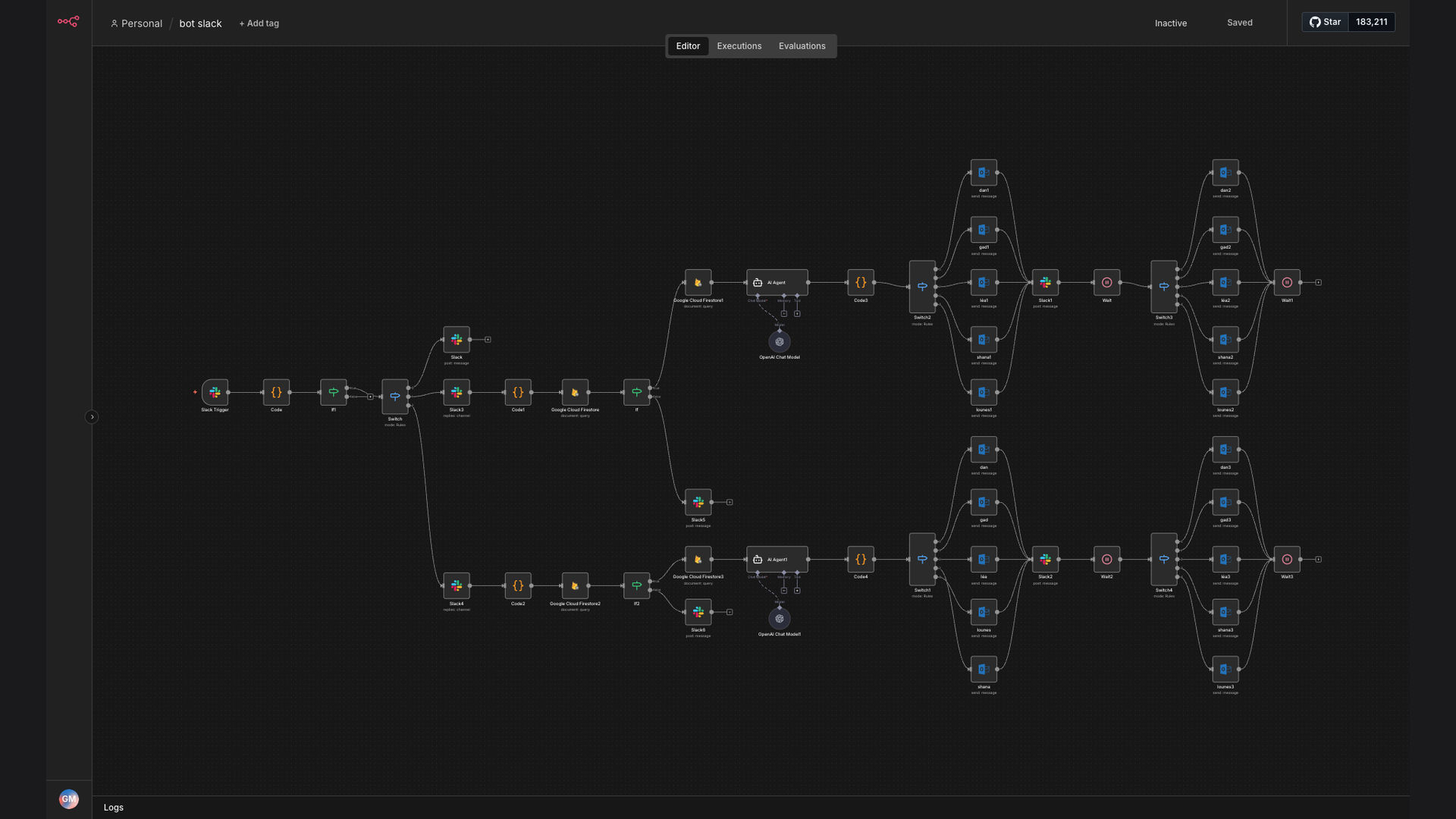
The solution was to develop an automated email sending system triggered by Slack commands, leveraging n8n for workflow orchestration, Firestore for data retrieval, and OpenAI for dynamic HTML email generation. This system allows auto-écoles to send personalized, branded emails directly from Slack with minimal manual intervention.
This tech stack was chosen for its scalability, flexibility, and cost-effectiveness. n8n provides a robust platform for building complex workflows, while Firestore offers a reliable and efficient database for storing student information. OpenAI's powerful language models enable the creation of high-quality, customized HTML emails that enhance engagement and maintain brand consistency.
How It Works — Automated Email Generation and Sending
The system automates the entire email sending process, from triggering the email send via Slack to generating personalized HTML content and sending the email.
- Slack Command: A user initiates the email sending process by entering a specific command in Slack, specifying the recipient and email type.
- Identify Auto-École: The system identifies the relevant auto-école based on the Slack command or user context.
- Fetch Email Content: The system retrieves the appropriate email template and content from a predefined source, such as a Google Sheet or database.
- Firestore Lookup: The system queries Firestore to retrieve the recipient's email address and other relevant information.
- AI HTML Conversion: The system uses OpenAI to convert the email content into a well-formatted HTML email, incorporating branding elements and personalization.
- Personalization: The HTML email is personalized with the recipient's name, specific details, and any other relevant information retrieved from Firestore.
- Review and Modification: The generated HTML email is presented for review and modification, allowing users to make any necessary adjustments before sending.
- Email Sending: Once approved, the system sends the personalized HTML email to the recipient via an email service provider.
💡 AI-Powered Personalization: OpenAI's language models enable the creation of highly personalized HTML emails that resonate with recipients, improving engagement and response rates.
What This System Does That Manual Process Can't
Speed & Efficiency
Automated email generation and sending significantly reduces the time and effort required compared to manual processes.
Personalization at Scale
AI-powered HTML conversion allows for highly personalized emails to be sent to a large number of recipients without manual customization.
Consistent Branding
Automated system ensures that all emails adhere to brand guidelines, maintaining a consistent and professional image.
Data-Driven Insights
Integration with Firestore enables the use of real-time data to personalize emails and track engagement metrics.
Reduced Errors
Automation minimizes the risk of human error in email creation and sending, ensuring accuracy and reliability.
24/7 Availability
The automated system can send emails at any time, regardless of staff availability, ensuring timely communication.
Before vs. After: Streamlined Email Communication
Before: Auto-écoles spent an average of 20 hours per week on manual email tasks, leading to delays and inconsistencies.
After: The automated system reduced email-related workload by 90%, freeing up staff to focus on core activities and improving overall efficiency.
Implementation: Live in 4 Weeks
- Planning & Design: Define the scope of the automation, identify key data sources, and design the overall workflow.
- n8n Workflow Development: Build the n8n workflow to connect Slack, Firestore, and OpenAI, implementing the necessary logic and integrations.
- AI Model Configuration: Configure the OpenAI model to generate HTML emails based on predefined templates and branding guidelines.
- Testing & Refinement: Thoroughly test the system to identify and resolve any issues, ensuring accurate and reliable email generation and sending.
- Deployment & Training: Deploy the automated system and provide training to staff on how to use the Slack commands and monitor the email sending process.
The Right Fit — and When It Isn't
This solution is ideal for auto-écoles and other businesses that need to send personalized emails at scale and want to streamline their communication processes. It's particularly well-suited for organizations that already use Slack and want to integrate email sending into their existing workflow.
However, this solution may not be the best fit for businesses that require highly complex email designs or have very specific data privacy requirements that cannot be met by the current tech stack. In such cases, a more customized or specialized solution may be necessary.