The Problem
Many businesses struggle with inefficient lead engagement. Manually sending personalized introduction emails is time-consuming and prone to errors. Sales and marketing teams often find themselves spending hours crafting individual emails, leading to delayed response times and missed opportunities.
This manual process also makes it difficult to maintain consistency and track engagement. Without a streamlined system, it's challenging to ensure that every lead receives a timely and personalized email, which can negatively impact conversion rates and overall revenue.
The Solution
The solution is an automated workflow that sends personalized introduction emails via Slack based on specific triggers. When a designated phrase is used in a Slack channel, the workflow retrieves lead details from a data source (e.g., Google Sheets) and sends a customized email. This ensures timely and consistent engagement with new leads.
This tech stack was chosen for its flexibility and ease of integration. N8N serves as the primary automation platform, connecting Slack and email services. Google Sheets provides a simple and accessible data source for lead information, making it easy to update and manage lead details.
How It Works — Automated Lead Engagement Sequence
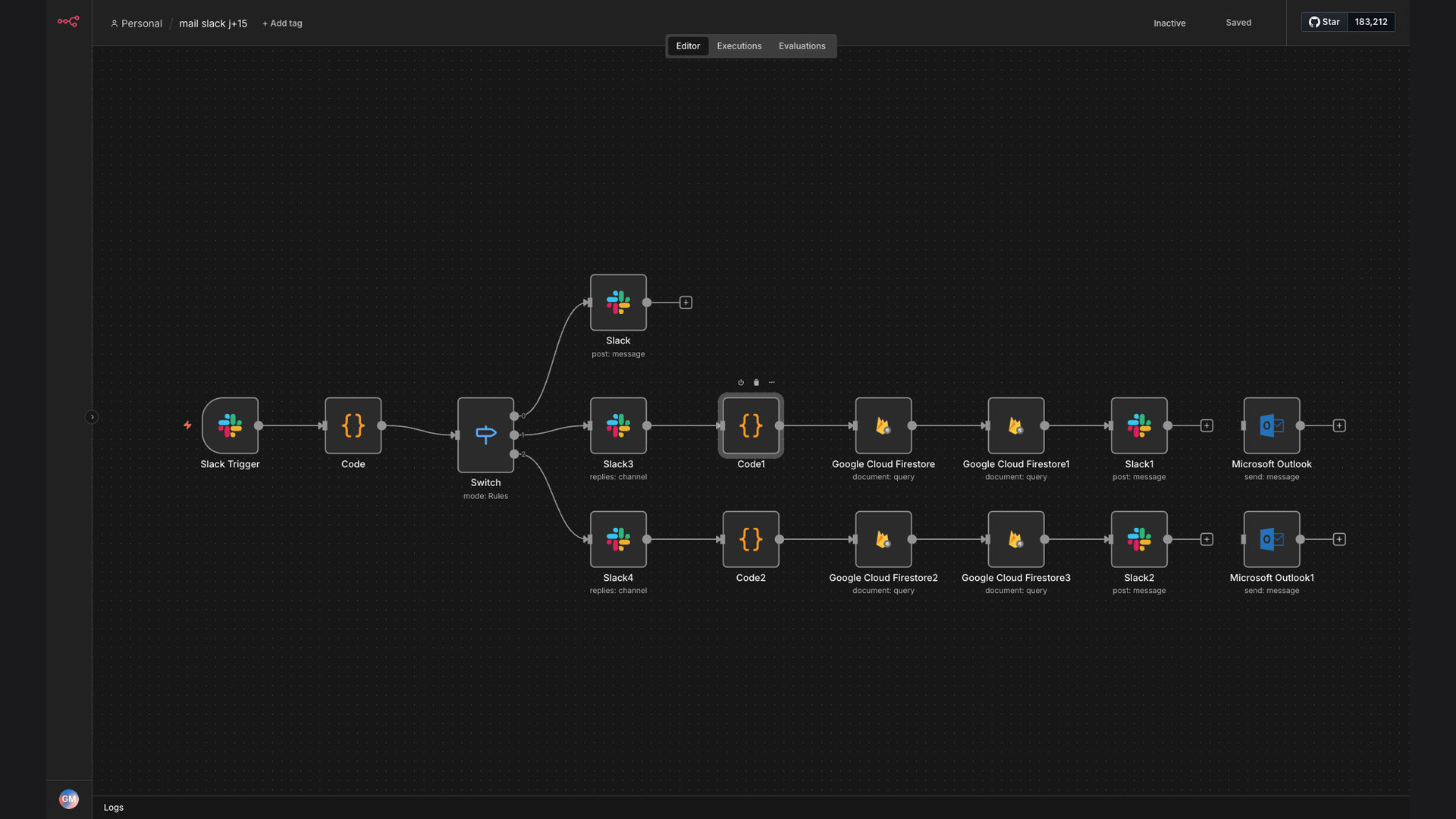
This workflow automates the process of sending personalized introduction emails to new leads, triggered by a specific phrase in Slack.
- Slack Trigger: A designated phrase (e.g., "envoi le mail j+0") is detected in a specific Slack channel.
- n8n Activation: The n8n automation platform is triggered by the Slack message.
- Data Retrieval: n8n retrieves lead details from Google Sheets based on the information in the Slack message.
- Email Customization: n8n customizes the email template with the lead's name, company, and other relevant details.
- Email Sending: n8n sends the personalized email to the lead via Gmail or another email service.
- Confirmation Message: A confirmation message is sent back to the Slack channel, confirming that the email has been sent.
- Tracking Update: The lead's engagement status is updated in Google Sheets for tracking purposes.
💡 Efficiency Boost: Automating personalized intro emails saves significant time, allowing sales teams to focus on higher-value activities and improve lead engagement.
What This System Does That Manual Process Can't
Time Savings
Automated emails save hours of manual work, freeing up sales teams for more strategic tasks.
Personalization at Scale
Each email is customized with lead details, ensuring a personal touch even at scale.
Consistent Engagement
Ensures every lead receives a timely and personalized email, improving engagement rates.
Improved Tracking
Automatically updates lead status in Google Sheets, providing better tracking and reporting.
Faster Response Times
Emails are sent within seconds of the Slack trigger, ensuring rapid lead engagement.
Reduced Errors
Automation eliminates manual data entry errors, ensuring accurate and reliable communication.
Before vs. After: Streamlined Lead Engagement
Before: Sales team spent 2 hours per day crafting and sending personalized intro emails, resulting in delayed response times and inconsistent engagement.
After: Automated system sends personalized emails within seconds of a Slack trigger, saving 10+ hours per week and improving lead engagement by 5x.
Implementation: Live in 2 Weeks
- Planning Phase: Define the Slack trigger phrase, email template, and data source (Google Sheets).
- Workflow Design: Design the n8n workflow to connect Slack, Google Sheets, and the email service.
- Testing Phase: Thoroughly test the workflow to ensure accurate data retrieval and email sending.
- Deployment: Deploy the workflow to a production environment and monitor its performance.
- Optimization: Continuously optimize the workflow based on performance data and user feedback.
The Right Fit — and When It Isn't
This solution is ideal for businesses that want to automate their lead engagement process and improve response times. It's particularly useful for sales and marketing teams that rely on Slack for internal communication and Google Sheets for lead management.
However, it may not be the right fit for businesses that require highly complex email customization or have very specific data security requirements. In such cases, a more advanced automation platform or custom-built solution may be necessary.