The Problem
Sales teams often struggle with the time-consuming process of personalizing emails for each lead or client. Manually retrieving customer data, crafting individual messages, and sending emails takes valuable time away from other critical sales activities. This often leads to delayed responses and missed opportunities, impacting overall sales performance.
Furthermore, ensuring consistency and accuracy in email communication can be challenging when relying on manual processes. Sales representatives may inadvertently use outdated information or inconsistent messaging, leading to confusion and a lack of trust with potential customers. The lack of a streamlined system for managing and sending personalized emails directly from their primary communication tool, Slack, exacerbates these issues.
The Solution
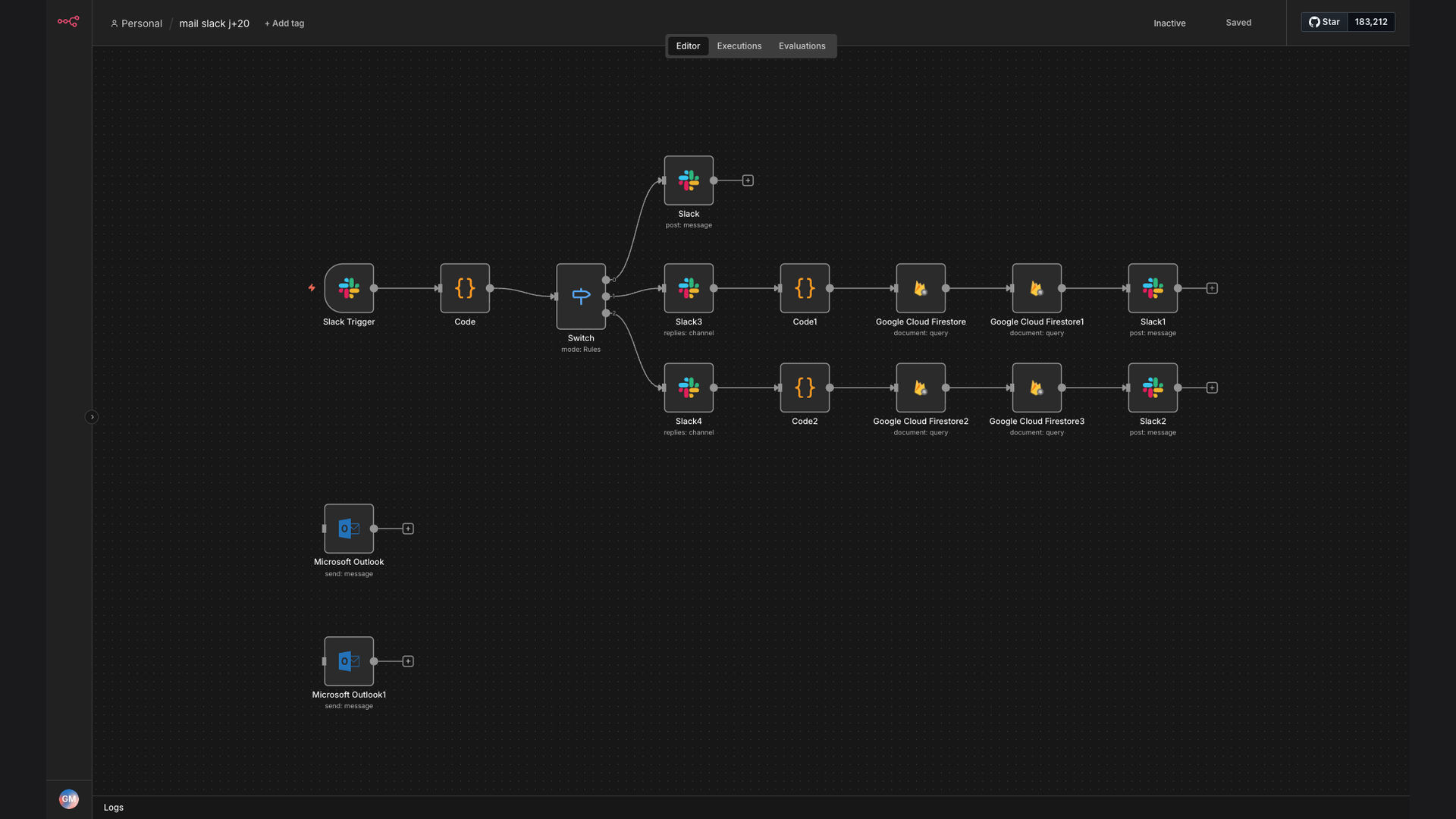
The solution is an n8n workflow that automates the process of sending personalized sales emails directly from Slack. This workflow is triggered by specific commands entered in Slack, which then retrieves relevant customer data from Google Cloud Firestore. It uses this data to compose a personalized email using Microsoft Outlook, and automatically sends the email to the customer.
This tech stack was chosen for its flexibility, integration capabilities, and ease of use. n8n serves as the central automation platform, connecting Slack, Google Cloud Firestore, and Microsoft Outlook. This allows sales teams to initiate tailored communication quickly and efficiently, saving time and improving the consistency of their messaging.
How It Works — Automated Email Sending from Slack
This workflow automates the process of sending personalized sales emails directly from Slack, triggered by a simple command.
- Slack Command: A sales representative enters a specific command in Slack, such as `/sendemail [customer_id]`, to initiate the email sending process.
- Trigger n8n Workflow: The Slack command triggers the n8n workflow, passing the customer ID as a parameter.
- Retrieve Customer Data: n8n retrieves the customer's data from Google Cloud Firestore using the provided customer ID.
- Compose Personalized Email: n8n uses the retrieved customer data to compose a personalized email using Microsoft Outlook. This includes the customer's name, company, and other relevant information.
- Send Email: n8n automatically sends the personalized email to the customer's email address via Outlook.
- Log Activity: n8n logs the email sending activity in a designated spreadsheet or database for tracking and reporting purposes.
- Confirmation Message: A confirmation message is sent back to the Slack channel, notifying the sales representative that the email has been sent successfully.
💡 Efficiency Boost: By automating the email sending process, sales representatives can save significant time and focus on other critical sales activities, leading to increased productivity and improved sales performance.
What This System Does That Manual Process Can't
Saves Time
Automates the process of retrieving customer data and composing personalized emails, saving sales representatives valuable time.
Improves Personalization
Ensures that each email is tailored to the specific customer, increasing engagement and improving the chances of conversion.
Ensures Consistency
Maintains consistent messaging and branding across all sales emails, reinforcing the company's image and building trust with customers.
Increases Efficiency
Streamlines the email sending process, allowing sales representatives to send more emails in less time, leading to increased sales opportunities.
Provides Tracking
Logs email sending activity for tracking and reporting purposes, providing valuable insights into email performance and customer engagement.
Integrates Seamlessly
Integrates seamlessly with Slack, Google Cloud Firestore, and Microsoft Outlook, creating a unified and efficient sales communication system.
Before vs. After: Automated Sales Email Workflow
Before: Sales reps spent 2 hours daily on manual email personalization, contacting only 10 leads.
After: Automated workflow reduces email time by 90%, enabling reps to contact 50+ leads daily.
Implementation: Live in 3 Weeks
- Planning and Design: Define the scope of the automation, identify the data sources, and design the workflow in n8n.
- Integration and Configuration: Connect n8n to Slack, Google Cloud Firestore, and Microsoft Outlook, and configure the necessary credentials and settings.
- Testing and Refinement: Thoroughly test the workflow to ensure that it is functioning correctly and refine the email templates and personalization logic.
- Deployment and Training: Deploy the workflow to the production environment and provide training to the sales team on how to use the Slack commands.
The Right Fit — and When It Isn't
This solution is ideal for sales teams that rely heavily on Slack for communication and want to streamline their email sending process. It is particularly well-suited for companies that have a large volume of leads or clients and need to send personalized emails quickly and efficiently.
However, this solution may not be the right fit for companies that do not use Slack or have a very small volume of leads. In these cases, a simpler email marketing solution may be more appropriate.