The Problem
Many organizations face the challenge of efficiently onboarding new users or clients. Manually sending welcome emails is time-consuming and prone to errors. This process often involves delays in response times, leading to a negative first impression. The lack of automation results in inefficient resource allocation and potential loss of engagement.
The manual approach also struggles with personalization at scale. Crafting individual emails for each new user demands significant effort, making it difficult to maintain a consistent and engaging experience. This can lead to lower user activation rates and decreased customer satisfaction. Furthermore, tracking the status of sent emails and managing follow-ups becomes a logistical nightmare without an automated system.
The Solution
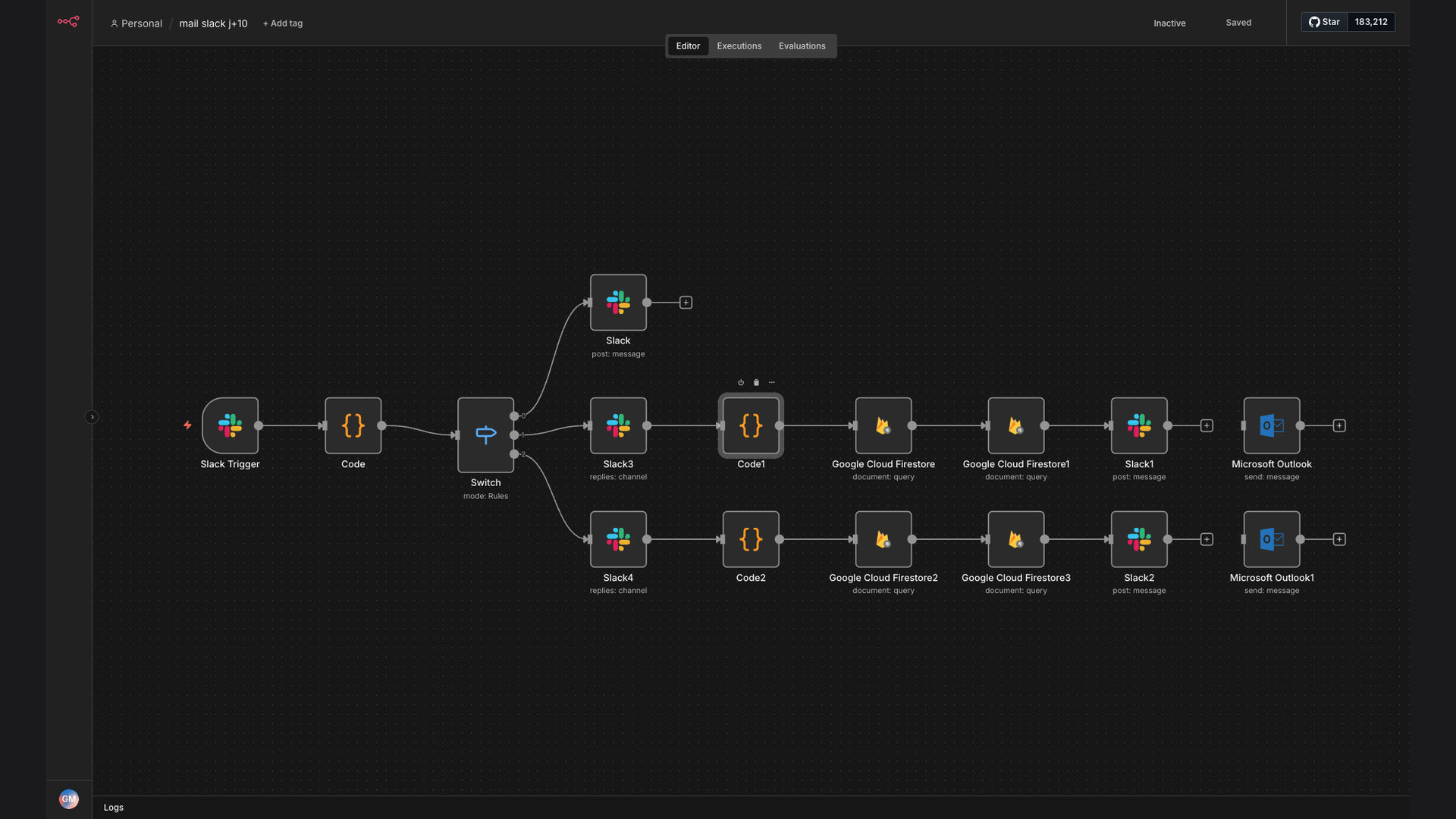
The solution was to create an automated workflow that triggers welcome emails directly from Slack commands. This system leverages n8n to connect Slack with Google Cloud Firestore and Microsoft Outlook. When a specific command is entered in Slack, the workflow retrieves user details from Firestore and sends a personalized welcome email.
This tech stack was chosen for its flexibility and scalability. n8n provides a robust platform for integrating various applications, while Google Cloud Firestore offers a reliable database for storing user information. Microsoft Outlook was selected for its widespread use and ease of integration. This combination ensures a seamless and efficient onboarding process.
How It Works — Streamlined Onboarding Process
The automated workflow efficiently manages the onboarding process, ensuring new users receive timely and personalized welcome emails.
- Slack Trigger: A specific command in Slack, such as "/newuser [email]", initiates the workflow.
- n8n Activation: n8n receives the Slack command and extracts the user's email address.
- Firestore Lookup: n8n queries Google Cloud Firestore to retrieve the user's profile information using the email address.
- Data Retrieval: The workflow retrieves relevant data, such as the user's name, company, and other details.
- Email Personalization: n8n uses the retrieved data to personalize the welcome email template.
- Outlook Integration: The workflow connects to Microsoft Outlook to send the personalized email.
- Email Dispatch: Outlook sends the welcome email to the new user.
- Confirmation Log: n8n logs the email dispatch in a tracking system for future reference.
💡 Efficiency Boost: Automating the welcome email process significantly reduces the time and effort required, allowing teams to focus on more strategic tasks.
What This System Does That Manual Process Can't
Instant Response
Automated emails are sent immediately after the Slack command, ensuring a prompt welcome experience.
Personalized Content
Emails are tailored with user-specific information retrieved from Google Cloud Firestore, enhancing engagement.
Scalable Solution
The system can handle a large volume of new users without requiring additional manual effort.
Error Reduction
Automation minimizes the risk of human error in data entry and email dispatch.
Trackable Metrics
The system logs each email sent, providing valuable data for tracking onboarding success.
Consistent Experience
All new users receive a standardized and professional welcome email, ensuring a positive first impression.
Before vs. After: Streamlining User Onboarding
Before: Manually sending welcome emails took approximately 5 minutes per user, resulting in delays and potential errors.
After: The automated system sends personalized welcome emails instantly, reducing the onboarding time to seconds and minimizing manual effort.
Implementation: Live in 3 Weeks
- Planning Phase: Defining the scope of the automation, identifying key data points, and designing the email template.
- Integration Setup: Connecting n8n with Slack, Google Cloud Firestore, and Microsoft Outlook, ensuring seamless data flow.
- Workflow Development: Building the n8n workflow to retrieve user data, personalize the email, and dispatch it via Outlook.
- Testing and Refinement: Thoroughly testing the system with various scenarios and refining the workflow based on feedback.
- Deployment and Monitoring: Deploying the automated system and continuously monitoring its performance to ensure optimal efficiency.
The Right Fit — and When It Isn't
This solution is ideal for organizations that frequently onboard new users or clients and want to streamline the process. It is particularly beneficial for companies using Slack, Google Cloud Firestore, and Microsoft Outlook. The automated system ensures a consistent and engaging welcome experience, reducing manual effort and improving overall efficiency.
However, this solution may not be suitable for organizations with very low onboarding volumes or those that require highly customized and manual email interactions. In such cases, the investment in automation may not be justified. Additionally, organizations with limited technical expertise may require assistance in setting up and maintaining the system.