The Problem
Many organizations struggle with inefficient onboarding processes, particularly in sending timely and personalized welcome emails. Manually drafting and sending these emails is time-consuming and prone to errors, leading to delays and inconsistent communication. This can negatively impact new members' initial experience and overall engagement.
The lack of automation results in delayed response times and increased administrative burden. Teams spend valuable time on repetitive tasks that could be better allocated to strategic initiatives. Furthermore, ensuring consistent branding and messaging across all welcome emails becomes challenging without a streamlined system.
The Solution
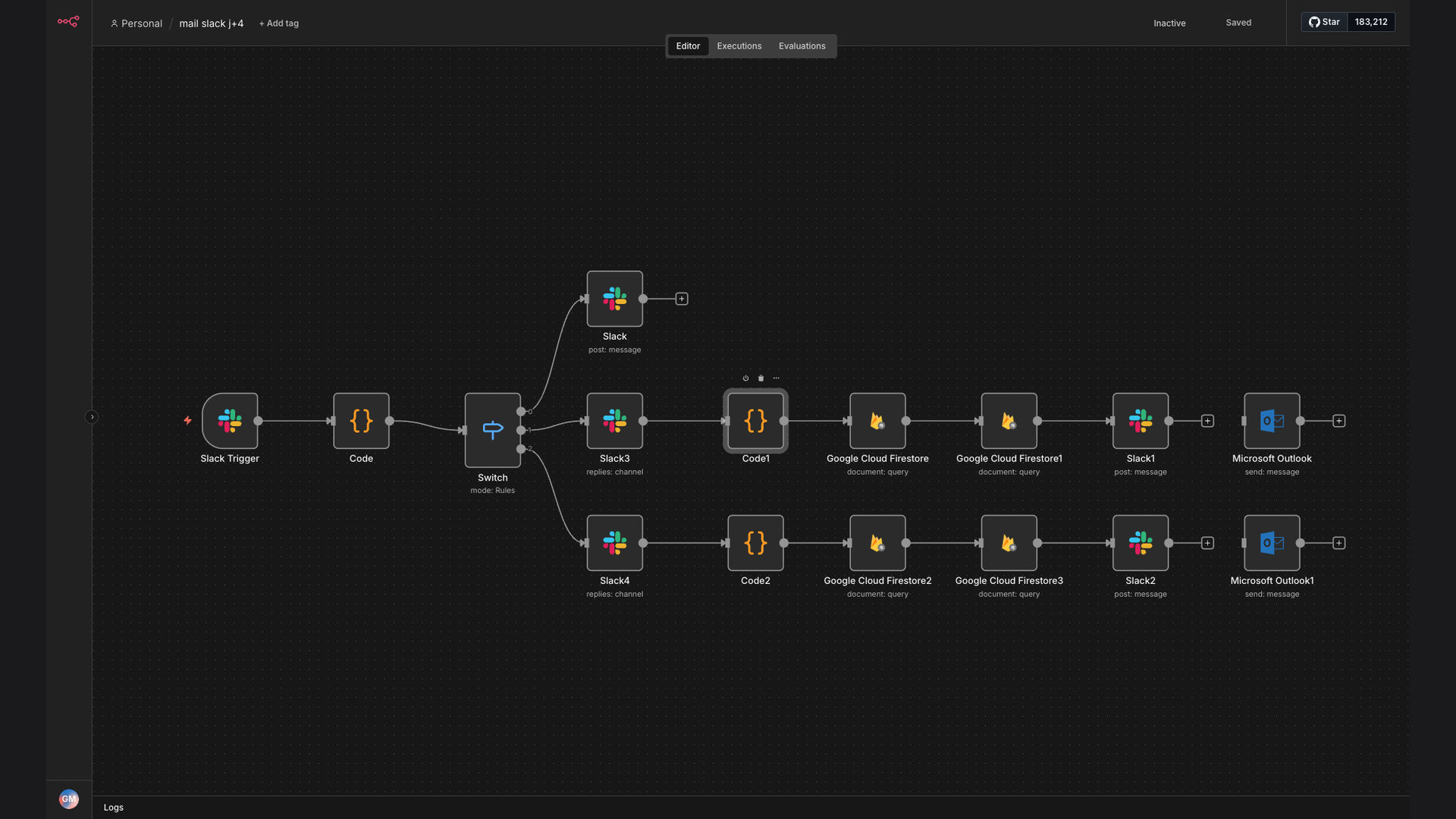
The solution is an automated workflow that triggers a welcome email via Microsoft Outlook when a new request is made in Slack. This system extracts necessary details, confirms the email content in Slack for approval, retrieves the user's email address from Google Cloud Firestore, and sends the email automatically. This ensures timely and personalized communication.
This tech stack was chosen for its seamless integration capabilities and robust automation features. n8n serves as the central automation platform, connecting Slack, Microsoft Outlook, and Google Cloud Firestore. This combination allows for efficient data retrieval, content confirmation, and email delivery, streamlining the entire onboarding process.
How It Works — Streamlined Onboarding Process
The automated workflow simplifies the process of sending welcome emails, ensuring new members receive timely and personalized communication.
- Slack Trigger: A new request in Slack initiates the workflow.
- Extract Details: The workflow extracts relevant information from the Slack request, such as the new member's name and role.
- Confirm Email Content: A message is sent to a designated Slack channel to confirm the welcome email content.
- Approval: An administrator approves the email content directly within Slack.
- Retrieve User Email: The workflow retrieves the new member's email address from Google Cloud Firestore.
- Send Welcome Email: The welcome email is sent via Microsoft Outlook, personalized with the new member's details.
- Log Activity: The activity is logged for tracking and reporting purposes.
💡 Personalized Communication: By retrieving user details from Google Cloud Firestore, the welcome email is personalized, enhancing the new member's initial experience and engagement.
What This System Does That Manual Process Can't
Time Savings
Automates the email sending process, saving significant time compared to manual drafting and sending.
Accuracy
Reduces the risk of errors by automatically extracting and populating user details.
Consistency
Ensures consistent branding and messaging across all welcome emails.
Scalability
Easily scales to accommodate a growing number of new members without increasing administrative burden.
Personalization
Personalizes welcome emails by retrieving user details from Google Cloud Firestore.
Tracking & Reporting
Logs all activity for tracking and reporting purposes, providing insights into the onboarding process.
Before vs. After: Streamlining Onboarding
Before: Manually sending welcome emails took approximately 15 minutes per new member, resulting in several hours per week spent on repetitive tasks.
After: The automated workflow reduces the email sending time to under a minute, saving approximately 5 hours per week and improving response time by 90%.
Implementation: Live in 3 Weeks
- Planning & Design: Define the scope of the automation, identify the required data, and design the workflow.
- Configuration: Configure the necessary connections between n8n, Slack, Microsoft Outlook, and Google Cloud Firestore.
- Testing: Thoroughly test the workflow to ensure accurate data extraction, content confirmation, and email delivery.
- Deployment: Deploy the workflow to a production environment.
- Monitoring & Optimization: Continuously monitor the workflow for performance and make necessary optimizations.
The Right Fit — and When It Isn't
This solution is ideal for organizations that want to streamline their onboarding process and improve communication with new members. It is particularly beneficial for teams that frequently add new members and want to ensure consistent and personalized welcome emails.
However, this solution may not be suitable for organizations with very infrequent onboarding needs or those that require highly customized welcome emails that cannot be easily automated. In such cases, a manual approach may be more appropriate.