The Problem
Many businesses rely on manual processes to communicate with their customers, which can be time-consuming and inefficient. Manually sending personalized messages through WhatsApp is particularly challenging, especially when dealing with a large number of contacts and variable data.
The manual approach often leads to delayed responses, inconsistent messaging, and increased operational costs. Businesses need a more streamlined and automated way to send personalized WhatsApp messages using data from Google Sheets to improve customer engagement and drive sales.
The Solution
The solution is an automated workflow that connects Google Sheets and WhatsApp using N8N. This workflow reads data from Google Sheets, iterates through contacts, and sends custom template messages with personalized parameters and URL buttons. This ensures timely and consistent communication with customers.
N8N was chosen for its flexibility, scalability, and ability to integrate seamlessly with Google Sheets and WhatsApp. The workflow leverages N8N's data transformation and routing capabilities to create a robust and efficient messaging system, reducing manual effort and improving customer engagement.
How It Works — Automated WhatsApp Messaging Process
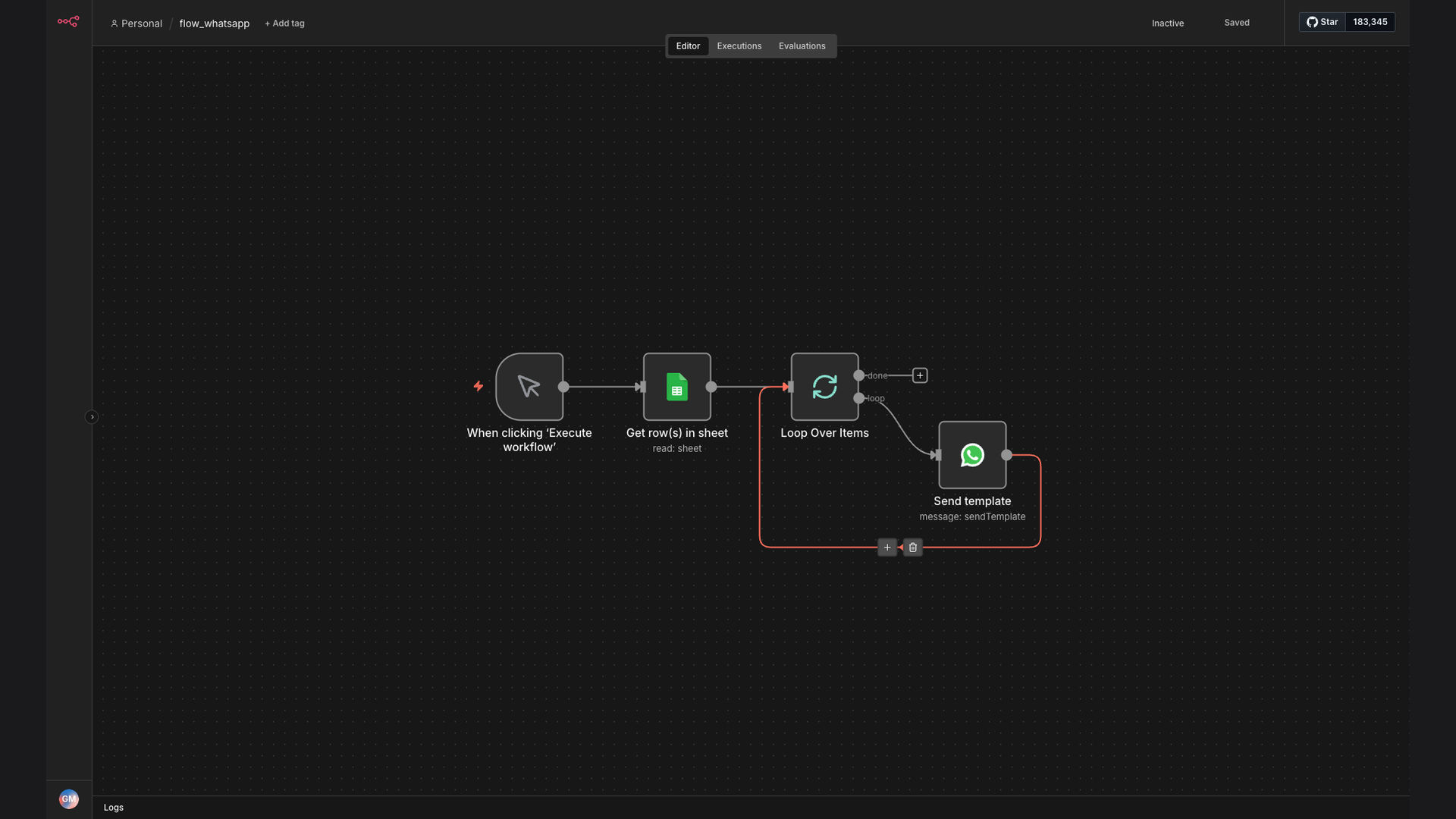
This workflow automates the process of sending personalized WhatsApp messages using data stored in Google Sheets. Here's a detailed breakdown of how it works:
- Read Google Sheets Data: The workflow starts by reading data from a specified Google Sheets spreadsheet. This includes contact information, personalized parameters, and other relevant details.
- Iterate Through Contacts: The workflow then iterates through each row in the Google Sheets spreadsheet, treating each row as a separate contact to send a message to.
- Prepare Message Parameters: For each contact, the workflow extracts the necessary parameters from the Google Sheets data to personalize the WhatsApp message.
- Compose WhatsApp Message: The workflow uses a pre-defined WhatsApp template message and populates it with the extracted parameters, creating a personalized message for each contact.
- Send WhatsApp Message: The personalized WhatsApp message is then sent to the contact using a WhatsApp Business API integration.
- Log Interaction: After sending the message, the workflow logs the interaction, including the contact details, message content, and timestamp, for tracking and reporting purposes.
- Handle Errors: The workflow includes error handling mechanisms to catch any issues that may arise during the process, such as invalid phone numbers or API errors, and logs them for further investigation.
💡 Efficiency Boost: Automating WhatsApp messaging from Google Sheets not only saves time but also ensures consistent and personalized communication, leading to improved customer engagement and satisfaction.
What This System Does That Manual Process Can't
Time Savings
Automated messaging eliminates the need for manual message composition and sending, saving significant time and resources.
Personalized Communication
The system uses data from Google Sheets to personalize each message, ensuring that customers receive relevant and engaging content.
Consistent Messaging
Automated workflows ensure that messages are sent consistently and according to a predefined schedule, maintaining a consistent brand voice.
Scalability
The system can easily scale to handle a large number of contacts and messages, making it suitable for businesses of all sizes.
Data-Driven Insights
The system logs all interactions, providing valuable data for tracking and reporting on message performance and customer engagement.
Error Handling
Automated error handling mechanisms ensure that any issues that arise during the process are quickly identified and resolved, minimizing disruptions.
Before vs. After: Automated WhatsApp Messaging
Before: Manually sending WhatsApp messages took hours, with only 50 contacts reached per day and frequent errors in personalization.
After: The automated system sends personalized messages to 250+ contacts daily, with near-zero personalization errors, saving countless hours.
Implementation: Live in 3 Weeks
- Planning and Design: The initial phase involves understanding the client's requirements, defining the scope of the automation, and designing the workflow architecture.
- Google Sheets Configuration: This phase focuses on configuring the Google Sheets spreadsheet to store the necessary data, including contact information and personalized parameters.
- N8N Workflow Development: The N8N workflow is developed and configured to read data from Google Sheets, compose personalized WhatsApp messages, and send them via the WhatsApp Business API.
- Testing and Refinement: The workflow is thoroughly tested to ensure that it functions correctly and meets the client's requirements. Any issues are identified and resolved.
- Deployment and Monitoring: The workflow is deployed to a production environment, and ongoing monitoring is implemented to ensure that it continues to function correctly and deliver the desired results.
The Right Fit — and When It Isn't
This solution is ideal for businesses that want to automate their WhatsApp messaging and improve customer engagement. It's particularly well-suited for businesses that rely on Google Sheets to store customer data and want to send personalized messages to a large number of contacts.
However, this solution may not be the right fit for businesses that don't use Google Sheets or don't have a need to send personalized WhatsApp messages. In such cases, other automation solutions may be more appropriate.